0:00
uh hello guys welcome to this video so
0:02
in this video I will show you how to
0:04
integrate the Highlight JS library
0:07
inside your angular application so there
0:10
is a package specifically made for
0:12
angular which is ngx highlight GS where
0:15
you will be able to display source code
0:17
inside your angular application so if
0:19
you want to display some score Snippets
0:22
with syntax highlighting you will see we
0:25
are displaying the PHP code right here
0:28
it is having the syntax highlighting
0:30
attached to it so if you don't know
0:32
about highlight GS it's a open source
0:35
syntax highlighter library for
0:37
JavaScript and note CH this is their
0:39
official website and it has various
0:42
themes out there if you see it supports
0:44
192 languages 498 themes so there is a
0:49
package in angularjs sorry angular if
0:53
you go to npmjs.com just search for this
1:04
actually a specific library for angular
1:07
the command is simple you install this
1:09
it's having 1,00 weekly downloads so I
1:12
have written a stepbystep blog post on
1:14
my website guys with full source code of
1:17
this example code that I will showing
1:18
you you can follow the blog the link is
1:22
given in the description so first of all
1:24
guys I will delete everything from here
1:26
and start from scratch so
1:30
for the first of all we need to
1:32
integrate this module by adding this
1:37
statement so we will import this
1:41
highlight GS configuration highlight
1:43
configuration which is coming from this
1:45
ngx highlight JS and then we add this
1:49
configuration inside this provide and
1:53
here we mention that we want to
1:54
highlight which language so here we are
1:56
simply telling that we need to highlight
1:59
the HTML language and then we come to
2:02
the template file here app. component.
2:04
HTML file and here we render
2:15
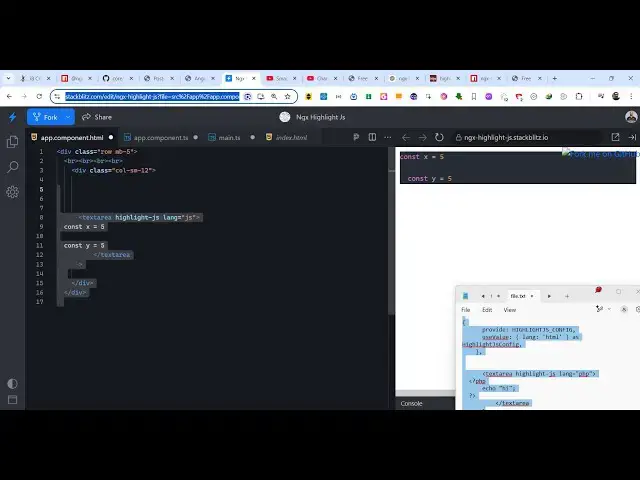
actual inside our text area we actually
2:22
the we simply say highlight GS we attach
2:26
this directive and then it takes a
2:30
and I will simply say HTML and here you
2:35
specify the HTML language so you will
2:39
see as soon as I write here on the right
2:41
hand side you will see
2:45
the as I'm writing the code here the
2:48
code is being highlighted
3:07
so you can see that uh this is actually
3:09
the HTML language you can change this
3:11
language to PHP so now what happens
3:15
instead of HTML code you will write your
3:42
so in this way you will see PHP code
3:45
will be highlighted you just need to
3:47
change this language parameter to any
3:50
language that you want to have so if you
3:53
want to put Javascript language
4:00
so you can see that so you can highlight
4:02
any language so it supports all the
4:05
languages 192 languages 498 themes so
4:10
you can get the full example code the
4:12
link is given in the description it's
4:14
very easy you first of all register this
4:17
and then you come to the template file
4:19
then just directly put this highlight
4:23
just directive and language whatever
4:27
language you want to highlight and then
4:28
you can simply write render out the
4:30
source code inside your angular
4:32
application so thank you very much guys
4:34
for watching this video and also check
4:37
out my website as well free mediat
4:39
tools.com which contains thousands of
4:42
tools regarding audio video and MH and I
4:45
will be seeing you guys in the next