Up next in 10

Windsurf & Codeium VSCode IDE Open Source INSANE FREE AI Coding Autocomplete Alternative to CLAUDE
Jul 12, 2025

Get the full source code of application here:
Show More Show Less View Video Transcript
0:00
Uh hello guys, welcome to this video. So
0:02
in this video, I'll show you a VS code
0:04
extension which allows you to use AI
0:07
autocomplete. It's a AI coding assistant
0:10
similar to chat, GPT, claude or Google
0:14
Gemini and it's a free alternative. It's
0:17
doesn't have any sort of limitations or
0:20
any sort of restrictions. So the name of
0:23
the extension is wind surf. If you just
0:26
go to the extensions tab just write here
0:28
wind surf it's formerly knows known as
0:32
kodium. So this is the extension it's
0:34
developed by this company wind surf.
0:37
It's used by almost 3 million developers
0:40
of vs code. So it's already formerly
0:43
known as kodium and it's called as wind
0:46
surf.
0:47
Simply install this and just activate
0:50
this extension. After activating it on
0:52
the sidebar section you will see this
0:54
will add this option of wind surf.
0:57
Simply click on that and now the chat
1:00
window will appear. You will see that
1:02
and now here you can actually ask any
1:05
sort of question here. You will say
1:07
build a calculator in HTML CSS and
1:11
JavaScript. So as you ask the question
1:14
you will see the speed is tremendous. it
1:17
will give you the response back and as
1:20
you can see it is generating a simple
1:22
calculator code here HTML CSS and
1:24
JavaScript code here. So now it has
1:28
successfully generated this. So we can
1:30
simply copy the clipboard.
1:33
Copy the code here.
1:36
And it also comes with its own
1:38
autocomplete feature as well. So if you
1:40
uh it supports all the languages. So
1:42
let's suppose I'm giving this PHP code
1:45
here. So now you will see it will
1:47
suggest me the autocomplete suggestions.
1:49
So automatically these suggestions will
1:51
come as you write the code here. Just
1:54
need to press the tab key to accept the
1:57
suggestion. And this will significantly
2:00
you will see it is suggesting me the
2:01
code here. It will reduce the time to
2:04
code. So as you can see as you are
2:07
writing your code.
2:12
So it supports all the languages. Here
2:14
you will see this is PHP and it also
2:18
have support for all the languages. So
2:22
you can ask any question here. And let's
2:24
suppose if you want to reference some
2:26
kind of a file here you can also have
2:29
the option in the settings uh in the
2:32
settings you can change the theme to
2:34
light theme, dark theme. You can just
2:37
select this autocomplete speed. So there
2:40
is no kind of restriction. That's the
2:42
thing that I like about this software.
2:45
If you just see on their plug-in page,
2:48
if you clearly see in the extension tab,
2:51
they have seen that there is no
2:52
restriction. It's unlimited single and
2:56
multi-line code completions forever. So,
2:59
they have clearly mentioned on their
3:00
website and the plug-in page that it is
3:03
completely unlimited and they do offer a
3:08
AI complete editor for Windows as well.
3:12
uh similar to VS code. So if you just
3:14
want a simple autocomplete
3:17
AI code assistant.
3:20
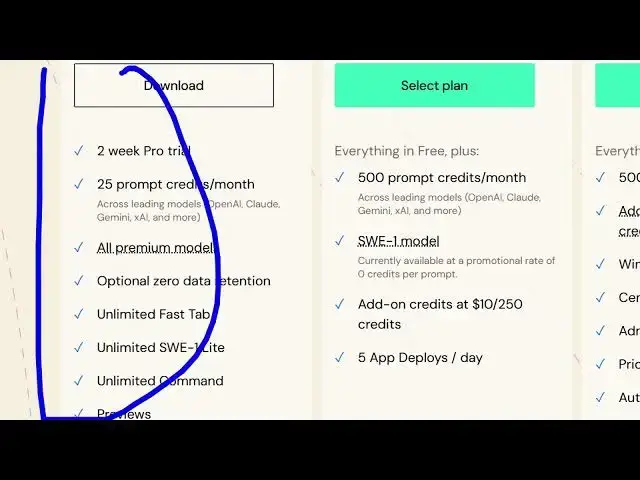
So this has some pricing model you will
3:22
see the free model provides you with
3:24
these kind of restrictions and their
3:26
paid plans start from $15 per month. But
3:28
this extension this extension is
3:31
completely free for forever. So that's
3:35
the extension that I use for my projects
3:37
in VS Code. And as you can see now you
3:40
can even reference this file here. Let's
3:43
suppose if I want to reference this
3:45
file. So what I need to do I simply
3:48
select this file or go to advance and
3:51
here we can
3:53
add the context and here we can search
3:55
for the file
3:58
which is index php. So now we have
4:01
referenced this file here. So I will ask
4:03
question here. I will say modify
4:07
this PHP file to make a
4:13
file
4:17
or make a
4:20
calculator in PHP.
4:24
So you're basically asking the question
4:26
here. So it is just modifying this
4:29
index.php file here and making out a
4:33
calculator. So either you can accept
4:36
changes,
4:37
click this button, copy the clipboard
4:40
and simply paste this code. So now it
4:43
actually changes it to a
4:47
calculator. So you accept these two
4:49
numbers. You can suggest the operation
4:53
calculate and the result comes out to be
4:56
true. So this you can do this with any
4:58
file. Uh this is PHP. You can select
5:01
here. Let's suppose I say index html. I
5:04
again simply go to wind surf. Simply
5:07
suggest change this to index.html and
5:10
just
5:16
I will say build a
5:19
react
5:21
calculator in HTML using CDN.
5:25
Again you ask question again you can see
5:28
you can ask unlimited number of
5:30
questions so there is no such limit out
5:32
there in this AI code assistant it's a
5:35
great alternative to Gemini claude or
5:38
chat GPT which do have restrictions but
5:40
this VS code AI coding assistant doesn't
5:44
have any sort of restrictions you can
5:46
ask unlimited number of questions and
5:48
then it will generate the response for
6:02
So you can install this extension and
6:04
start using it. It's called as windsurf
6:07
formerly known as kodium. So, thank you
6:09
very much for watching this video and
6:11
also check out my website
6:13
freemediatools.com
6:15
uh which contains thousands of tools.
#Development Tools
#Freeware & Shareware
#Open Source