0:00
uh hello guys welcome to this video so
0:02
in this video I will show you yet
0:04
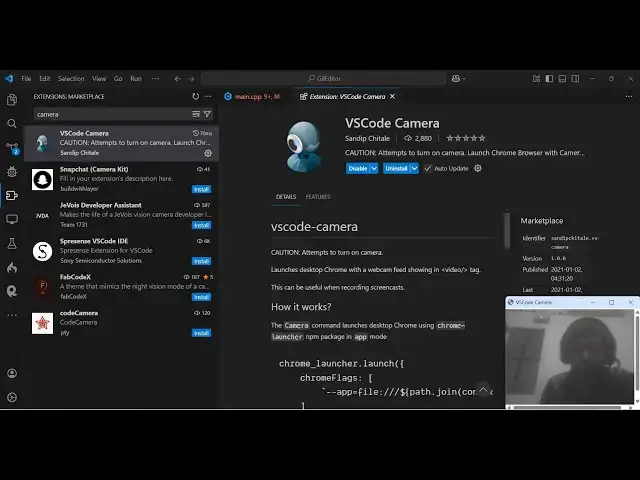
another vs code cool little extension
0:07
which enables web camera so while you're
0:09
coding in vs code you can actually
0:10
install this extension which is called
0:12
as vs code camera if you go to the
0:15
extensions just type this and the very
0:17
first extension which comes right here
0:19
this is actually the extension it's got
0:23
2,800 downloads so it actually turns on
0:27
your web camera so let me just uninstall
0:30
and install it once again so click the
0:32
install button to activate this
0:34
extension and as soon as you activate
0:37
this now to show that web camera uh you
0:40
just need to press the shortcut key
0:42
which is control shift
0:45
p control shift B to open this and just
0:48
type your camera and just activate this
1:00
just type so now you will actually see
1:03
your window will open here just need to
1:06
Grant the permission here to your web
1:08
camera so now the web camera will be
1:10
started and side by side you can
1:13
actually pin this window right here
1:15
while you are recording something also
1:17
it's very good extension while you're
1:19
coding here you can actually enable this
1:21
extension to show your face while coding
1:24
here so you can record your video
1:25
anything you can do so it's a nice
1:28
little extension in vs code so which
1:31
camera uh automatically side by side the
1:34
window will show right here and you can
1:37
actually code here you can see that so
1:40
it's a nice little extension if you do
1:42
want to show yourself file coding here
1:45
something so it's a very good extension
1:48
definitely go to extensions just
1:50
activate this and just control shift p
1:53
this is actually the shortcut and just
1:55
search your camera this will come right
2:02
you can see that so it's very
2:06
simple so if you want to stop this you
2:09
can simply click the cross button so
2:11
this will turn off your camera again if
2:13
you want to turn this on control shift p
2:15
just search your camera and turn this on
2:19
so just grant the permission here and
2:21
then it will can see that
2:24
so it's a nice little extension you can
2:27
install it in vs code and uh
2:30
thank you very much for watching this
2:32
video and also check out my website free
2:34
mediat tools.com which contains
2:36
thousands of tools regarding audio video
2:37
and image and I will be seeing you in