Up next in 10


Get the full source code of application here:
Watch My Visual Studio Code IDE Setup Video For Fonts,Themes & Extensions
https://youtu.be/Bon8Pm1gbX8
Hi Join the official discord server to resolve doubts here:
https://discord.gg/cRnjhk6nzW
Visit my Online Free Media Tool Website
https://freemediatools.com/
Buy Premium Scripts and Apps Here:
https://procodestore.com/
Show More Show Less View Video Transcript
0:00
uh hello guys welcome to this video so
0:02
in this video I will show you one other
0:04
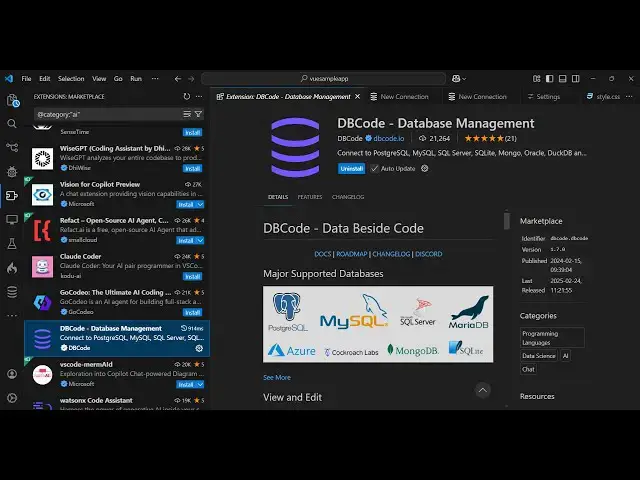
vs code extension which is allinone
0:07
extension to connect with any database
0:09
it can be MySQL mongodb
0:12
esite post all the database it supports
0:17
uh the name of the extension is DB code
0:19
database management ultimate tool for vs
0:22
code just write this in the extension
0:24
panel the very first extension which
0:26
comes right here it's got almost 22,000
0:30
installs and it actually have this
0:32
website here DB
0:35
code. and it's a paid Tool uh it does
0:39
offer a free free plan as well go to the
0:42
pricing here free plan is more than
0:45
enough because in the free edition you
0:47
get almost all the databases
0:50
major unlimited connections you get
0:53
Customs equal all these features you get
0:56
and cery history you get five but I
0:59
think the free plan is more than enough
1:01
and now to actually install this click
1:03
the install button to actually activate
1:05
this extension so as soon as you
1:07
activate this you will see this will be
1:09
added in the
1:11
sidebar and right here you have this
1:14
interface where you can add multiple
1:16
connections so let me show you by
1:19
clicking this add connection
1:22
button so as soon as you click the add
1:25
connection button you will be granted to
1:27
this interface where you actually get
1:32
you can connect to your mongod DB let me
1:34
show you so here you can give it a name
1:37
right here so name can be anything
1:40
mongod
1:41
DB and
1:43
then your host here which will be Local
1:47
Host and by default it runs on this port
1:50
number
1:52
27017 just take with the default option
1:54
save now the connection is successful
1:57
guys here you just need to press the
1:59
password
2:00
just enter it default password is
2:03
nothing and now you will see all the
2:05
databases will
2:08
be automatically
2:11
be and now you can also see the tables
2:14
as well you can add a new
2:17
row you can see very easy enter
2:24
it so you can even delete this row as
2:26
well by right clicking it and click on
2:38
just there is this delete option which
2:46
deletes and similarly you can see it is
2:49
displaying the data you can click
2:50
individually on any database click the
2:53
collection and then it will show you the
2:55
actual data which contains inside this
2:57
you will see that so this is one
3:00
connection now you can add multiple
3:02
connections now I will add side by side
3:05
my SQL connection as well so simply
3:08
connect and let me just name it as my
3:11
SQL
3:13
and host will be Local Host and for the
3:17
username default username is root
3:19
password is nothing click
3:22
save and now if you see password is
3:24
nothing enter
3:31
uh just make sure that you started your
3:35
MySQL server I'm using exam control
3:37
panel which comes with a purchase to
3:40
start this on this port number so after
3:43
you start this now you can
3:46
actually you can see the connection is
3:48
successful so now it actually fetches
3:50
all the details
4:04
so you can see that you can add a new
4:12
row so in this easy way guys you can do
4:14
this multi manage multiple databases in
4:17
vs code using this extension and I find
4:21
this extension to be very useful so
4:23
without leaving your vs code while
4:25
coding you can manage your databases
4:28
connections so thank you much guys for
4:30
watching this video and also check out
4:32
my website as well free mediat tools.com
4:35
uh which contains thousands of tools
4:38
regarding audio video and image and I
4:41
will be seeing you in the next video
#Business Services
#Data Management
#Programming