0:00
uh hello guys welcome to this video so
0:02
in this video I will show you a vs code
0:04
extension which actually shows the live
0:07
preview of the images whenever you
0:09
include them inside the code here so it
0:12
will show you side by side a short
0:14
little preview you can hover onto the
0:16
image and there will be showing this
0:18
information about this image such
0:20
as a short little preview you can see
0:24
that as I'm hovering on this image it is
0:26
showing me the dimensions of this image
0:28
the size and also this short little
0:31
preview and also right here also it
0:34
actually shows the preview if you
0:36
see so it actually helps you because if
0:39
you are including the image from a path
0:41
so if I let's suppose I make a spelling
0:45
mistakens so now that preview will not
0:48
show so from this you will definitely
0:50
know that if you have written the path
0:52
of the image correctly or not so if I
0:54
change the part to correct so now it
0:56
will show me this nice little preview on
0:58
Hover so this confirms that your path is
1:01
correct so it actually saves a lot of
1:05
time as well because if you are working
1:07
with images you're including images in
1:09
the CSS code then it will show this live
1:12
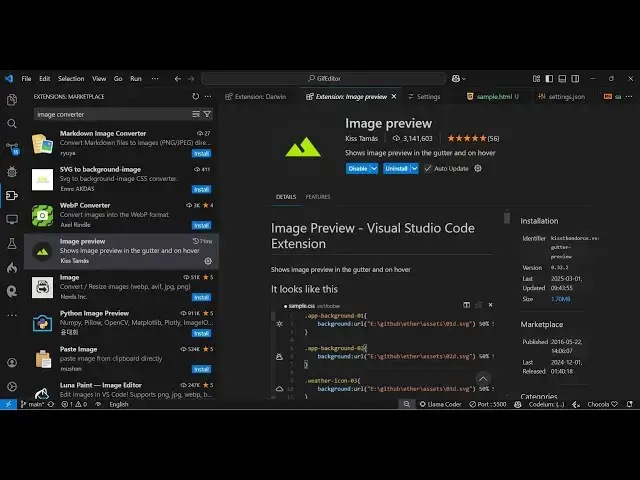
preview so there is this extension if
1:14
you go to extensions tab just right here
1:16
image preview and the very first
1:19
extension which comes uh it's got almost
1:21
3 million installs so it's a very
1:23
popular extension so it actually shows
1:26
the image preview in the gutter and on
1:28
Hover as well Side by by side it shows
1:30
the image preview so what you need to do
1:34
just click the install button and just
1:36
activate this extension so as soon as it
1:44
see it will actually shows the live
1:53
side so whatever image you are including
1:56
right here you will see it will show the
2:02
and whenever you hover onto this it
2:04
contains some additional information
2:05
such as the size the dimensions and you
2:13
that so this can be done in HTML code as
2:17
well so if you are directly including
2:19
this image in the HTML by using a image
2:23
tag then also I think it shows you you
2:27
can see that so side by side it shows
2:29
you the I preview so this
2:32
actually saves a lot of time because it
2:35
actually confirms that you have included
2:39
correctly so it works
2:42
with in all the languages where you are
2:44
including your images so I think that's
2:47
a very good extension you should have
2:50
extension so directly install
2:53
this and start using it and also check
2:56
out my website free mediat tools.com
2:58
which contains thousands of tools
3:00
regarding audio video and image and I
3:02
will be seeing you in the next video