Up next in 10

Vitara.ai INSANE UNLIMITED Vibe Coded Apps from Text Prompts — Claude & Gemini Can’t Touch This
Aug 15, 2025

Get the full source code of application here:
Show More Show Less View Video Transcript
0:00
Uh hello guys, welcome to this videos.
0:02
In this video, I'll show you yet another
0:04
coding AI platform for building
0:06
softwares and fullstack applications. So
0:10
this is a platform name vara vi a r a
0:13
doi ai. So simply type this address and
0:16
you will land on this page right here
0:18
and you can basically build full stack
0:20
applications using a simple prompt. So
0:23
whenever you land on this you can
0:25
basically sign this with your Google
0:27
account here. Just sign up on this
0:29
platform for completely free. So after
0:32
you sign up, you will be redirected to
0:34
the
0:36
dashboard area where you would be able
0:38
to actually write what sort of
0:40
application you want to create. So I can
0:43
simply say very simple build a
0:47
scientific calculator web app in browser
0:51
using
0:55
HTML, CSS and JavaScript. So similarly
0:58
we write in claude cursor and Gemini as
1:00
well. We write the prompt and just a
1:04
click. Now it will
1:14
you just need to include here React.
1:27
So as soon as you do this, it also
1:30
provides you suggestions as well right
1:31
here at the bottom side. what sort of
1:34
application you want to create. So you
1:36
can copy the prompt from here
1:53
and you can even attach files as well.
1:56
Simply click the attach file button to
1:58
actually attach files as well. So this
2:01
is
2:04
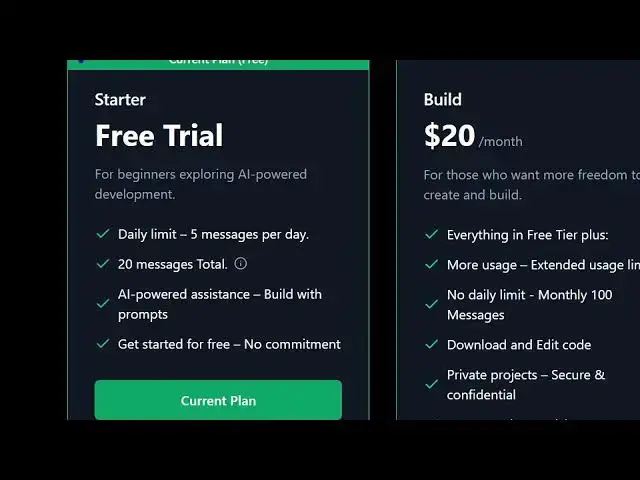
you basically on
2:06
the starter plan here. You can even
2:08
upgrade as well.
2:10
So in the free trial you get uh five
2:13
messages per day and uh the pro plan
2:17
start with $20. So now it is
2:20
initializing your project. As you can
2:21
see it has a complete IDE field to it
2:24
and on the right hand side it is
2:26
actually scanning your overall structure
2:28
of the application. It is making all
2:30
these files for you automatically. You
2:32
will see on the left hand side
2:35
all these components are automatically
2:37
generated for you.
2:41
So this is your
2:43
editor right here. These are all the
2:46
files which are generated. If you see it
2:48
is coding right here
2:51
fullstack application.
2:55
So definitely check out this platform
2:57
vara.ai. AI.
3:00
It can be a great alternative to tools
3:02
like Claude, Gemini and Cursor. And once
3:07
it is complete, you will see the live
3:09
preview and also it shows you the option
3:12
to see the live preview and also we can
3:15
download the code as well. So
3:18
we have live theme can change the theme
3:21
from here.
3:47
So this will take some time guys
3:49
depending upon the application that you
3:51
want to read out. So once it is
3:53
completed it will show you the live
3:54
preview right here. You also get the
3:56
publish button as well. So you can even
3:58
publish your project by clicking this
4:01
publish button. So definitely try this
4:03
platform.
4:09
So on the left hand side it will show
4:11
you the preview here.
4:16
You can preview on multiple devices. So
4:18
now your application is almost complete.
4:23
So if any sort of error take place just
4:26
click the automatic fix. the AI will
4:28
automatically try see your code and
4:32
automatically fix the issue here. So
4:34
this is the leave manager web
4:35
application. So here you can see the
4:38
application has been successfully made
4:40
and you can see this is the history.
4:44
This is the admin section right here. So
4:46
automatically
4:48
it made out this application for you.
4:52
So you can see that. So in this easy way
4:54
you can build out any sort of
4:55
application. Just write the prompt here.
4:58
Uh automatically this AI system will
5:00
build out. So you can definitely try
5:02
this for completely free and you get
5:05
also this download code button as well.
5:07
So definitely
5:09
uh try this platform AI platform for
5:12
coding and also check out my website.
5:19
So now you can see the project is ready.
5:22
It fixed fixed out that mistakes.
5:28
So now the overall application is
5:30
complete. Here you will see that we
5:32
build out a full stack application.
5:35
So in this easy way you can see.
5:42
So definitely check out my website as
5:44
well freemediatools.com
5:46
uh which contains thousands of tools.
#Programming
#Business & Productivity Software