Up next in 10

UnfoldAI VS Code Extension is INSANE – Code Generation, Debugging Tool Claude Alternative
Jul 22, 2025

Get the full source code of application here:
Show More Show Less View Video Transcript
0:00
Uh hello guys, welcome to this video. So
0:02
in this video, I'll show you a VS code
0:04
extension uh which allows you to
0:06
generate code, debug your code or fix
0:09
your code. This is the extension unfold
0:12
aai.io.
0:14
So this is the extension. It's similar
0:16
to claude. It actually generates code.
0:19
You basically write the prompt and it
0:21
will generate the code. It also fixes
0:23
errors as well. Automatic errors
0:24
detection. So if you make any sort of
0:27
mistake inside your uh program, it will
0:29
automatically detect errors like this.
0:32
It will
0:34
highlight that errors and uh this is
0:39
actually the web page. If you just this
0:42
is the website unflow unfoldai.io.
0:46
So inside the pricing model, they do
0:49
have the free version where you can
0:50
actually try out their tool for
0:52
completely free and they the pro version
0:55
starts with $12 per month and you get
0:58
unlimited code generations
1:01
with unlimited use, no open AAI
1:04
registration needed. So you can actually
1:06
use all the AI models for completely
1:08
free with $12 per month. So now to
1:11
install this, you go to the extensions
1:13
in VS Code. Simply type this extension,
1:16
Unfold AI.
1:19
So, this is the extension that I'm
1:21
talking about. It's got almost 80,000
1:24
installs.
1:25
So, this is a verified extension here.
1:28
And click on install. And as soon as you
1:31
install this extension, it will enable
1:33
this extension globally. And now in the
1:35
sidebar section, you will see this
1:37
appearing right here, Unfold AI. So,
1:40
simply activate this. And now in the
1:42
sidebar you need to simply sign up
1:46
with your Google account. So just select
1:49
and simply sign up. And after that you
1:52
can try out this extension and this will
1:54
actually generate the code directly
1:56
inside VS code and automatically debug
2:00
your code as well. So once you sign up,
2:04
so just wait for the sign up to complete
2:07
and after that
2:12
you will be redirected to the chat
2:14
window. So this is the chat window that
2:16
you can see right here.
2:20
This is debugging. This is functions
2:23
menu. So right here
2:27
enjoy or you will see this is a window.
2:35
So
2:37
you can type anything here. Clear chat
2:39
history. So
2:43
think it is complete sign up.
2:47
So now you basically open any sort of
2:49
file here. Let's suppose this file
2:54
and just open this sidebar section right
2:56
here.
3:04
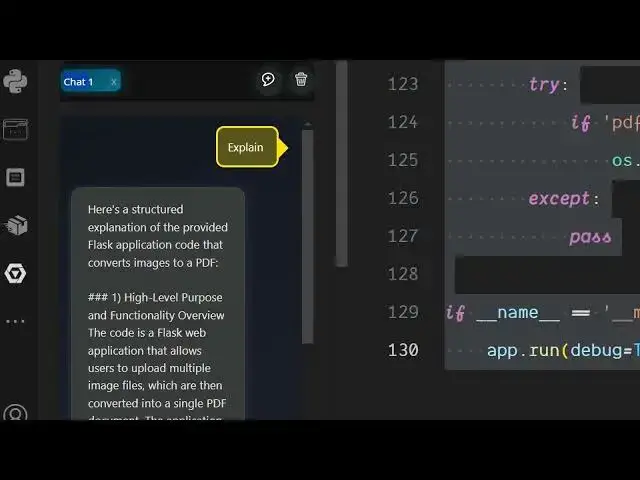
So functions menu. So you click on
3:06
explain and basically you need to select
3:08
a snippet of code that you want to
3:10
explain. And right here simply click
3:13
explain. So what this tool will do? So
3:16
it will explain this code to you this
3:18
Python code that I selected on the left
3:21
hand side. So just wait it will actually
3:24
processing this code entirely and then
3:26
it will give you a summary of the code
3:29
of what this code is doing right here.
3:31
So you can see here's a structure
3:32
explanation of the provided flask
3:34
application that converts image to PDF.
3:37
So it gives you a summary of the snippet
3:40
that you highlighted.
3:42
So this is really useful if you're
3:45
looking forward to actually
3:48
generate a documentation about your code
3:50
or what the code is doing. So you can
3:53
see it is generating a documentation
3:55
instantly. Apart from that you can even
4:00
generate the code as well. So as you can
4:03
see it basically build out this
4:05
documentation for you.
4:09
Also you can if you make any sort of
4:11
mistake right here if I open any sort of
4:14
other language let's suppose I open a
4:17
JavaScript file and right inside this
4:20
file if I make some kind of mistake so I
4:24
import
4:26
this is my
4:30
thing right here. If I make this mistake
4:32
here.
4:35
So if if I just select this code and
4:38
then now select find problems. So right
4:42
here there is a tool right here which
4:45
lets you find problems inside the source
4:47
code. So now it is finding out whatever
4:50
bugs whatever errors are there in this
4:53
program and it will automatically tell
4:56
you what sort of errors are there. So
4:59
now you can see
5:03
it is exactly telling you syntax error.
5:06
The use of double equal to in const
5:08
express require should be equal to the
5:12
assignment of uh should be. So it is
5:15
correcting all these mistakes. So it is
5:17
telling you
5:19
this should be the correct code. So you
5:21
simply copy the code.
5:27
So now you can copy the correct code.
5:30
Simply paste it right here. And now it
5:34
given you the correct code like this. So
5:36
in this easy way you can debug your code
5:38
as well.
5:41
And you can actually
5:44
generate the code as well. So generate a
5:46
image to PDF app in browser.
5:54
So here you can write the prompt and
5:56
based upon the prompt here it will
5:58
generate the code for you.
6:03
So there is no limit. So it's a great
6:06
alternative to tools like claude and
6:10
Gemini. So this doesn't have any sort of
6:14
limitations. They do offer the upgrade
6:16
plan as well. So as you can see it is
6:18
now generating the code for you as well.
6:21
So it will give you the entire code
6:23
here. As you can see in the VS code
6:26
itself, it is generating the code.
6:30
So this is your HTML code. This will be
6:32
the JavaScript code here
6:37
and also the CSS code. So in this easy
6:40
way guys, you can use this extension for
6:42
completely free. go to the extensions
6:44
and just install this extension unfold
6:48
and it will basically perform all these
6:50
features. Also check out my website
6:53
freemediattools.com
6:55
uh which contains thousands of tools.
#Programming
#Web Services