Up next in 10

This VSCode Extension Will Automatically Update All Node Packages in Package json With Single Click
Jul 12, 2025

Get the full source code of application here:
Show More Show Less View Video Transcript
0:00
Uh hello guys, welcome to this video. So
0:02
in this video, I'll show you a very
0:04
useful VS code extension which allows
0:06
you to update all your packages, all
0:09
your NodeJS packages at once with a
0:12
single click. So if you are using some
0:14
outdated packages inside your NodeJS
0:17
project, this extension will help you in
0:20
those situations. So if you don't know
0:24
about the latest version, it will
0:25
automatically prompt you that you should
0:28
update to the latest version. So if you
0:30
just go to the extension tab, just type
0:32
here npm. This extension will come right
0:35
here. Uh it's got almost uh
0:39
170,000 installs. So click on the
0:43
install button to simply install this
0:45
dependency. And after installing it, you
0:48
go to your package.json file. And if you
0:51
are using some outdated packages, as you
0:54
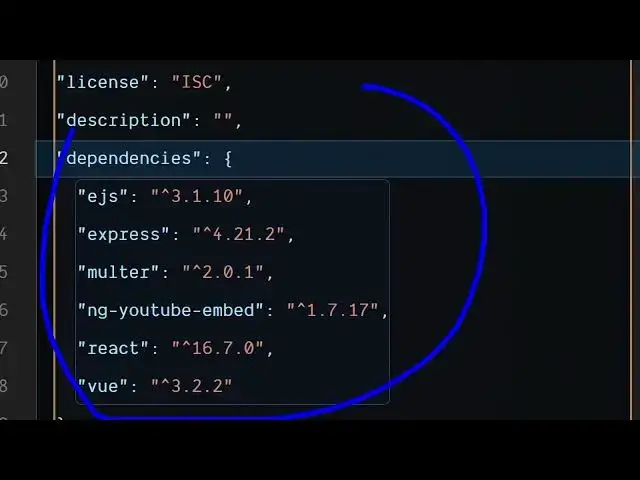
can see, we are using these, these are
0:56
not new ones. These are old packages. If
1:00
you just right click and simply it will
1:04
add this option npm update latest.
1:08
Simply with a single click, it will
1:10
update all the dev dependencies and also
1:13
all the packages that you are using. So
1:15
you don't need to know that if you are
1:17
using the latest or not. You simply
1:19
right click and simply select this
1:21
option npm update and automatically it
1:24
will go package by package and it will
1:27
automatically
1:29
install the latest packages. So as you
1:31
can see it changed all the packages. It
1:34
uh upgraded the react one to 19 version
1:38
which is the latest one and also V1
1:40
which is 3.5 which is the latest one. So
1:42
with a single click
1:45
if you have if you're using a lot of
1:47
packages third party packages so this
1:50
extension will go package by package and
1:53
install the latest version of that
1:55
specific one. So this will save you a
1:58
lot of time. So if I revert back to the
2:01
previous thing here so it was looking
2:03
like this. If you see we were using the
2:06
outdated package which is react 16 and
2:09
view 3.2.2.
2:11
So with this single click it updated
2:14
this file to use the latest versions. So
2:17
this will save you a lot of time. Same
2:20
thing goes for dev dependencies as well.
2:22
So definitely install this. I personally
2:26
use this extension a lot. So this will
2:28
save you a lot of time. It just add this
2:30
option in the context menu in the right.
2:33
So as you go to your packaged JSON file
2:36
simply right click
2:38
and it will update all your packages at
2:42
once. It add this option npm update
2:45
latest.
2:46
So thank thank you for watching this
2:49
video and also check out my website
2:51
freemediatools.com
2:53
which contains thousands of tools.
#Software
#Business & Productivity Software