Up next in 10

This VibeCodeApp.com AI App Builder is INSANE to Build Full Stack Apps From Prompt Destroys Claude
Apr 2, 2026

https://www.vibecodeapp.com/
Watch My Visual Studio Code IDE Setup Video For Fonts,Themes & Extensions
https://youtu.be/Bon8Pm1gbX8
Hi Join the official discord server to resolve doubts here:
https://discord.gg/cRnjhk6nzW
Visit my Online Free Media Tool Website
https://freemediatools.com/
Buy Premium Scripts and Apps Here:
https://procodestore.com/
Show More Show Less View Video Transcript
0:01
Hello [snorts] guys, in this video I
0:03
will show you another AI app builder.
0:06
It's called as wipe code app.
0:10
If you go to Google
0:11
simply type here
0:13
wipe code
0:17
app
0:19
AI
0:20
So this website will come. It's called
0:22
as wipe code
0:24
app.com.
0:26
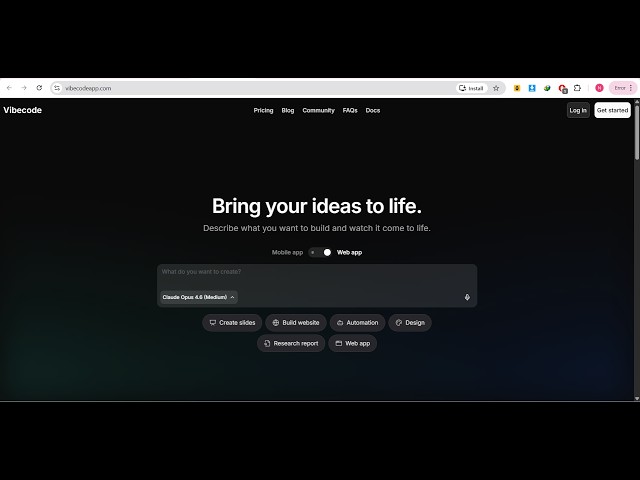
So it's an AI mobile and web application
0:30
builder.
0:31
So the interface looks something like
0:33
this.
0:35
So you actually tell the AI which sort
0:38
of application you want to develop.
0:40
So you can simply get started for
0:43
completely free. Simply log in with your
0:45
Google account.
0:47
And once you log in
0:49
inside the chat prompt you will be able
0:51
to make full stack coding applications.
0:53
So it's similar to cloud Gemini GPT
0:56
every AI platform.
0:59
So once you log in, you click on create.
1:02
Either you can create mobile
1:04
applications or web application.
1:06
So let's suppose I select web
1:08
application.
1:10
And it has a fully fleshed AI code
1:12
builder.
1:13
Similar to VS code and right in the chat
1:16
prompt, let's suppose I write here I
1:18
want a image to PDF
1:20
web app.
1:25
in browser.
1:27
So
1:28
now as soon as I write the chat prompt
1:31
the AI will start working.
1:33
So essentially as you can see it's using
1:36
the cloud Opus 4.6 model.
1:43
It's a very powerful model that it is
1:45
using and
1:47
if you want to also use the code editor
1:49
then you need to upgrade. In the free
1:51
plan code editor is not there.
1:54
So the pro plan start with $20 per
1:57
month.
2:01
So it has a free fully fleshed
2:04
code editor. Once it finishes the live
2:06
preview will show right here.
2:08
You can preview in different screen
2:10
sizes as well.
2:14
So they also have a Android app. You can
2:17
simply scan to download it.
2:21
To actually make uh
2:24
mobile applications. So
2:39
it's also available on the Google Play
2:40
Store. So you can also download this as
2:43
a mobile application as well. So after
2:46
once the application completes you can
2:48
even deploy the application by clicking
2:50
the deploy button. So
2:52
it's very easy.
2:57
Uh you can connect your database,
2:59
payment gateway
3:00
everything you can do.
3:02
API
3:04
various APIs you can integrate.
3:23
So just wait for it to complete.
3:37
So one thing I don't like about this
3:39
platform, it doesn't give you
3:40
notification. So as soon as I written
3:42
the prompt you should give me some
3:44
notification
3:46
which files are created on this or not.
3:49
There is no notification out there. So
3:51
that's one disadvantage of this
3:53
platform.
3:55
So [snorts] apart from that it's really
3:57
good wipe code app.com. So it's an AI
4:00
app builder.
4:09
So if you're watching it for the very
4:11
first time, please hit that like button
4:13
subscribe
4:14
the channel as well. I daily record AI
4:18
related videos.
4:20
If any AI platform is released I want to
4:23
share it with you guys. So
4:25
definitely consider subscribing.
4:28
And as you see once the application
4:32
completes it will show you the live
4:34
preview.
4:35
So I think now it is complete.
4:47
>> [sighs]
5:10
>> So as you can see it also has this
5:12
platform as well.
5:14
Wipe code.dev.
5:16
This is also the same platform. It's
5:18
called as wipe code app.com. And it is
5:21
wipe code
5:23
dev. This is also a second website of
5:26
its.
5:28
So follow the instructions.
5:33
So I think you can install it as a CLI.
5:35
So
5:37
it also have its own CLI as well. So you
5:39
can get started with the wipe code CLI
5:41
for free. Simply run the install
5:43
command.
5:44
So you can even install it inside your
5:47
command line and then you simply copy
5:49
the API key that it gives you.
5:53
So as you can see right here.
6:00
You can simply follow the installation
6:04
instructions inside here.
6:19
So definitely visit this. It's really
6:21
good wipe coding AI app builder wipe
6:24
code app.com. It has its own CLI tool as
6:26
well.
6:27
So once it finishes it will reload
6:31
as you see right here.
6:34
It's actually installing step by step.
6:37
It's coding out your applications. As
6:39
you can see this is on third stage.
6:42
So once it finishes it will show you the
6:44
live preview right here and then you can
6:46
deploy the application.
6:59
So definitely visit this website.