Up next in 10

This Blink.new AI Coding Builder & Agent Builds Landing Pages,Apps From Prompt & Deploys FREE (100%)
Apr 10, 2026

Watch My Visual Studio Code IDE Setup Video For Fonts,Themes & Extensions
https://youtu.be/Bon8Pm1gbX8
Hi Join the official discord server to resolve doubts here:
https://discord.gg/cRnjhk6nzW
Visit my Online Free Media Tool Website
https://freemediatools.com/
Buy Premium Scripts and Apps Here:
https://procodestore.com/
Show More Show Less View Video Transcript
0:02
Hello guys, in this live stream I will
0:04
yet again show you a very good AI
0:07
builder for specifically coding and
0:10
software development. It's called as
0:12
blink.new.
0:14
If you simply type this on Google, this
0:16
is an all-in-one coding AI builder and
0:20
agent which will actually build full
0:22
stack coding application from simple
0:25
prompts.
0:26
So, it's similar to Cloud GPT
0:29
Gemini. So, once you land on this,
0:31
unfortunately, if you are from India,
0:34
you will see this message.
0:37
But, by default, this is their software
0:40
development prompt. You can
0:42
develop a full stack app, mobile
0:45
application, and a website as well.
0:47
Blink it.
0:49
You can build out SaaS kind of
0:50
application. But, if you are from India,
0:53
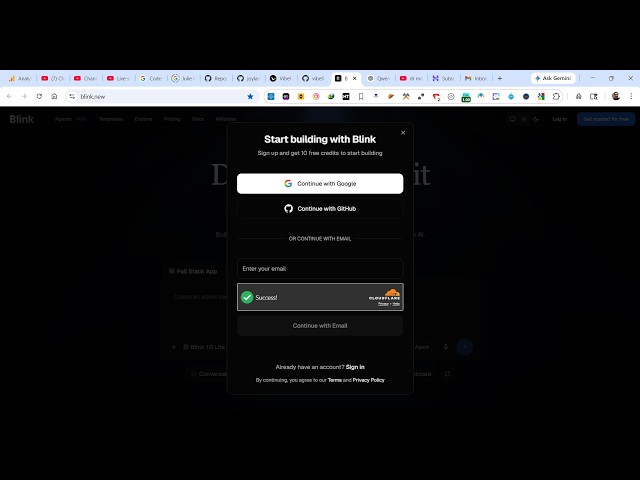
you will actually see this screen that
0:55
invite-only access is there.
0:58
Because it is not launched in India
1:01
fully.
1:02
So, that's why you will see this screen
1:03
that please enter your invite code. And
1:06
from here, if you are invited, then you
1:08
will enter the invite code and access
1:10
Blink.
1:12
If you already have your account, you
1:14
can click on login.
1:16
And you can continue with Google if you
1:18
already have your account.
1:21
So, you can simply sign up using your
1:23
Google account.
1:29
I can change the IP address and connect
1:32
to a VPN provider.
1:34
So, once you actually come to this, you
1:36
will see that
1:38
now
1:39
you will see this
1:40
chat prompt. I've already invited, so
1:43
I'm just
1:44
checking this beta version which is
1:46
released. So, from here, this is their
1:48
default
1:49
AI model. So, from here, you can
1:51
actually build out, let's suppose, build
1:54
a
1:54
image to PDF web app
1:58
in browser.
1:59
Exactly, I say, and just click start
2:01
building.
2:03
And now the AI will start building your
2:04
project and
2:07
it will also deploy the application as
2:09
well once it completes
2:11
generating all the project files.
2:14
So, it has its own AI coding editor. So,
2:17
as you see that
2:19
in the free plan, you get five credits.
2:22
So, you can see that. Then you can
2:24
upgrade it after those credits are over.
2:28
But, it's it is more than enough to try
2:30
out the platform in order to build out a
2:32
full stack app.
2:35
So,
2:36
you can see that it is actually coding
2:39
out. This is a code editor
2:41
where you actually see all the code
2:44
file by file. It's actually generating
2:46
all the code for us.
2:49
So,
2:51
you can simply download the code as well
2:54
by clicking the download button.
2:56
And you also get a publish button where
2:58
you can deploy the app.
3:00
So, here you can actually connect your
3:01
GitHub account, Superbase, everything
3:04
you can connect.
3:06
This is a live preview window.
3:08
This is a code window.
3:11
So, you can see that step by step, it's
3:12
actually generating all these files for
3:15
you.
3:16
And it's a very good platform. I
3:18
personally used it
3:20
and to create very good web applications
3:24
directly using this platform.
3:28
So, you just need to write the prompt
3:30
and automatically it will create the
3:32
necessary files for you.
3:51
So, you can see that
3:53
it's actually applying the necessary
3:55
changes
3:57
to create the application for you.
4:19
So, it's writing the necessary
4:20
components which are there. So,
4:49
So, if you click the upgrade button,
4:50
they do have a pro plan as well.
4:53
Which is starts from $13 per month.
4:58
So,
5:00
you get all these features.
5:03
In-app code editing as well, $25, $100.
5:07
You can connect your custom domain as
5:09
well. So, these are their pricings.
5:12
But, you can try this for completely
5:14
free by simply signing up your using
5:16
your Google account.
5:18
So, now a fully fleshed image to PDF
5:20
application is ready now.
5:23
You can also click publish. I'll just
5:25
publish it to this link.
5:27
For this, you do need require a paid
5:30
subscription.
5:31
But, from here, you can select a bunch
5:33
of images.
5:36
It's very easy. Just select
5:41
and select page size, click on convert
5:44
to PDF, and automatically your PDF will
5:46
be generated.
5:49
You can see that.
5:52
So, in this easy way, you can see that.
5:55
So,
6:00
it constructed this UI for you. This is
6:03
the code.
6:12
You can click the download button to
6:14
actually download the code as well.
6:16
This requires subscription, so you do
6:18
need to upgrade.
6:21
So, definitely check this out.