Up next in 10

This Base64 Coding AI Agent Codes Full Stack Apps From Prompt Destroys Claude & Cursor??
Mar 31, 2026

Get the full source code of application here:
Show More Show Less View Video Transcript
0:01
Uh hello guys in this live stream I will
0:04
show you I built out I recently
0:07
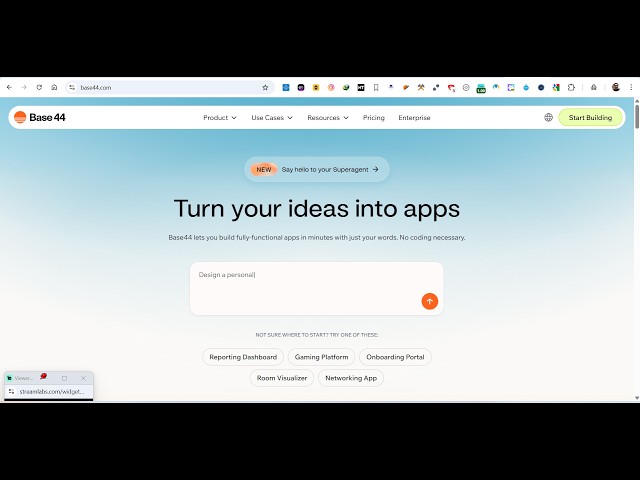
discovered this base 44 coding AI agent.
0:12
So it's called as base44.com. It's an
0:15
coding AI agent which actually codes
0:18
full stack
0:21
apps in a matter of seconds. So you
0:23
specify what sort of application you
0:25
want to generate inside the chat prompt.
0:28
It's works similar to claude and cursor.
0:31
It basically in a matter it's a free
0:34
alternative. You can get started totally
0:36
for free. You can actually use your
0:38
Google account. Simply login with your
0:40
Google account. So once you log in
0:45
inside the chat prompt you specify what
0:48
sort of application you want to generate
0:51
and uh let's suppose you can specify
0:53
anything. Let's suppose I say build a
0:57
fullyfledged
1:00
advanced
1:02
scientific
1:04
calculator
1:08
in browser using HTML, CSS and
1:11
JavaScript. So I specify just I want to
1:13
make a scientific calculator using HTML,
1:16
CSS and JavaScript. And as soon as you
1:19
specify it, it has an advanced coding
1:22
editor. So the AI will build out your
1:26
scientific calculator. So as you can see
1:29
on the left hand side it actually
1:32
research how to build the scientific
1:34
calculator. First of all it list out
1:37
actual technologies which will be
1:39
required and then on the right hand side
1:41
it also offers this code later editor
1:45
where you will see all the files which
1:47
will be created
1:49
and also it will show you the live
1:51
preview as well. This is a preview
1:53
screen, code screen, everything.
1:57
So I personally used it this website a
2:00
lot base 44 coding AI agent to build out
2:02
my applications.
2:05
So this AI is actually is really popular
2:10
website. First of all, it actually
2:16
builds out your code in a matter of
2:19
seconds.
2:21
It's actually built out full stack
2:24
applications. You can specify any
2:25
framework React, Angular, Vue. So it's
2:28
not limited to HTML, CSS and JavaScript.
2:32
So you just specify what sort of
2:34
application you want to develop in which
2:36
framework. You simply specify that
2:39
inside the prompt and then this AI will
2:41
specify it will start building out your
2:44
application.
2:46
So once it get completed, you will
2:48
actually see the end result. You can
2:50
even click this button as well continue
2:52
in background as well. So it will
2:54
actually AI will code your application
2:57
in the background. So you can just see
2:58
here these files are specified. It's
3:01
created by this AI calculator display.
3:05
So it's actually
3:07
uh
3:09
creating all the components which are
3:12
necessary for your scientific
3:13
calculator.
3:16
So it's totally free. There is no
3:21
money that is costing right here. You
3:23
can start for completely free and they
3:26
do have their upgrade plan. If you do
3:29
want to upgrade, you click the upgrade
3:30
button as well. So you also get the
3:33
publish button. You can publish your app
3:35
as well.
3:42
So now you if you see the live preview
3:45
is ready right here. Once it completes
3:51
so specify. So now your scientific
3:54
calculator is ready. Here you will see
3:56
that it has a unique interface. The
3:59
design you can test out your
4:01
application.
4:06
So all the features sign cause log. This
4:10
is actually
4:16
this is your the overall structure of
4:19
the and if you click the code section so
4:22
here all the code is there. So you will
4:25
see that it's actually built out a
4:29
so these are all the components it has
4:32
built out as you see all the components
4:35
are coded directly inside JSX file. If
4:39
you see the package.json file, it's
4:42
actually
4:44
I think it's a React application. So
4:47
it's actually using the latest version
4:49
of React. So by default, it will create
4:52
a React application for you. So whenever
4:54
you submit and it actually uses the
4:57
actual dependencies.
5:00
So so in a matter of seconds your full
5:03
stack application is ready. So you can
5:05
even click the publish button. You can
5:07
even see how the application will look
5:10
on mobile, on tablet,
5:13
this will look on desktop. And if you
5:16
click the publish button, so you can
5:18
even publish it as a
5:20
So once you click the publish button,
5:22
your app will be published. So you can
5:26
see that app is published here. This
5:29
provides you with this link right here.
5:35
So now the app is also published. You
5:38
can even publish as a mobile application
5:40
as well. So if you want to publish as a
5:43
mobile app, you need to connect your app
5:46
store Google Play submission and then
5:49
you can do that. So if you want to
5:52
upgrade, they do have the upgrade plan
5:54
as well.
5:57
So start from $16 you get 100 monthly
6:01
credits then $40
6:03
$80 as well. So from here you can create
6:07
unlimited number of apps. You basically
6:09
get a limited amount of credits 100
6:13
credits. This is there 160.
6:18
So it's a really good uh app builder AI
6:21
app builder similar to cloud and cursor.
6:24
It's accessible at bass44.com.
6:27
So definitely try this.
6:34
So if you're watching it for the very
6:35
first time guys, please subscribe to
6:37
this channel. On a daily basis, I will
6:39
spec upload AI related videos
6:42
specifically for coding and programming.
6:45
So definitely subscribe.