Up next in 10

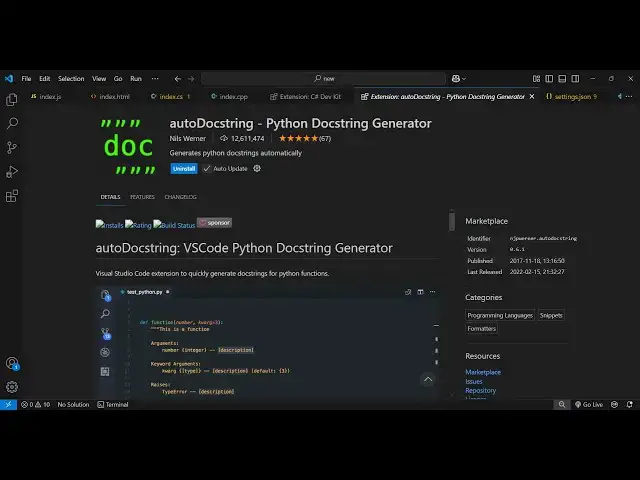
Stop Writing Docstrings Manually — Use This VS Code Extension to Auto Generate Perfect Python Docs!
Mar 7, 2025

Get the full source code of application here:
Watch My Visual Studio Code IDE Setup Video For Fonts,Themes & Extensions
https://youtu.be/Bon8Pm1gbX8
Hi Join the official discord server to resolve doubts here:
https://discord.gg/cRnjhk6nzW
Visit my Online Free Media Tool Website
https://freemediatools.com/
Buy Premium Scripts and Apps Here:
https://procodestore.com/
Show More Show Less View Video Transcript
0:00
uh hello guys welcome to this video so
0:02
in this video I will show you a very
0:04
popular extension related to python so
0:07
inside vs code so it's called as Auto
0:09
Doc string python doc string generator
0:12
doc string is documentation string if
0:15
you are having a lot of code if you want
0:17
to generate documentation related to
0:19
that code so specifically this is
0:20
related to python so if you just search
0:23
inside vs code autod do string this is
0:26
actually the plugin just simply go to
0:27
the extensions tab just WR type autod do
0:30
string this is actually the plug-in it's
0:33
almost having 12 million installs it's
0:36
very much used related to python so now
0:39
let's suppose if I open a python file
0:42
and I have a bunch of functions which
0:44
are there and now I need to generate
0:46
documentation related to this code
0:49
because uh documentation is really
0:51
necessary if you are producing code for
0:53
production if you are sharing code
0:55
between a bunch of developers so now
0:58
let's suppose we have this function and
1:00
we need to generate this doc string
1:02
documentation for this so we come to the
1:04
function and we just write after we
1:06
install this plug-in just simply click
1:08
the install button and it will get
1:10
activated it's completely free and then
1:14
you just need to come to your python
1:15
file and right inside this function you
1:18
just need to write double quotes again
1:22
double quotes and this option will come
1:24
right here generate dog string
1:27
documentation as soon as you do this
1:29
you'll see here you can write the
1:31
summary this is a simple greting user
1:36
function and as you press a Tab Key it
1:39
will automatically go to this and here
1:42
you can
1:48
write so you can see how beautifully we
1:50
have generated documentation we simply
1:53
go to the function just put uh this
1:58
uh C this double
2:01
quotes two times we press double quotes
2:04
and we get this option generate dog
2:06
stram and here we can write the summary
2:09
very
2:16
quickly and as I press the Tab Key it
2:19
will go automatically to this location
2:22
we don't need to man do this just press
2:24
the Tab
2:25
Key and here you will provide the string
2:28
type which is an integer
2:34
like this so it actually Returns what
2:38
value it
2:44
returns so you can see it will save you
2:46
a lot of time just come to the function
2:48
and double quotes and just generate the
2:52
dog string for every function you will
2:55
see can see that
3:00
will automatically do this here you can
3:03
write the summary this is the argument
3:05
here for the function and what it
3:07
returns you can see it is widely used
3:10
this plugin guys you can activate this
3:12
inside vs code and act automatically
3:15
write documentation for every python
3:18
code python
3:20
function can see that so it will save
3:24
you a lot of time if you want to
3:26
document your code and if you don't need
3:28
to manually do this from process you can
3:30
activate this extension and this
3:33
extension will automatically do this for
3:35
you this will save you a lot of time so
3:38
this is actually the
3:39
extension simply activate this extension
3:42
and as you
3:46
just double Cotes and you will see this
3:49
option so thank you very much for
3:51
watching this uh video and also check
3:55
out my website free mediat tools.com
3:58
which contains thousands of tools
4:00
regarding audio video and image and I
4:02
will be seeing you in the next video