Up next in 10

Save Hours Writing C/C++ Code – INSANE VSCode Snippets & Intellisense Extension!
Aug 3, 2025

Get the full source code of application here:
Show More Show Less View Video Transcript
0:00
Uh hello guys, welcome to this video. So
0:02
Uh hello guys, welcome to this video. So
0:02
Uh hello guys, welcome to this video. So in this video, I'll show you a very
0:04
in this video, I'll show you a very
0:04
in this video, I'll show you a very useful VS code extension especially for
0:06
useful VS code extension especially for
0:06
useful VS code extension especially for C C++ developers. This is a snippets
0:10
C C++ developers. This is a snippets
0:10
C C++ developers. This is a snippets extension. It's used by almost 1 billion
0:13
extension. It's used by almost 1 billion
0:13
extension. It's used by almost 1 billion developers. So
0:15
developers. So
0:15
developers. So simply install this by clicking the
0:18
simply install this by clicking the
0:18
simply install this by clicking the install button. Simply activating this.
0:21
install button. Simply activating this.
0:21
install button. Simply activating this. After you activate this extension, just
0:23
After you activate this extension, just
0:23
After you activate this extension, just go to your CP or C or C++ file. If you
0:27
go to your CP or C or C++ file. If you
0:28
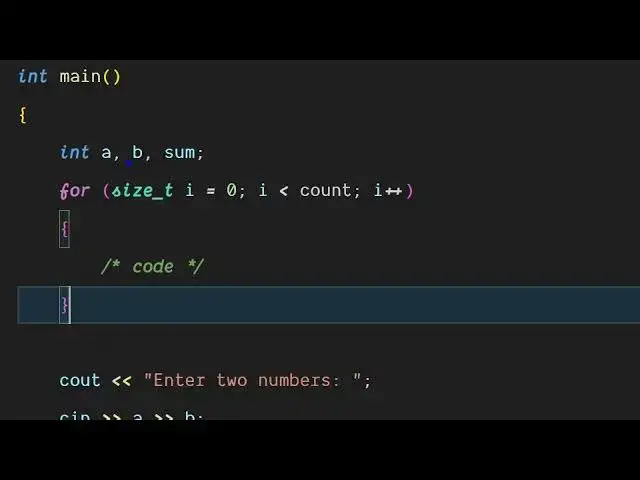
go to your CP or C or C++ file. If you want to have a for loop, you simply type
0:29
want to have a for loop, you simply type
0:29
want to have a for loop, you simply type the for and simply enter and
0:32
the for and simply enter and
0:32
the for and simply enter and automatically this will fill out all the
0:35
automatically this will fill out all the
0:35
automatically this will fill out all the source code which is required for the
0:36
source code which is required for the
0:36
source code which is required for the syntax. So this will speed up the
0:39
syntax. So this will speed up the
0:39
syntax. So this will speed up the process and similarly for while loop as
0:41
process and similarly for while loop as
0:41
process and similarly for while loop as well you will see you will put the
0:43
well you will see you will put the
0:43
well you will see you will put the condition and like this. So it has all
0:47
condition and like this. So it has all
0:47
condition and like this. So it has all the snippets available for these common
0:49
the snippets available for these common
0:49
the snippets available for these common task. You simply type for and press
0:52
task. You simply type for and press
0:52
task. You simply type for and press enter and this will simply and also for
0:56
enter and this will simply and also for
0:56
enter and this will simply and also for while loop. So these are all the
0:59
while loop. So these are all the
0:59
while loop. So these are all the pre-made snippets for C++ or C program.
1:03
pre-made snippets for C++ or C program.
1:03
pre-made snippets for C++ or C program. So this will save you a lot of time
1:05
So this will save you a lot of time
1:05
So this will save you a lot of time where you don't need to write it from
1:08
where you don't need to write it from
1:08
where you don't need to write it from scratch.
1:17
So for the main function as well you
1:19
So for the main function as well you
1:19
So for the main function as well you simply write after you just need to
1:21
simply write after you just need to
1:22
simply write after you just need to write the main function. So simply
1:23
write the main function. So simply
1:23
write the main function. So simply select from here and automatically this
1:26
select from here and automatically this
1:26
select from here and automatically this will add this for you.
1:29
will add this for you.
1:29
will add this for you. So these are different snippets which
1:30
So these are different snippets which
1:30
So these are different snippets which are there. You can definitely try this.
1:37
So
1:39
So
1:39
So so definitely try this extension.
#Programming
#Software
#C & C++