Up next in 10

Python 3 Whatsapp Web API to Make Whatsapp Bot to Send Text & Images Automatically
Jun 3, 2025

Get the full source code of application here:
https://codingshiksha.com/python/python-3-whatsapp-web-api-to-make-whatsapp-bot-to-send-text-images-automatically/
Show More Show Less View Video Transcript
0:00
uh hello guys welcome to this video so
0:02
in this video I will show you a Python
0:04
script by which you can actually make a
0:07
simple WhatsApp bot which can actually
0:11
answer questions from whenever you
0:14
receive messages so there is actually
0:17
this WhatsApp API meta API that you can
0:20
use first of all you need to register on
0:23
this website panel dot WhatsApp API let
0:27
me show you the API name right here i
0:30
have given the link in the description
0:32
of the video so just go to that website
0:35
and just register i've already created
0:38
this account here the name is
0:41
vapi.com and just loging in with your
0:43
Google account and then just create a
0:46
channel after creating the channel you
0:49
need to enter your WhatsApp number so
0:52
just link your WhatsApp account with
0:53
this API after you do
0:56
this uh for trial purposes it will give
1:00
you some kind of limited messages that
1:03
you can do so as you can see my trial
1:06
messages 150 messages are there so I can
1:09
send up to 150 messages and then after
1:12
that I need to
1:13
upgrade so this is actually the API URL
1:16
that you can see
1:19
httpsgate.appy.cloud
1:20
cloud and this is my token here and the
1:25
to the token will be different for you
1:28
so this is actually the API here
1:30
WhatsApp
1:32
API so now we'll be writing a simple
1:35
Python script hitting this API so first
1:37
of all just create a simple Python file
1:40
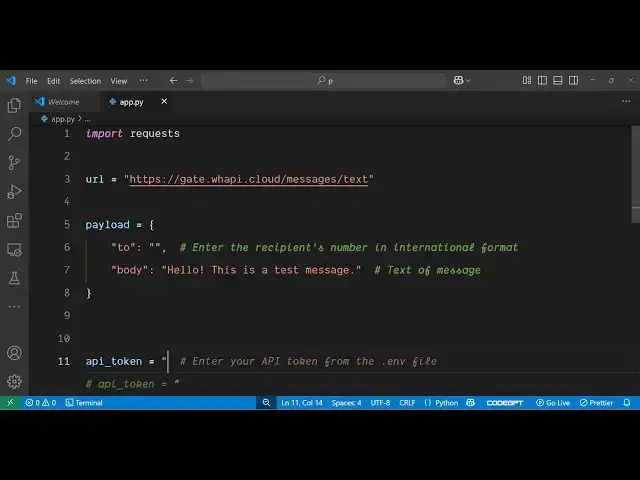
and we will be requiring the request
1:43
module and then we will be hitting this
1:47
URL as you can see this is actually /
1:52
messages slash text so this is the API
1:57
endpoint that we are hitting right here
1:59
using the request module inside Python
2:01
script so after that you just need to
2:04
specify which message you will be
2:06
sending inside your payload so right
2:09
this will be an object right here it
2:12
will contain three properties
2:15
first of all to which phone number you
2:17
are sending the
2:19
message and the second property will be
2:21
the name of the
2:24
recipient and the third property will be
2:27
the body what is the body of the message
2:30
so this will be anything hello
2:36
world so this will be your message and
2:39
here you just need to replace the phone
2:41
number to which you want to send done so
2:44
let me I'm using this
2:52
uh let me just copy this number
2:57
and paste this
2:59
number so you don't need to write plus
3:02
here just need to write the country code
3:06
this is 91 for India so then after that
3:09
and followed by 8 10digit number that's
3:13
all so this is the payload and after
3:15
that you need to specify the header
3:19
information so this header will contain
3:22
three
3:24
properties so you will be accepting
3:28
application/json the second property
3:30
here will
3:31
be the content
3:36
type which will be again be
3:39
application/json and the third third
3:42
property here will be the authorization
3:45
header
3:52
so this will be error and then followed
3:56
by
3:56
your space and curly bracket here you
4:01
need to replace your API token so this
4:03
will be inside your dashboard so if you
4:05
go to this website after you register it
4:08
you will see this token will be there so
4:10
simply copy your own token and replace
4:14
it here
4:18
so after doing this we just need to make
4:21
this post request so we simply say
4:26
request dot post and we'll be sending it
4:31
this post request and plus this JSON
4:34
payload data alongside with the
4:38
headers so once we make this uh API
4:42
request the backend server
4:45
will successfully send our message so we
4:49
can print out the response the status
4:52
code
4:54
and the text which is coming from the
4:57
API so if I try to execute this
5:00
application so now what
5:02
happens if I say python app
5:06
py so you will basically see it is
5:10
saying that authorization is not defined
5:19
i I think
5:21
here B is capital right here i just make
5:32
sure yeah so this is actually the API
5:35
token
5:38
just declare this API
5:47
token again paste
5:49
it just copy it and paste it right
5:53
here just make sure this needs to be in
5:57
uh double quotes sorry I I forgot this
6:01
needs to be in double
6:03
quotes because this is a string value so
6:07
now this needs to be in double
6:12
quotes and you don't need these curly
6:16
brackets you can delete this i think
6:28
uh let me try this
6:52
can declare this variable right here api
7:02
token uh just replace this API token
7:05
here
7:20
simply so it is saying response is not
7:23
defined i think I made a mistake in
7:25
sorry this is response
7:39
uh wrong request parameters details
7:43
/body to must match pattern
7:56
I just make sure
8:27
And now you will see you will receive
8:29
this object 200 status code sent is is
8:34
equal to true message it gives you the
8:36
message ID and
8:40
uh this is sent from this phone number
8:43
so if I try to
8:48
see you will
8:52
see hello this is a test message the the
8:56
message has been successfully sent here
8:58
you will see that I didn't do this
9:02
Python script automatically sent this
9:04
message for us and uh I can change this
9:08
number here accordingly let's suppose I
9:11
take any other
9:17
number so I take this number for example
9:20
i copy this number and simply replace it
9:24
i have given the script in the
9:26
description of this video so simply you
9:27
need to replace the number and your
9:30
token and then this script will
9:32
definitely work so as you can see I just
9:35
replacing it number and again if I run
9:38
this Python script you will actually see
9:40
again this will return this object to
9:48
This
10:04
just so in this way you can actually
10:08
create a simple WhatsApp bot you can
10:11
even send images as well so there is a
10:14
media property that you will send as
10:19
well so you don't need to spam because
10:22
if you spam your account may also get
10:25
deleted so you need to execute this
10:36
so first of all you need to come to this
10:38
website register it login with your
10:41
google.com and then it will give you a
10:45
set of 150 messages so as soon as you
10:48
execute the script here you will see
10:50
these messages will be one
10:54
messages you can see it's completed so
10:58
141 149 is remaining
11:01
so so this will give you your own token
11:04
this is will be the API URL and
11:08
uh you can even send
11:10
out media as well if you want
11:18
to so there is a different example for
11:21
the media here let's suppose I paste
11:26
it so this is the example here if you
11:30
see here we are sending out a image file
11:34
instead of a text message so again you
11:37
just need to replace the token here
11:43
uh so just copy the token and simply
11:46
replace it inside the script just paste
11:49
it the rest of the script remains
11:52
constant we simply are making a simple
11:54
post request this time we are sending
11:56
out a image so if I try
12:01
to execute this Python script you will
12:04
actually see the message will be and now
12:08
you will see we sent out this image file
12:12
the image file has already been
12:14
successfully sent automatically so once
12:16
you run the Python script it will
12:18
actually make the change it will
12:20
automatically send the message to your
12:22
WhatsApp web user
12:25
so this is the actual WhatsApp web API
12:28
guys which allows you to send out
12:30
messages programmatically it provides
12:33
you with the free API that you can use
12:36
so I've given all the source code in the
12:38
description of the video both the
12:40
scripts for sending out text and media
12:43
files so check out the link to find out
12:46
all the source code and thank you very
12:49
much for watching this video and also
12:52
check out my website freemediattools.com
12:55
uh which contains thousands of tools
#Software
#Text & Instant Messaging
#Voice & Video Chat
#Web Services
#Scripting Languages
#Intelligent Personal Assistants