Up next in 10

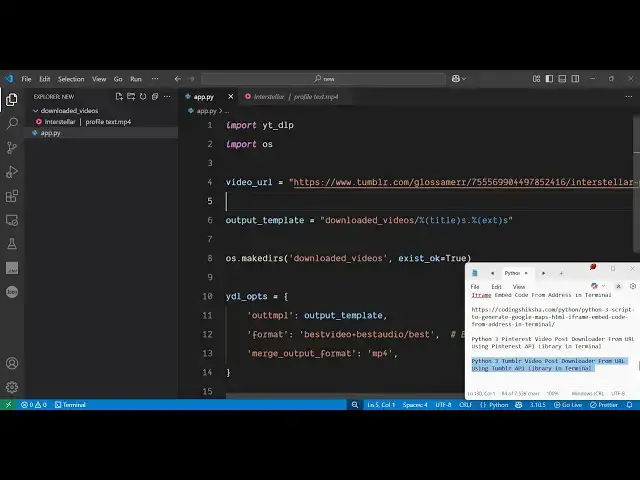
Python 3 Tumblr Video Post Downloader From URL Using Tumblr API Library in Terminal
Jun 3, 2025

Buy the full source code of application here:
Show More Show Less View Video Transcript
0:00
uh hello guys welcome to this video So
0:02
in this video I will show you how to
0:04
download Tumblr videos inside
0:07
uh your Python application So I've
0:09
written a simple Python script which
0:11
will download your Tumblr videos Tumblr
0:14
is a very uh good site social networking
0:17
site So many a times you need to
0:20
download these videos Tumblr videos So
0:23
what you need to do you just need to go
0:26
to the
0:27
actual whichever video you need to
0:29
download
0:32
Simply go to that
0:40
post
0:42
So here you just need to copy whichever
0:45
video you need to download
0:50
So you just basically write here copy
0:53
the link So there is option here of copy
0:56
the link and then we actually return
0:59
this Python script You simply paste the
1:02
URL of this Tumblr video and uh now if I
1:07
execute this Python script So you will
1:08
actually see on the left hand side it
1:10
will create a
1:12
folder and uh you don't need to be login
1:15
inside your account It will do the job
1:17
automatically You can see it is now
1:20
downloading your video At the bottom
1:22
side you will see So the speed is also
1:25
very tremendous There is no kind of
1:27
restriction You can do this unlimited
1:29
number of times So it is communicating
1:31
with the Tumblr API in the background So
1:33
now it is completed It has created this
1:35
folder and now we have the actual video
1:38
playing So it is in MP4
1:40
format You can save this inside your
1:43
device and play it very easily So this
1:46
is actually a module that I found out
1:48
guys Uh you can do this unlimited number
1:51
of times So there is no kind of
1:53
restriction So again you come to the you
1:56
copy the link and again you paste it
1:59
inside this Python script So there is no
2:03
site no kind of restriction that how
2:05
many videos you can download So you can
2:07
try this unlimited number of times So
2:09
once again we execute and once again it
2:13
will download this
2:15
video So it's a very great module you'll
2:19
see once again a brand new video will be
2:23
downloaded and I recently discovered
2:26
this module last week which is a Python
2:29
open-source module
2:32
YTDLP So in the background it
2:34
communicates with the Tumblr API So you
2:37
don't need to pass any sort of API key
2:40
or nor you need to have
2:43
authenticated You can do this unlimited
2:45
number of time You can see the video has
2:47
been saved
2:51
So now let me show you the actual module
2:55
So if you go to the website here which
2:59
is uh py p i o rg which is the website
3:05
for python modules So here you just need
3:08
to search for this module
3:10
ytdlp which is a this library we are
3:13
talking about So the command is simple
3:16
You simply execute this command the pip
3:18
command So I have already downloaded So
3:21
just create a simple app py file and
3:24
here you just need to import this module
3:26
So ytdlp and also we need to import the
3:29
operating system module and here you
3:31
specify the video URL So whichever video
3:34
you need to download So you specify the
3:38
link After specifying the link you
3:41
simply specify the location where you
3:44
need to download this So we will create
3:46
a folder which will be downloaded videos
3:49
inside this the title and the extension
3:51
will come and then we will create this
3:53
folder by using the operating system
3:56
module inside Python After that we
3:58
specify the
4:00
options So these this JSON object
4:03
contains three options The first option
4:06
is where you save the
4:08
video So which is this location here
4:10
that we specified in this variable The
4:12
second option is the format of the video
4:14
So we are specifying the best video and
4:17
the best audio quality
4:19
And the third one is the quality sorry
4:21
MP4 extension of the
4:24
video And after that we will pass these
4:27
options to this function
4:29
yt DLP And it contains this function
4:33
YouTube
4:37
ytl
4:40
options and then it contains this
4:42
function download which will actually
4:44
download the actual Tumblr video So this
4:48
is the thing guys If I once again run
4:51
this now you will see that downloading
4:53
will start It is saying that YTDL
4:56
options are not
4:59
defined Sorry YDL
5:05
sorry So let me just delete this folder
5:08
once again Create
5:11
this So you can see there is no sort of
5:14
restriction is there You can do this
5:17
process unlimited number of time With
5:19
many modules there will be a restriction
5:22
but this module doesn't have any sort of
5:24
restriction You can see you can download
5:26
Tumblr videos really
5:29
easily So also check out my website
5:33
freemediattools.com uh which contains
5:35
thousands of tools
#Online Media
#File Sharing & Hosting
#Photo & Video Sharing
#Photo & Image Sharing
#Video Sharing