Up next in 10

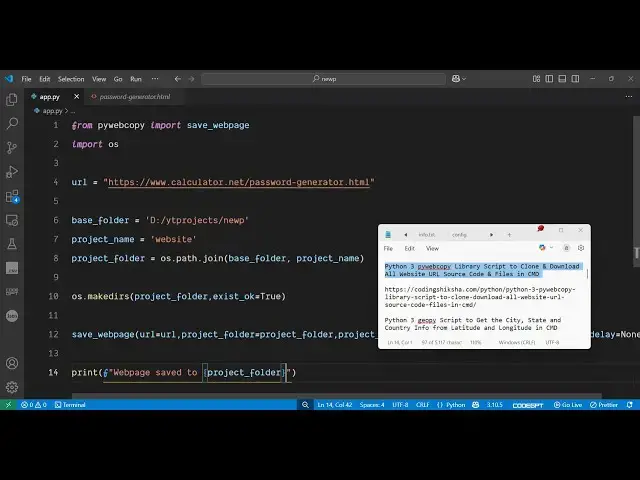
Python 3 pywebcopy Library Script to Clone & Download All Website URL Source Code & Files in CMD
Jun 3, 2025

Get the full source code of application here:
https://codingshiksha.com/python/python-3-pywebcopy-library-script-to-clone-download-all-website-url-source-code-files-in-cmd/
Show More Show Less View Video Transcript
0:00
uh hello guys uh welcome to this video
0:02
So in this video I will show you a
0:04
Python package which allows you to
0:06
download the website locally for offline
0:11
use So if you have a basically a web
0:14
page or website that you want to
0:16
download locally for offline use with if
0:20
you want to visit that website without
0:22
internet connection then there is a
0:23
specific module that you can target to
0:26
download the entire website locally
0:28
inside your system it will download all
0:30
the source code including the HTML CSS
0:33
and JavaScript source code locally
0:35
inside your machine So here you can uh
0:39
take any sort of website which runs
0:41
locally in the front end without server
0:44
side Let's suppose I take this website
0:46
for example I specifically target this
0:49
uh HTML web page I copy the address here
0:54
So it's a front- end website as you can
0:56
see when I click the generate it clicks
0:59
and it generates the random password So
1:03
this application works on the client
1:05
side So what we can do is that I can
1:07
simply paste the address here So what it
1:10
will do it will go to this website and
1:12
download the entire source code inside
1:15
the locally So if I just execute the
1:19
Python script here you will see it will
1:22
create the folder on the left hand side
1:24
it will target
1:26
the necessary URL and you can see it has
1:29
web page saved successfully So if I try
1:32
to open this you will see all the
1:35
JavaScript all the images which are used
1:37
all the icons If you see this is your
1:41
HTML
1:43
file This is the main file here the HTML
1:46
file So we can target this and open it
1:49
right in the locally So you can see we
1:52
are running it locally here So we
1:54
downloaded the entire web page here This
1:59
was there on the website but we actually
2:02
downloaded this using this Python module
2:05
So if I click generate here you will see
2:07
again it is the application is running
2:10
properly here You can see as I click the
2:13
generate button because this application
2:15
runs on the client side that's why as
2:19
you can see this is random password
2:22
generator So essentially we copied this
2:26
application you can change the design
2:29
and in this way you can target websites
2:32
and download the entire websites for
2:35
offline use So it's a very good package
2:38
Uh let me just show you the package name
2:41
which is PI web copy So if you go to the
2:46
website
2:50
documentation So just search for this
2:52
package which is py web copy This is
2:55
essentially this package name uh python
2:59
library for to cloning or archive pages
3:02
for sites from the internet So the
3:04
command is simple You simply install
3:06
this package I have already installed it
3:09
and they have a nice little
3:11
documentation I have given the script in
3:13
the description of the video So I will
3:16
show you step by step how to
3:21
actually make this So the very first
3:24
step you need to do you just need to
3:26
create a app py file Let me also delete
3:38
this So just create a app a dot py file
3:42
and then necessary packages just import
3:45
this from py webcopy We need to import
3:49
the method here which is save web page
3:53
and then we need to also import the
3:55
operating system module and then here
3:58
you need to mention the URL that you
4:00
want to download So this can be anything
4:03
So let me copy the necessary URL that I
4:07
need
4:07
to
4:11
download So then you basically provide
4:14
the location where it should download So
4:17
we are providing our base
4:20
folder So whatever is your path name
4:23
simply copy this So we just providing
4:26
the parent folder path here like this
4:29
And this will be the folder name created
4:31
And then this is a full path operating
4:34
system path join base folder and project
4:37
name And then it will create this
4:39
directory here by using this function
4:41
operating system make directory and then
4:45
project folder exist okay to
4:49
true And then we use this uh module here
4:52
or method save web page And here it
4:56
takes some arguments First of all the
4:58
URL that it needs to download Secondly
5:01
we also pass the project folder
5:06
what project folder it will create So
5:09
pass this variable and then what is your
5:11
project
5:13
name So we initialize this project name
5:17
as well So we just need to pass this as
5:25
well And lastly we also need to pass
5:30
open in browser So you know need to open
5:33
this in browser I will set it to
5:36
false and
5:38
delay to none So if you want to also put
5:41
some delay you can put but I will put
5:43
none These are default options After
5:46
that it will download in the background
5:49
and then you can simply save Just give
5:52
it a notification that web page saved to
5:55
like this That's all the code Uh if I
5:59
once again execute this So there is no
6:01
kind of limit here You can target any
6:03
website and download locally using this
6:06
package And this allows it very much
6:09
easy to clone any website You can clone
6:12
the design Just look at the
6:15
code You can see all the HTML code will
6:18
be there for you You can see the logic
6:20
how they developed this random password
6:22
generator website And this is very
6:25
useful You can even see the all the
6:28
styles that they have used as well the
6:29
CSS code So this is really useful for
6:33
troubleshooting any sort of application
6:36
on the internet You can see the design
6:37
you can see the stylesheet JavaScript
6:40
code as well HTML code as well So this
6:43
was a nice little package Thank you very
6:46
much for watching this video and please
6:48
hit that like button subscribe the
6:50
channel and also visit my website
6:53
freemediatools.com
6:56
uh which contains thousands of tools
#Programming
#Scripting Languages