Up next in 10


Get the full source code of application here:
https://codingshiksha.com/python/python-3-python-whois-library-to-get-whois-info-of-domain-name-in-terminal/
Show More Show Less View Video Transcript
0:00
uh hello guys welcome to this video so
0:02
in this video I will show you one other
0:04
Python package which you can extract the
0:07
who is info data about a specific domain
0:10
name uh who is info is a very important
0:14
data about the domain or websites on the
0:17
internet you can find out who registered
0:19
the domain when the domain name was
0:21
purchased the expiration date everything
0:24
and for this we haven't using any sort
0:26
of API so it's a free module inside
0:29
Python so let me show you the py uh
0:32
package name here so first of all you
0:34
just need to go to this website and just
0:36
search for this package which is python
0:39
who is this is actually the package name
0:41
uh the command is simple simply execute
0:44
this command to install this
0:47
and now let me show you the specific
0:50
example that I'm talking about so once I
0:52
run the script here it will extract all
0:56
the information and save it inside the
0:58
CSV file so if I run the script you will
1:01
see on the left hand side it will create
1:04
a file which will be a CSV file of your
1:08
domain name and if you open this you
1:10
will see all information regarding your
1:12
domain
1:13
name who registered
1:16
so you can see hostinger register
1:20
URL this is your updation creation
1:24
expiration date when the domain name was
1:27
purchased when the domain name is
1:30
expiring what are the name servers so it
1:33
will return the name servers as you can
1:35
see in this case it's
1:38
cloudfare status everything all such
1:40
information will be returned so let's
1:43
suppose I take a different domain name i
1:46
say
1:47
google.com so once again if I execute
1:50
this you will see it will create another
1:53
file here
1:54
google.csv and if I try to open this now
1:57
you will see it will return the country
2:01
registar the
2:03
state the name servers every so you can
2:08
do this unlimited number of times so
2:09
there is no restriction it's a free
2:11
open-source module and let me show you
2:14
how to get started so once you install
2:16
this it's very easy just create a simple
2:19
Python script and uh first of all you
2:22
just need to import this module so we
2:24
simply say import who is then we import
2:27
the CSV module and then here we specify
2:31
which domain name you're working with so
2:33
let's suppose I say facebook.com and
2:35
then I simply find out this data who is
2:39
it contains this function who is and we
2:42
just provide the domain name so now if I
2:44
just print this you will actually see
2:46
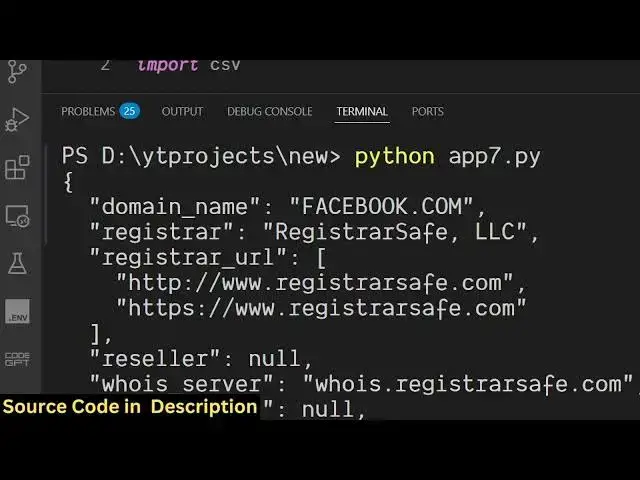
this will return the JSON as I run this
2:51
so it will extract all this information
2:54
inside this JSON response as you can see
2:56
it is returning this JSON response and
2:59
now we can actually store this
3:00
information inside a CSV file very
3:04
easily so you can simply say here you
3:07
can create a
3:09
dictionary inside Python so like
3:14
this and then we can create a simple
3:17
file
3:18
name CSV file
3:21
name after that we can open this file
3:24
name and
3:27
then
3:29
just like this we can open a new file
3:32
name this and then in write mode and we
3:36
can append all these data very simple
3:39
and run a simple for loop what are the
3:42
keys and the values and after that we
3:45
can simply print out a statement that
3:47
all your data has been successfully
3:48
saved in the CSV file
3:54
so it's very simple Python script you
3:56
require the actual module then you
3:58
specify the domain name and pass this it
4:01
contains this function and lastly we are
4:04
saving it in the CSV file so once again
4:06
if you run the Python script you will
4:09
see a new file will be
4:11
created Facebook dot you will see if I
4:15
try to open this you will see it will
4:17
contain information about
4:19
facebook.com who registered this the
4:21
company here the expiration date name
4:24
server everything every information will
4:26
be returned so in this way you can use
4:28
this module to actually extract the who
4:31
is info data of a specific domain
4:34
name and thank you very much for
4:36
watching this video and also check out
4:38
my website uh
4:40
freemediatools.com uh which contains
4:43
thousands of tools
#Software