Up next in 10

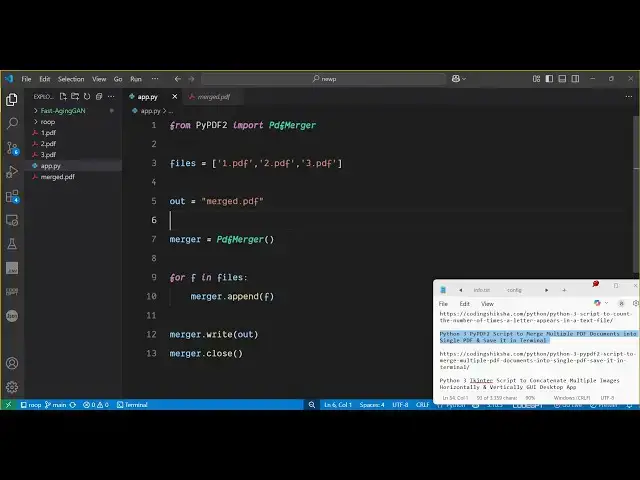
Python 3 PyPDF2 Script to Merge Multiple PDF Documents into Single PDF & Save it in Terminal
Jun 3, 2025

Get the full source code of application here:
https://codingshiksha.com/python/python-3-pypdf2-script-to-merge-multiple-pdf-documents-into-single-pdf-save-it-in-terminal/
Show More Show Less View Video Transcript
0:00
uh hello guys uh welcome to this video
0:02
so in this video I will show you how to
0:04
merge multiple PDF
0:06
documents inside Python so for this we
0:09
are using a open-source package which is
0:11
py PDF2 and we have a quite a number of
0:15
PDF documents present right in the root
0:17
directory 1 2 3 so three PDF files are
0:20
there so I will be merging all these
0:23
files into a single file so for this I
0:27
will use the script here so what I will
0:30
do I will simply provide the path
0:35
here so if I just execute this Python
0:38
script here go to the terminal just
0:40
write here Python app py so now you will
0:44
see your PDF all PDFs will be merged
0:47
into a single one you will get this file
0:51
right here and if you see total pages
0:54
are 28 you can
0:56
see so this PDF contains two pages this
1:00
one contains you can see three pages so
1:05
3 + 2 5 and this one contains 23 pages
1:08
so the total number of pages comes out
1:10
to be 28 so all the three PDF files have
1:13
been successfully merged into a single
1:15
file so I will now show you the package
1:19
first of all you just need to install
1:21
this
1:22
package which is py PDF2
1:26
which is a very famous package related
1:28
to PDF so the command is simple you
1:31
simply install this i've already
1:33
installed it so after installing it I
1:37
will show you step by step how to do
1:40
this so simply create a app py file and
1:43
write here from this library py pdf2
1:52
py PDF2 we need to import this uh
1:57
PDF merger
2:01
class and then we specify here the total
2:05
number of PDF files that you want to
2:07
merged separated by comma right here so
2:10
here you will mention all your PDF files
2:13
that needs to be merged and then here
2:15
you will specify the output file here
2:18
let me say merged dot PDF and then you
2:20
will initialize this class here PDF
2:23
merger you simply initialize it and
2:26
simply you loop through all the files
2:28
here in the for
2:30
loop and you add this simply by the
2:34
append method and pass it f and then you
2:38
simply say use the write
2:40
method to write all the files into a
2:44
single file and merger.close
2:47
close so if I just uh delete this and
2:52
again execute this application you will
2:55
see the output file will be created all
2:59
your PDF files will be merged into a
3:01
single file so in this easy way guys you
3:03
can create this awesome Python script
3:06
which runs in the
3:09
terminal so thank you very much for
3:11
watching this video please hit that like
3:12
button subscribe the channel and also
3:15
check out my website
3:18
freemediattools.com which contains
3:20
thousands of tools
#Software