Up next in 10

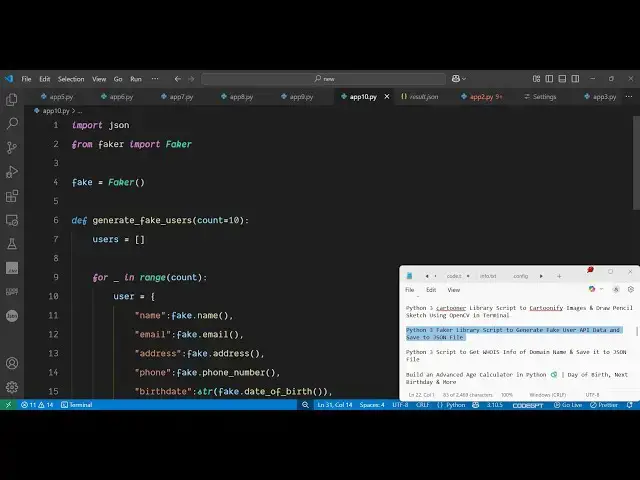
Python 3 Faker Library Script to Generate Fake User API Data and Save to JSON File
Jun 3, 2025

Get the full source code of application here:
https://codingshiksha.com/python/python-3-faker-library-script-to-generate-fake-user-api-data-and-save-to-json-file/
Show More Show Less View Video Transcript
0:00
uh hello guys uh welcome to this video
0:02
so in this video I will show you a
0:04
Python script which can generate uh fake
0:06
data for your API or any sort of use you
0:09
can do sometimes you need some fake fake
0:13
data uh it can be JSON data it can be
0:15
CSV data so there is a package inside uh
0:19
Python you can actually generate some
0:21
random fake data for testing purposes so
0:24
the name of the package is faker this is
0:28
actually the package here it's a simple
0:30
Python package that generates fake data
0:33
for your application for testing
0:35
purposes so the command is simple you
0:37
simply install this command i've already
0:39
installed it package so now I will show
0:42
you a very simple example so first of
0:46
all you just need to import the package
0:49
so we simply
0:51
import the JSON package which is
0:54
necessary and from this faker package we
0:57
need to import the faker
0:59
class and after that we just need to
1:02
initialize this faker class right
1:06
here so like this we can initialize it
1:10
after that we just need to generate a
1:12
list of fake users so for this I will
1:15
just define a simple
1:18
function which will be
1:21
generate fake users and here we'll pass
1:25
10 so we'll be generating 10 users data
1:29
so now we just need to define this
1:32
function right here
1:34
so we'll just define this generate fake
1:40
users so here it will take an argument
1:43
right here which will be 10
1:47
so here we'll be initializing this users
1:49
array which will be empty by default and
1:50
then we will be looping
1:54
through this for
2:01
loop and for each thing we will be
2:05
declaring this user
2:07
object and it will have these details
2:10
right here you can have a name right
2:13
here so this contains this function name
2:16
this will generate a random name for
2:18
your data then it will generate a simply
2:22
the email address similarly it if you
2:25
want the address you can it can even
2:28
generate address as well so it has all
2:30
these methods as you can see for
2:32
generating this data
2:36
types then we have the phone number if
2:38
you want the phone number it can even
2:40
generate the phone number as well
2:43
then we also want the birth
2:51
date can see that so everything is
2:54
available in this so we
2:55
can convert this into a string which
2:58
will be date of birth
3:07
uh then also we need all these things
3:10
which is the job title company
3:13
uh website everything IP address and
3:15
biography so these are the data types
3:18
each user will have each user has a name
3:21
email address phone number birthday job
3:24
everything so now we'll just after that
3:26
we will add this to the users
3:30
array and lastly we will be returning
3:32
this users array from this functions
3:36
that's all so it's that easy so after we
3:39
generate the users we can save this
3:41
inside the JSON file so we will simply
3:44
say result do.json so all this data will
3:47
be saved inside this JSON
3:52
file like this so after
3:57
that we will dump this all this data
4:00
inside
4:03
this and then we can print out a
4:06
statement that done so that's all this
4:10
is your Python script so if I run this
4:12
Python script here you will actually see
4:14
on the left hand side a JSON file will
4:17
get created right here so
4:21
app so you can see the result.json file
4:24
has been successfully created and if I
4:26
open this file you will see each user
4:28
will have these properties here name
4:30
email address phone number so it will be
4:33
an array of users so a total of 10 users
4:36
will be there so in this easy way you
4:39
can generate some uh random fake testing
4:42
data for your application you can try
4:44
this data let's suppose you're building
4:47
an API you need this data so you can
4:49
generate this using a very simple Python
4:51
script using this uh third party module
4:54
Faker so thank you very much for
4:56
watching this video and also check out
4:58
my website freemediattools.com
5:01
uh which contains thousands of tools