Up next in 10

PHP 7 MySQL Script to Take Name and Email and Download Source Code Multiple Files Using Sessions
Dec 21, 2025

Buy the full source code of application here:
https://procodestore.com/index.php/product/php-7-mysql-script-to-take-name-and-email-and-download-source-code-multiple-files-using-sessions/
Show More Show Less View Video Transcript
0:08
Uh hello friends, today in this tutorial
0:10
I will be showing you that how to take
0:13
email and uh
0:15
name from the user and then you need to
0:18
download files from the server.
0:21
So this will be a PHP and MySQL project.
0:24
And inside this,
0:27
let me just show you a very basic
0:28
example here. And if I load this
0:30
application in the browser, you will see
0:32
that
0:34
you need to pass a parameter here which
0:37
is called as PHP. So there will be a
0:40
form shown to you. You will see that
0:44
and here you enter you need to enter
0:46
your name and email. So whenever you
0:48
enter your name and email then uh you
0:53
need uh after when you enter your email
0:56
uh let me just show you. So here you
1:00
enter your name and email and if you
1:03
click on download then this uh
1:08
php.zip file will be downloaded. So
1:11
basically in uh various applications you
1:14
see that uh this is the scenario that
1:17
they take the information from the user
1:19
and then only they allow you to download
1:21
any sort of file. So we will be
1:23
developing this whole system inside PHP
1:25
and MySQL and MySQL will be the database
1:29
in which all the information will be
1:31
stored of the user. So every time user
1:33
comes to the web page they need to fill
1:35
out some information before they can
1:36
download the file. So without entering
1:39
this information they cannot download
1:41
the file. So you will see that please
1:42
fill out this field and also you can
1:45
change this to anything.
1:48
So this we are downloading multiple
1:50
files here right here. So here in the
1:52
URL whenever you are share this URL with
1:55
your user simply change this to test. So
1:59
now this will be a different file. If
2:01
you now fill out the information
2:04
now you will see test.zip is downloaded.
2:08
So all this information is stored inside
2:10
this database guys. You will see that
2:13
this is the files table here in which
2:15
all the files are present which is
2:18
test.zip PHP.zip and the users which are
2:24
you will see this is your first user
2:26
email address is stored and which which
2:30
file they have downloaded. They have
2:32
downloaded the PHP file. Second one they
2:35
have downloaded PHP file. Third one they
2:37
have downloaded test file. So all this
2:40
information is stored inside this table
2:42
and uh we are letting the user download
2:46
the file after they entered all the
2:48
required information. So let's start
2:50
building this project from scratch. So
2:53
all the source code will be there inside
2:55
the video description guys. If you want
2:56
to download all the source code you can
2:59
go to my video description link. This is
3:00
my blog post. I have written
3:02
step-by-step instruction. I have given
3:04
here with all the screenshot.
3:06
So
3:08
some HTML, CSS, JavaScript and PHP code
3:11
are used inside this tutorial. So just
3:14
you can follow along with this tutorial
3:15
video tutorial. So just go to the video
3:18
description link here. You can find out
3:20
this link. I have updated this.
3:24
So if you have any sort of comment guys,
3:27
you can also ask in the comment section.
3:28
I will happily reply to it.
3:32
and let's start uh
3:35
this tutorial here.
3:44
So for this we are uh using exam control
3:46
panel guys you can see that uh in the
3:49
previous tutorial as well I have shown
3:50
you exam is a piece of software which is
3:54
Apache web server for PHP. So you can go
3:57
to its official website and download the
4:00
latest version.
4:06
After downloading it, you just need to
4:08
start the Apaches server and the MySQL
4:10
database as well.
4:13
So after you do do that, you need to uh
4:18
create a new directory.
4:20
So this is present inside your C
4:22
directory examp docs and here you need
4:26
to create a new directory here. So we
4:29
will have a download file. We will cd
4:32
into this
4:34
and we will open this inside visual
4:36
studio code text editor
4:40
and uh
4:44
so inside this guys uh we need to now
4:46
create index.tphp file.
4:50
So this will be a very simple
4:56
[snorts] HTML file here. So
5:01
inside this what we need to do is that
5:04
let me paste this code and explain to
5:06
you what is happening.
5:08
So there's a lot of code to be written.
5:10
So that's why I'm copy pasting it and
5:11
then explaining you. So this is just the
5:14
barebone HTML code. Here you will see
5:16
that we are including the bootstrap for
5:18
styling purpose and uh here you just
5:21
need to make a CSS file just uh for the
5:24
styling purpose and also we are using
5:27
some bootstrap as well. [snorts] So and
5:29
jQuery as well. So close the body tag
5:33
and close the HTML tag as well. [snorts]
5:36
So inside a body guys you will have a
5:38
simple form which will be shown to the
5:40
user to submit the information in order
5:43
to download the file. So this will be
5:45
the form here
5:47
and the method of the form will be post
5:51
and we will be giving a id to the form
5:53
so that we can target it inside
5:55
javascript form download.
6:00
So inside this we will have a simple
6:02
label.
6:08
So you will see that let me paste it
6:11
here.
6:14
If you see here, uh
6:18
let me paste it here. Uh this is actual
6:21
form here which is the which will be
6:25
shown to the user. So let me paste it.
6:28
So you will see that uh it is saying
6:30
enter your name, enter your email
6:32
address and then the download button.
6:35
So now if you open this uh in the
6:38
browser
6:43
you will see just localhost download
6:46
code.
6:47
So
6:55
sorry this is a download file.
7:03
[snorts] So now you will see there will
7:04
be two input fields. Enter your name,
7:06
email address and then click the
7:08
download button. So
7:15
[snorts] label is the actual text which
7:17
is written beforehand the input field.
7:20
So let's suppose this is the label which
7:22
is enter your name, enter your email. So
7:25
this is the label and uh download is
7:28
also a label which is shown above the
7:31
button. So label is the text which is
7:33
written beside the input fields and the
7:36
button.
7:38
So after the form is ready guys we need
7:40
to simply if you closely look at
7:43
whatever the form is going through
7:46
whenever we submit the form here
7:49
we need to submit this form using uh
7:52
jQuery. So right after the body ends we
7:55
need to write the script tag.
7:59
So inside this script tag we will make
8:01
use of jQuery
8:07
and we will be targeting it by the ID
8:09
which we have given to it
8:15
[snorts] and there is a function out
8:16
there which is uh submit. So whenever
8:19
the form submits this function will
8:21
automatically execute.
8:26
This is a arrow function.
8:29
So we will execute e.prevent default to
8:32
prevent the autosubmission of the form.
8:34
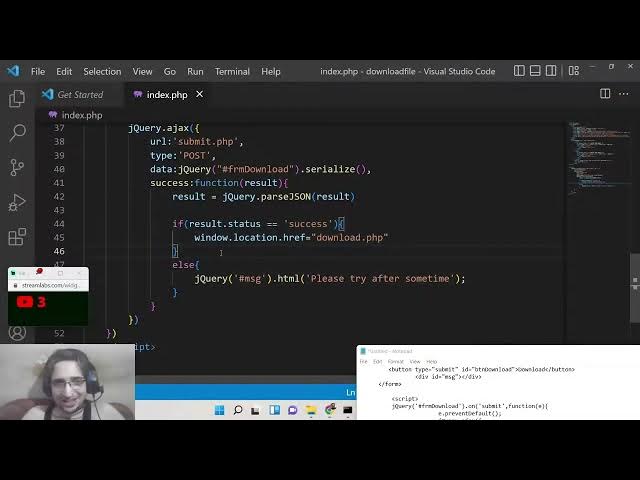
And then we will make a simple ajax
8:37
request which is jQuery Ajax and here we
8:41
will provide the URL to which we need to
8:43
call. So we will make a new file which
8:45
is submit.php.
8:47
So this will be a post request. So we
8:49
will say post
8:51
and the data which we will be sending is
8:54
the name and the email address. So we
8:55
will simply send this using [snorts]
9:00
the id which we have given to the form.
9:03
We will serialize the data using the
9:06
serialize method
9:08
like this. The serialize the both the
9:12
name and the email address
9:15
and then the success call back.
9:18
So when the return when the data is
9:21
returned to us we can display it. So we
9:24
can simply parse it using
9:31
jQuery method here which is parse JSON
9:37
and then we can check for the property
9:39
that uh if the result dot status is
9:42
equal to success. So in that case
9:49
we can redirect the user to
9:54
download.php. So where the user can
9:56
actually download the file
10:00
in the else scenario
10:06
if the request is not successful then we
10:08
need to redirect the user to back to the
10:10
homepage. So here
10:16
this is the error message which will be
10:18
shown to the user that please try again
10:21
after some time. You can see that if the
10:24
request is successful then we will
10:26
redirect the user back to the download
10:28
page where the user can actually
10:30
download the file and if the request is
10:33
not successful then we will show the
10:35
message that please try after some time.
10:38
And now guys we need to do two things.
10:40
we need to create actually the files
10:42
which will be downloaded. So these files
10:45
are uh nothing but the actual code
10:48
files. So we can simply copy it copy it.
10:51
So this contains nothing. These are the
10:53
actual test files. You can copy any
10:55
files that you like in order to download
10:58
the user. So we we can simply copy this
11:01
and paste it inside our folder.
11:05
So simply paste it. So this contains the
11:09
code that will be downloaded by the user
11:11
which visits your website. So this
11:13
contains two files which is php.zip and
11:16
test.zip zz zip. So these are two sample
11:18
files and also we need to uh connect to
11:22
the database as well guys. So right here
11:24
we will create uh connection db.tphp.
11:28
So inside this file we will have the
11:30
actual connection.
11:33
So here we will be having the host which
11:36
will be local host.
11:45
The username default username is root
11:50
[snorts] and uh password is also
11:53
nothing.
11:55
And here the database whichever database
11:57
that you create.
12:02
So inside your exam you need to go to
12:05
the admin section. This is PHP myadmin
12:07
section where you create your database.
12:11
So I have already have this database
12:13
which is YouTube which contains these
12:15
two tables which is the actual files
12:17
table.
12:21
You can see the files table
12:24
and the users table.
12:29
But uh for this tutorial we will create
12:32
a brand new table uh database here which
12:34
will be
12:37
download
12:38
file. [snorts]
12:42
So inside this we will create a table
12:45
here which will be user
12:50
column will be for now will be two three
12:54
sorry
12:57
first will be the ID this will be
12:59
integer then we will have the name and
13:02
the email address
13:05
name will be vchar and uh email is also
13:07
varchar 256 256 six.
13:12
[snorts] So ID will be the primary key.
13:14
So just put auto increment and uh then
13:18
click on save. So this is your table
13:21
created. This is users
13:24
user table inside download file
13:25
database. So here we need to configure
13:28
the
13:31
database name which is download file.
13:33
And now we need to connect to this. So
13:35
MySQL I connect we will pass these four
13:38
things host username
13:41
password
13:43
and the database as well.
13:50
So now this is connected. So after that
13:53
guys we need to simply make a
13:57
file. We need to make this file which is
14:00
uh we will call we are calling this file
14:02
which is submit.php.
14:04
So submit dotphp. So inside this file we
14:08
need to
14:10
receive the data which is submitted
14:11
through the form. So first of all inside
14:14
this PHP file we need to
14:18
include our uh db.tphp
14:22
which is the connection to the database.
14:24
After that we need to check that uh if
14:29
is set dollar post
14:32
name variable is set and also if the
14:37
email variable is also set.
14:42
So if these two variables are set then
14:45
only we will proceed we will take the u
14:47
name of the person. So here we need to
14:50
remove this uh any escape this
14:56
for preventing SQL injection. So MySQL I
15:01
real escape string we will pass the
15:04
connection object
15:08
dollar post
15:11
name
15:12
put a semicolon and also guys inside
15:15
db.tphp PHP you need to store it inside
15:18
the connection variable so that it is
15:20
accessible the connection just do it and
15:23
uh here we can get this connection here.
15:26
So after you need to do the same thing
15:28
for email as well. So simply copy this
15:30
line and paste it in the second line. So
15:33
just replace your email and uh replace
15:37
your email. So after that you got these
15:40
two things. we need to actually now
15:42
insert this information
15:45
in the database.
15:49
So [snorts] now to insert this it is
15:51
very easy mysqli query and uh we will
15:54
pass the connection object
15:57
and then we will write this query which
15:59
is insert into user this is a table
16:03
and then the fields which are name,
16:06
email
16:12
and the values actual values
16:21
name,
16:23
email
16:27
with [snorts] a semicolon.
16:30
So now we will check if this statement
16:33
if the insertion is successful or not.
16:36
MySQL I insert
16:39
id
16:41
and we need to pass the connection
16:42
object. If it is greater than zero then
16:45
we surely know that the insertion has
16:48
taken place then we can simply set the
16:50
status variable to success.
16:54
If not then we can inside our else
16:57
statement we can uh bake this to error
17:02
like this [snorts]
17:05
and then we can simply
17:08
put this we can encode this inside a
17:12
JSON array and pass it as a status like
17:17
this.
17:24
That's it. Put a semicolon.
17:27
So here we are returning the status
17:28
whether it is success or error based
17:30
upon whether the information is inserted
17:32
or not. And now inside this index dot
17:35
php we are checking now if the value of
17:38
status is success or not. If it is
17:40
success then we will redirect the user
17:42
to the download.php file where where
17:45
they can uh download their file. So now
17:48
we need to simply
17:50
uh check if it is working or not. So let
17:53
me just uh go to my uh f this one. Enter
17:58
my email and download.
18:05
Let me see what is the error here.
18:25
Uh, I think we have some kind of error
18:28
here.
18:40
Uh let me paste it once again guys
18:42
inside uh this one.
18:50
[snorts] Sometimes errors can take place
18:52
while you write code. So
18:55
let me delete this line here. Uh,
19:28
connection.
19:36
[snorts] Let me see if it is now working
19:38
or not.
19:56
Let me paste this. Uh this is a script
20:00
JavaScript here.
20:12
Uh let me paste it. So this is the same
20:15
code I pasted here. So let me see if it
20:18
is now working or not.
20:38
Uh undefined variable con
20:44
uh submit con.
20:52
[snorts] Oh, sorry. This needs to be
20:54
connection.
20:59
And now let me see if it is working or
21:01
not.
21:06
So now you can see that guys it is now
21:08
successfully working. It was just a typo
21:10
mistake in programming. It can happen.
21:13
So you can see now it is redirecting
21:14
download.php. It doesn't exist. So
21:17
that's why we need to create this file.
21:19
So we will create this file here. So
21:21
simply download.php.
21:24
So here you will write the code for
21:26
actually downloading the file in the
21:28
browser. So it's very easy in PHP in
21:31
order to download any sort of file. So
21:34
you just write
21:37
so this is some code here which you need
21:38
to write here some headers. So
21:44
content
21:46
let me just uh paste this code. So
21:51
these are the actual four headers which
21:52
are required here.
21:55
Let me explain you. So whenever you want
21:57
to download files inside PHP, these are
22:00
the headers which are required. Content
22:02
disposition attachment file name
22:06
and uh this is the file.
22:27
And one other table that you need to
22:29
create. I forgot this to just create
22:31
this new table
22:34
which is the files table.
22:49
This is auto increment. And uh
23:05
if you look at this table, let me just
23:08
see this table file. Sorry, this is file
23:11
here. So guess uh
23:20
This is ID. This is a primary key. So
23:22
just make it auto increment.
23:25
And uh this is actual file.
23:28
This can be warchar 256.
23:33
And click on save. So this is your table
23:36
created.
23:40
And now we need to insert the files
23:42
which needs to be downloaded. So this
23:45
you need to do it manually. So here we
23:48
will simply write here file sorry
23:52
php.zip
23:56
test.zip
23:58
and then we will click on go. So two
24:01
entries are being inserted here. You
24:03
will see that
24:05
uh php.zip test.zip Zip.
24:24
So now we can simply
24:27
download this.
24:30
So we are just making a simple. So at
24:34
the very top you need to require it
24:38
include uh
24:40
db uh php.
24:50
So we are passing the connection object.
24:52
So we are [snorts] taking the actual
24:55
file
24:58
and concatenating it. [snorts] So I
25:01
think that will work.
25:13
>> [snorts]
25:13
>> So just make it like this.
25:23
So uh now if you enter your email click
25:25
on download. So it is saying that uh on
25:29
line three
25:32
unexpected row.
25:39
Oh, sorry. This needs to be select star.
26:02
I think I have given the table name as
26:05
files
26:07
and this I have given as file
26:25
Select file.
26:56
I think uh if you are doing it
26:58
statically uh we need to download these
27:01
two files which are present right here
27:02
php.zip and test.zip.
27:06
So
27:10
let me do like this.
27:20
There's a file name here
27:31
will be php.zip zip because statically
27:34
we are doing we are not using any
27:35
dynamic code here. So in order to
27:38
download this file here php.zip so this
27:40
is only for single file for first of all
27:42
I'm telling you so that's [snorts] why
27:45
this will be php.zip. So here we are not
27:48
taking the data from the database. So
27:50
that's why first of all I will be
27:52
showing you for a single file. Let me
27:55
now run this.
27:59
So now you can see that guys it is
28:02
downloading this file here. You can
28:04
change this to any file test.zip as
28:07
well. You can replace here test. So here
28:11
you can download any image video file or
28:14
any source code file that you want to
28:16
download. So once again if I you need to
28:20
first of all submit the information.
28:23
This is mandatory. So this is the whole
28:25
point of this project. After you submit
28:28
the information then this zip file will
28:30
be downloaded.
28:32
So this is only for a single file
28:34
because we are hard coding hard coding
28:36
this value inside this code. So now to
28:38
take this value from the database we
28:41
need to add a simple field simple column
28:45
inside uh
28:48
our files table.
28:52
So this column we need to
29:00
uh
29:03
if you see
29:06
how we can uh add a column here.
29:21
How we can add it.
29:33
So we can we need to
29:37
after ID. So we need to add a column
29:40
here. But this column will be called as
29:43
allies. A L I A S.
29:47
So basically this will be the pointer to
29:49
whichever file you are downloading. So
29:51
this is also will be varchar 256
29:56
and uh simply click on save. So now we
29:59
have three fields inside our table files
30:02
table similar to this. So if you check
30:04
here so simply this will be the pointer
30:08
to which we will be downloading the
30:10
file. So if you're downloading text
30:13
test.zip zip this allies needs to be
30:15
having test and if you're downloading
30:18
PHP.zip zip turn this l value needs to
30:21
be have in PHP.
30:24
So here we need to
30:27
edit this. So we need to write PHP here.
30:37
Click on go. And similarly we need to do
30:39
it for this value as well. Test.
30:43
And in the future as well if you want to
30:46
add more files if you want to allow more
30:48
files to be downloaded you will just
30:50
simply add this manually inside this
30:52
table and this script will automatically
30:55
work. So now the logic is that inside of
30:58
this we will pass this all variable like
31:00
this question mark a l i a s then we
31:04
will pass the file that needs to be
31:06
downloaded. If you want to allow users
31:09
to download the php.zip zip version you
31:12
will pass here PHP and then this uh form
31:16
will be shown to the user where they
31:18
will enter the information and then that
31:21
php.zip file will be downloaded if you
31:24
want to download test.zip zip you will
31:26
write here test allies. So depending
31:29
upon the value of allies you will
31:33
download multiple files. So this is the
31:34
concept this is a logic.
31:37
So after you updated this table we need
31:39
to go to the user table as well
31:43
and let me delete all this.
31:50
So inside our users table as well we
31:53
need to add a third column which is uh
32:05
download file. So whichever file that
32:08
you are downloading. So this will be
32:10
actually the allias.
32:12
So 256
32:17
whichever file the user is downloading
32:19
it will be equal to the value of lis. So
32:25
you will see that this is download file.
32:28
The value of this will be equal to the
32:31
value of li you will see that. So in
32:34
both the tables we need this column. So
32:36
we have successfully added this. Now we
32:38
need to simply write the PHP script for
32:40
this to handle this. So inside our uh
32:45
submit dot PHP
32:47
[snorts] and also guys we are using the
32:49
concept of sessions as well to prevent
32:52
multiple downloads of files. So as you
32:54
know that sessions are very much
32:56
important. So right here inside your uh
32:59
connection file just start the session
33:01
right here
33:03
session start
33:07
So this will start the session and uh
33:10
just inside your submit.php
33:14
wherever you are getting this
33:17
information.
33:23
So we will after you get this so
33:27
we need to get the file whichever file
33:30
the user is downloading. So we will
33:31
store it inside download file and we
33:35
will get this using session variable of
33:39
allies.
33:42
So how we will set this variable of
33:44
session allies. Let me show you
33:48
at the very starting index.php. So
33:51
whenever you open the homepage let's
33:53
suppose whenever you open the homepage.
33:57
So whenever you give give the link to
34:00
the user to download the file you will
34:02
include this li parameter li is equal to
34:06
PHP. So whenever you hit this endpoint
34:09
we need to get this parameter. So now to
34:12
get this parameter [snorts] inside our
34:15
index do.php we need to write some PHP
34:17
code.
34:29
So right here guys what we need to do is
34:31
that at the very top first of all we
34:34
need to include our uh database file
34:37
which is db.php PHP and this will start
34:40
the session automatically because it is
34:43
included inside this file. And in order
34:45
to get the parameters which are included
34:47
inside the URL, we will use dollar.get.
34:50
You will see that. Now to get this
34:52
parameter, we will say dollar dollar
34:55
get.
34:57
This is slightly complicated but it will
34:59
be understandable. LIS. You can see that
35:04
if the parameter is present inside the
35:06
URL then we will get the UR uh parameter
35:09
lis MySQL real escape string. We will
35:15
pass the connection object and we will
35:17
get the parameter which is present
35:20
allies
35:24
and then we will simply
35:28
check MySQL query
35:32
pass the we will get
35:36
the files
35:38
select
35:40
file from files Here
35:44
li all is equal to
35:49
alli parameter is equal to the past
35:52
allies parameter. What is the pass
35:54
parameter? It is stored inside this
35:56
variable. That's it. So basically we are
35:59
in this statement we are running a query
36:01
inside our files table. You can see
36:03
inside our files table we have a field.
36:06
We have a column called as allies. You
36:09
can see that. So here we are just
36:11
comparing whichever lis is passed either
36:14
PHP or test. So [snorts] whichever is
36:16
passed here our file will be stored
36:18
inside row parameter.
36:21
And simply here we can simply write
36:25
numbers.
36:27
We can pass the row if it is greater
36:29
than zero then we surely know that.
36:32
Then we can set the session variable of
36:37
lis
36:38
to dollar_get
36:45
allies.
36:47
That's it.
36:50
In else statement we can simply say that
36:52
uh
36:55
die something went wrong.
37:03
So it is slightly complicated guys. You
37:06
can see that we are first of all
37:07
checking from the files table the value
37:11
of allies. Depending upon the value of
37:13
allies which file will be selected. If
37:15
the condition is successful then we are
37:18
setting the session variable of all
37:22
to be used in multiple pages. In the L
37:24
scenario we are dying the page
37:29
and
37:31
also in the else if the allias variable
37:33
is not present then we will also die the
37:36
page at ser which is something went
37:38
wrong. So now if you load the page
37:41
without specifying this lis parameter
37:45
what will happen now you will see
37:48
something went wrong because it is now
37:50
mandatory that you pass this variable in
37:52
the URL.
37:54
So [snorts] you can't open the URL
37:56
without it. So now if you pass the lis
38:00
parameter to PHP then this form will be
38:04
shown. If you pass it to test then also
38:07
it will be shown. If you pass a invalid
38:10
you will see something went wrong. So
38:13
this condition is successful. So you can
38:15
see that.
38:19
[snorts]
38:21
So after that guys we need to go to the
38:23
submit.php.
38:24
So inside this file guys we need to get
38:27
the we are equating this download file
38:31
to the session variable which is set of
38:33
li. So after that we need to also insert
38:37
to the one other column here which we
38:40
created which is uh
38:45
[snorts]
38:46
download file
38:50
the third column
38:54
inside our user table. If if I show you
38:58
uh
39:05
Inside our user table, you will also
39:07
show uh see a
39:12
fourth column which is download file.
39:30
So [snorts] here we will be inserting
39:32
this value as well which is this one.
39:39
That's it.
39:42
So this is essentially the value of all
39:45
we are inserting it inside our download
39:47
file column. So after this the rest of
39:49
the code is constant. And also at very
39:53
last we also need to write here we need
39:56
to make this uh dollar session and here
40:01
we need to write a special session
40:03
variable is download to yes.
40:07
So this will simply set inside our
40:10
download php we will check for this
40:12
session variable if it is set or not. So
40:16
inside this this will be updated to it.
40:19
Let me copy this.
40:26
So this will change like this. We will
40:28
first of all check for the session
40:29
variable which is set here which is is
40:31
download
40:33
which we set here is download. This
40:35
needs to be is
40:37
download
40:44
and after that we also need to unsert it
40:46
because uh for the future sessions as
40:48
well for the user and uh also we will
40:52
get the value of all which we are using
40:57
getting from the assession variable of
40:59
lis and inside this once again guys this
41:03
needs to be connection ction we are
41:06
selecting the file based upon the allias
41:08
value here whichever file that needs to
41:10
be downloaded either it will be php.zip
41:12
or test.zip. So this is our files table.
41:16
So you can see that dynamically we are
41:18
now uh downloading multiple files. So we
41:22
are now no longer hard coding the path
41:24
here to php.zip or test.zip. We are
41:28
taking the value state from the
41:29
database. So now if I execute this
41:31
project guys hopefully this now will
41:33
work. So [snorts] now whenever you share
41:36
the path you will share it allies. PHP.
41:39
So now if I enter my name email address
41:42
click download you will see php.zip will
41:44
be downloaded. If I change this to test
41:48
enter the name email address click
41:50
download. You will see test.zip is
41:52
downloaded. And if I check my database,
41:54
you will see that uh
41:58
if I refresh my you can see that uh
42:01
browse this is the entries are inserted
42:04
successfully to the table name, email
42:07
and whichever file the user has
42:09
downloaded either PHP.zip or test.zip.
42:12
So inside files this will be constant.
42:15
So this will be constant table. You just
42:17
need to add files whenever you want to
42:19
just update this table [snorts] allias
42:21
and file value. So that's it guys. This
42:24
is the whole project of uh this
42:26
downloading file with authentication.
42:28
You have seen this in many websites
42:29
where user required the required to
42:32
submit information before they can
42:34
download the file. You have seen in
42:36
various WordPress website as well. So
42:39
this [snorts] is the logic behind it. I
42:40
have explained you step-by-step
42:42
instruction. If you like this video then
42:44
please hit the like button and also if
42:47
you want to download all the source code
42:48
I have given the source code in the
42:50
video description.
42:52
So just go to the
42:55
description of the video and you will
42:56
find all the source code
43:00
and thanks very much for watching this
43:02
video and uh I will be seeing you in the
43:04
next [snorts]
43:06
live stream.