Up next in 10

PHP 7 MySQL Script to Display Bootstrap 4 Pagination Records Using LIMIT Clause in Javascript
Dec 21, 2025

Buy the full source code of application here:
https://procodestore.com/index.php/product/php-7-mysql-script-to-display-bootstrap-4-pagination-records-using-limit-clause-in-javascript/
Show More Show Less View Video Transcript
0:07
Uh hello friends today in this tutorial
0:08
I'll be showing you that how to create a
0:10
pagination using PHP and MySQL database.
0:14
So you can see on your screen here we
0:16
are displaying using Bootstrap 4. You
0:20
can see this is a list group and there
0:23
are certain pages out there. On the
0:25
first page we are displaying the first
0:27
five records. On the second page, we are
0:29
displaying the next five records. The
0:32
third page and the fourth page. So this
0:34
is the certain pagination structure that
0:36
you see inside every website which uses
0:38
pagionation. Pagination is nothing but
0:40
displaying data inside uh different
0:43
kinds of pages because if you have a lot
0:45
of data to display on an application,
0:47
you will want this data to be chunked
0:50
into pieces so that you can display them
0:52
inside multiple pages. Because if you
0:55
display it on a single page, it will
0:58
take a lot of time. So that's why
0:59
pagination is a very con important
1:01
concept in programming. Many developers
1:04
use it. So this is the simplest of
1:06
example. I will be telling you inside
1:08
PHP and MySQL database. So in the
1:11
starting uh in the URL you can see we
1:13
are passing a start parameter. So this
1:15
is a page number. So if you want to go
1:17
to the second page, you can directly go
1:19
to using this URL. So it will go to the
1:21
directly to the second page. If you want
1:24
to go to the third page, you will you
1:26
can see it will go to the third page and
1:28
also you will see it will highlight the
1:31
selected page number with the different
1:33
class name. This is coming because of
1:35
bootstrap. So if you go to the certain
1:37
page number, it will highlight that page
1:39
number because you can see that we are
1:41
on first page number, second page
1:43
number, third page number, fourth page
1:44
number. So all these records are being
1:47
stored inside the database guys. If you
1:49
closely look inside our table, so these
1:51
are the certain records out there. You
1:53
can insert more records here if you
1:55
inside this insert insert insert
1:58
statement. And this is our structure
2:01
here. So inside the PHP script, you
2:04
closely look we are displaying five
2:06
records inside a single page. You can
2:08
also change this to two here. So if I
2:11
make this adjustment in the PHP script,
2:13
you will see in the result panel here.
2:15
If I refresh it now the pages will be
2:18
increased here. You can see the pages
2:20
will be increased. Now we are only
2:21
showing two records per page. If I go to
2:24
the second page, I will show the next
2:26
two records like this. So the pages now
2:29
will be increased. So now let me
2:32
increase the record per page to 10. So
2:34
now we are displaying 10 records per
2:36
page. So now in this case the pages will
2:39
be decreased. So now you will see that
2:41
only two pages are there because we are
2:43
displaying 10 records. So you can just
2:45
customize this play with this
2:46
accordingly whatever is the requirement
2:49
of your application. So this will be the
2:51
pagenation that we will be building in
2:53
this tutorial in pure PHP and MySQL
2:55
database and we will also be using some
2:57
bootstrap as well for styling purpose
3:00
and uh let's start this tutorial and if
3:04
you are new to this channel then please
3:05
hit the like button subscribe the
3:06
channel as well. So let's start building
3:09
this pageation guys. So the very first
3:11
thing we need to do is that we need to
3:13
create a table inside our database. So
3:16
right here we are using exam control
3:18
panel. This is a free software which is
3:20
used to develop PHP my applications
3:22
inside your local host. So make sure
3:24
that you install it. It's a
3:26
crossplatform stop software. So just
3:28
type exam control panel and simply go
3:32
its official website and download for
3:34
Windows.
3:35
And after this guys once you start this
3:38
go to the admin panel of PHP admin
3:40
create a new database. I have already
3:43
created this pagination database.
3:46
So
3:48
you just need to create a new table
3:50
here. Table name can be anything. Let's
3:54
suppose uh
3:56
page
3:58
table.
4:00
And you can give a column name to ID
4:02
which will be auto incremented. This is
4:04
a bind primary key of the table. And
4:07
next would be the
4:09
title. This will be var. You can give
4:12
any column name 256. So clicks on save.
4:16
So this is our table here. This is a
4:18
primary key and this is the title. So
4:20
here we can insert some entries into it
4:22
which will be first
4:26
second.
4:28
So,
4:31
so two entries have been inserted. In
4:33
the similar manner, we can increase it
4:36
to
4:38
insert more entries like this. So, if
4:40
you now see four entries are there. So,
4:43
we can insert some more entries here.
4:46
Five, six. So, I'm just taking some test
4:50
random data. So, depending upon your
4:52
application, you will insert some more
4:54
data.
4:57
7 8
5:03
9 10.
5:09
So now you can see that guys 10 entries
5:11
are there here. So it is more than
5:13
enough for our application to test out.
5:16
So first of all what we need to do is
5:18
that we need to write our PHP script. So
5:23
I will delete all these files here and
5:26
start from scratch.
5:29
So inside our root folder you just need
5:31
to create a index dot PHP file. So this
5:34
will be the PHP file which will be
5:36
required. So just put the PHP tags here
5:40
and first of all we need to connect to
5:43
our database.
5:46
So here we will use the MySQL I connect
5:48
method and here we will pass the host
5:52
name which is local host in this case.
5:55
Username is root password is nothing and
5:57
the database name is pagination.
6:01
So put it like this. So now we have
6:03
successfully connected. So after the
6:05
connection what we need to do is that we
6:07
need to set some variables. So this will
6:09
be the how many records you need to
6:12
display.
6:15
So this will be the per page parameter.
6:17
So we need to display four records
6:22
and the starting variable starting page
6:25
number this will be zero by default and
6:28
the current page number
6:31
is equal to
6:33
the current page will start from one. So
6:36
these are the three variables that we
6:37
have declared guys. How many records to
6:40
display? Four records. The starting
6:42
variable is zero and the current page
6:45
number. So basically the page number
6:47
that you see inside the pagination. So
6:49
it will start from one. So after that
6:52
what we need to do is that we need to
6:55
get the records.
6:57
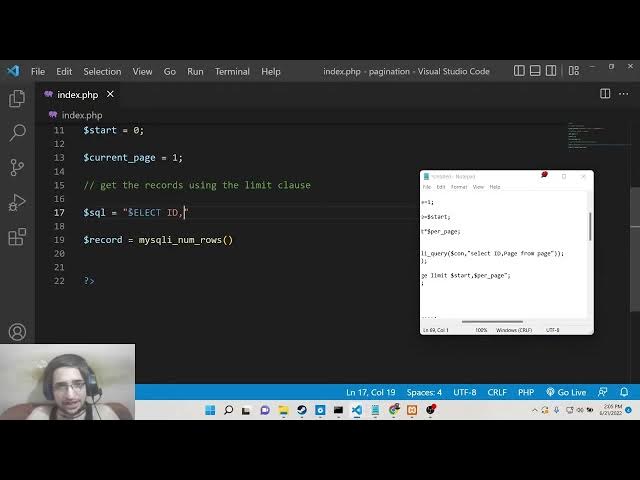
We need to get the records using the
7:00
limit clause. So basically inside SQL
7:04
database you will know this limit clause
7:07
which will which is actually used for
7:09
the pagination purpose. So basically it
7:11
is used to only select a certain number
7:14
of records. So here we will make a new
7:17
variable which is record.
7:20
And now to get
7:22
the number it is very simple which is
7:26
MySQL I
7:28
numbers.
7:31
And inside this we need to dis uh
7:34
uh
7:36
first of all we will calculate we will
7:39
uh write our query here which will be
7:43
this query which is select
7:47
the column name which is select id, page
7:51
from the table name which is page. So
7:54
now we need to execute this query.
7:58
So for executing this query it is very
8:00
simple. Uh we will
8:03
have our result.
8:06
So MySQL I query method is used to
8:09
execute this. So we will pass the
8:11
connection object. So here we need to
8:15
hold the connection inside this object
8:16
here so that we can use it. So here we
8:19
will pass the connection object and then
8:21
the query which is the SQL query. That's
8:24
it. So this will be the actual result
8:27
which is uh returned to us. So now we
8:29
will pass this result inside our
8:33
MySQL number rows. So basically here we
8:36
will calculate how many rows are
8:38
returned to us.
8:43
So these are the number of records which
8:46
are returned to us. So we can echo out
8:48
just to tell you uh tell how many rows
8:51
are returned to us. So basically if I
8:53
refresh it and go to my script here
8:55
which is localhost
8:57
pagi nation. So now you will see that
9:00
guys 16 records 16 rows have been
9:04
returned to us.
9:07
You can see that
9:13
me can see
9:16
this is 1 2 3 4 5 6 7 8 9 10.
9:21
So 16 it is saying
9:24
let me see uh select ID comma page from
9:29
page
9:34
uh oh sorry
9:37
I think we have selected the wrong table
9:40
that's why you can see that there is
9:42
another table called as page out there
9:44
which contains 16 records so that's why
9:46
it is pulling 16 here this value so we
9:49
need to change the table name this our
9:51
table which is page table. So that's why
9:54
it is just change this table name to
9:56
page table.
9:59
And now if you refresh it 10 uh my SQL
10:02
num equals
10:07
23
10:12
select ID, page.
10:16
Oh, sorry. this column needs to be title
10:18
because if you closely look here inside
10:20
this table, the column name is title. So
10:24
that's why you will see this. If you now
10:27
refresh it, you will now see 10 records
10:29
will be returned to us. 10 rows because
10:32
uh if you closely look here uh inside
10:34
the table 10 records is present. So now
10:37
the PHP script is running perfectly. It
10:40
is showing the correct result. So now
10:42
after this just remove this echo
10:45
statement.
10:47
So now we have got the correct records.
10:49
So now we need to
10:51
calculate the number of pages that will
10:54
be displayed in the pagination.
10:58
So now to do that it is very easy. There
11:01
is a certain mathematical formula which
11:04
will be pagi. I will call this. So we
11:06
will use this seal method which is uh
11:10
used for roundup. So basically in
11:12
mathematics you 4.5 uh is returned is
11:16
round up to five. So in similarly in
11:19
programming we do this using the seal
11:22
function. So here you need to pass the
11:24
total number of records and you need to
11:26
divide it by the per page parameter
11:29
which is how many number how many pages
11:32
we need to display how many records was
11:35
four. So we are dividing this by four.
11:38
Let me change this to five. Here it is
11:40
very much easy. So put a semicolon and
11:44
now if you echo out this value so it
11:46
will tell you the number of pages which
11:49
will be used to display these records.
11:52
So if I
11:55
refresh it now you will see two pages
11:57
will be required to display five records
11:59
per page because total number of records
12:02
if you see it's 10 here. So 10 divided
12:05
by 5 is equal to 2. So basically
12:11
now if I change this to two
12:14
and uh refresh it now this will be five
12:17
because uh 10 divided by 2 is 5. So
12:21
that's why and if I change this to three
12:24
10 divided by 3 comes out to be 3.9. So
12:28
this will be rounded off to four. The
12:30
seal method will round up to four pages.
12:32
So that's why this is a mathematical
12:34
formula which is calculate to dis uh
12:37
calculate the number of pages which is
12:39
required for pagination. After you
12:41
calculate this guys, it is now very
12:43
easy. Now we need to get all the data
12:47
which is select ID title from page table
12:53
and here we need to use the limit clause
12:56
here that I talked about at the starting
12:58
of the video. So limit and then we need
13:01
to pass the start parameter which is
13:03
equal to zero
13:05
comma and then the number of records
13:08
which needs to be displayed per page per
13:11
page that's it. So basically this will
13:14
only
13:17
uh select certain number of records
13:21
starting from uh 0 to
13:25
three. So if I echo out this statement
13:33
so you will see select ID from page
13:36
table limit 0 to three. So it will first
13:39
of all uh calculate the three records
13:41
which are required 1 2 3. You will see
13:44
that it will first of all get the first
13:46
record, the second record and the third
13:48
record. This is meant by this statement
13:50
limit.
13:53
So just remove this echo statement.
13:59
So then we need to get this result
14:03
my SQL query. We need to execute this
14:06
query. Pass the connection object and
14:08
also the SQL. That's it. So this is our
14:11
PHP code which is done right now. Now we
14:14
need to write our HTML code which is
14:16
required for this application.
14:18
So
14:22
mind you guys, I have given all the
14:24
source code of this PHP script. If you
14:27
face any sort of problem writing this,
14:30
you just need to go to the video
14:32
description link here. I have given all
14:34
the uh source code of this PHP script in
14:38
my coding sa blog post. So simply go to
14:41
the video description link and you will
14:43
get all this PHP script. So simply you
14:45
need to copy it. So the link will be
14:47
there inside uh the video description.
14:50
So just go to it and copy all the source
14:52
code. So after this guys what we need to
14:55
do is that
14:59
so now we need to include our
15:02
bootstrap and jQuery.
15:05
It is very easy. So
15:09
head
15:12
in the title we can say boot uh
15:15
for pagination in PHP and MySQL.
15:22
Close the title.
15:26
So for this guys uh we will need
15:32
Bootstrap CDN. So simply you can go to
15:35
w3schools.com
15:37
and uh right here in this you will need
15:40
all these three things which is the CSS
15:42
part jQuery and also the JS part of uh
15:46
Bootstrap. So simply paste it all these
15:48
three CDN links
15:52
and also we will need need the style
15:55
three styles here. Simply paste it and
15:59
close the head.
16:01
So inside our body here we will now have
16:04
our uh body code. Simply close the body
16:07
here and also close HTML. So right here
16:11
inside the body we will have uh a
16:15
container class of bootstrap and margin
16:18
top of uh 100. So these are all
16:21
bootstrap classes.
16:26
So inside this we will have a h2
16:28
heading.
16:30
We will give it a class of margin bottom
16:32
from 30. So here we will simply say
16:35
pagination example.
16:40
So close the this.
16:44
So after this we will have a ul element
16:47
and we will give it a class of list
16:49
group. So inside this list uh ul element
16:53
unordered list we will display our
16:54
pagionation.
16:57
So here put the PHP tags here and uh
17:00
then we need to compare inside if
17:02
condition my SQL numbers
17:07
if the result is greater than zero in
17:10
that case only we need to display the
17:12
pagination.
17:16
So here we will make use of while loop.
17:20
So here we will make use of the while
17:21
loop.
17:24
So we will get this data inside
17:27
associative array. MySQL fetch
17:30
associative. We will pass the result
17:32
object like this.
17:36
Close the PHP tags here.
17:42
So here you need to just close it
17:50
and also wrap this inside the PHP tags.
17:54
So in between these we will show the uh
17:57
pagenation which is very simple. Inside
18:01
uh list item
18:05
we will give it a class of list group
18:07
item.
18:12
So here you simply need to
18:18
echo out the title which will be row
18:24
the column name which is title here.
18:25
That's it. So now you need to also close
18:28
the tag.
18:31
So if I now refresh it guys this
18:33
application you will see this the
18:36
pagination will be displayed here. Three
18:37
records will be displayed. the first
18:39
three records first, second, third from
18:42
the database you will see first, second,
18:44
third. So if I change this script to
18:47
let's suppose I need to display the
18:49
first four records, four records here.
18:53
So now you will see it will display the
18:55
four records. You can see that
18:59
this is that easy. And uh
19:04
we also need to write the else statement
19:06
as well. If no records is found then we
19:10
also need to show
19:13
uh after this
19:17
we will also have a else condition as
19:19
well. If no records is found
19:26
then we will simply say no records found
19:30
and then we need to close this else
19:32
statement as well.
19:38
So let's suppose I change this to here
19:41
uh 40. So this is a invalid value
19:44
because uh 40 records is not found in
19:47
the table. Only 10 records are present.
19:50
So in this case you will only see it
19:52
will only display the first 10 records.
19:56
You can see that.
20:01
And let's suppose if I pass uh invalid
20:04
minus 40. So in this case I think it
20:08
will display
20:10
my SQL. You can see this error is saying
20:12
and no record found. You will see this.
20:17
So now after this guys we need to
20:22
uh display the pages as well. So
20:29
just change it to five here.
20:35
So now we need to display the page
20:37
numbers which is uh essential part of
20:39
the pagination the number of pages which
20:41
will be displayed. So this is very easy
20:43
right here at this bottom of the screen
20:45
after this ul element we will display
20:48
the page numbers which is quite easy.
20:51
We will once again use another unordered
20:54
list for doing this.
20:57
So inside this we will give it a class
20:59
to it of bootstrap class which is
21:02
pagination margin top to 30.
21:07
So inside this we will again use the PHP
21:09
tax and here we will use the for loop I
21:13
is equal to 1 and basically it will run
21:16
until
21:19
the number of pages which needs to be
21:21
displayed which is stored in pg. So we
21:24
have calculated this at the very top you
21:26
will see this page you will see this we
21:29
have calculated using this formula. So
21:32
here we are just looping it until it
21:34
reaches its value and then dollar i ++.
21:40
So this is a loop
21:43
and here inside this loop we will
21:45
display a class variable which will be
21:47
nothing
21:48
and then we will compare if the current
21:51
page
21:53
is equal to
21:56
dollar i in this case. So current page
21:59
value is you can see is equal to one.
22:02
So here we are just comparing it. If the
22:05
current page is equal to one in that
22:07
case. So
22:13
so this is slightly complicated code
22:16
here. So I will just paste it here
22:20
and then explain you what is happening.
22:23
So here inside the pagination pages here
22:26
guys we are just comparing it and then
22:28
we are display attaching the active
22:29
class to it as well. So these are all
22:32
bootstrap classes which is page item and
22:34
active as well. So this is the anchor
22:37
link uh and
22:42
and these are the rest of the pages out
22:44
there also we are attaching the page
22:46
item class to it as well. So this is a
22:49
hyperlink which will go to the actual
22:51
page number.
22:54
You can see that
22:56
if you refresh it now the page numbers
22:58
will be shown to you. You can see this
22:59
is the first page. This is the second
23:01
page. So start is equal to two. So we
23:04
haven't handled this scenario until now.
23:07
So if the user passes any start variable
23:11
here that suppose start is equal to
23:13
four. So this is not handled. So we need
23:15
to write code for this. So it is very
23:18
simple at the very top we will make a if
23:21
condition. So if we get this data passed
23:24
inside the URL. So if
23:28
is set
23:30
and dollar_get.
23:32
So if the start variable is passed
23:34
inside the URL
23:37
and uh we will initialize the start to
23:40
this using this like this dollar get. So
23:44
whatever is the value passed we will
23:46
initialize it to start
23:49
and also we will here compare if the
23:51
start variable
23:55
is uh smaller than or equal to zero in
23:58
that case we will initialize the start
24:00
to zero
24:04
and also the current page will be equal
24:06
to one.
24:09
So basically we are saying that if the
24:11
past value is in negative or is equal to
24:14
zero then the start will be zero and the
24:16
current page will be one
24:19
and else in the else scenario we will
24:22
current page will be equal to the start
24:25
and start we will just minus minus we
24:29
will subtract one from it. So this is a
24:32
formula guys which is used for
24:34
pagination for all the paginations you
24:36
have seen that and start will be
24:38
multiplied by the number of entries
24:41
which needs to be displayed which is
24:42
stored inside per page that's it. So
24:45
this is all the if condition you need to
24:47
write to handle this pagination.
24:49
So now if you decrease the number of
24:52
records to be displayed to two.
24:55
If I now
24:58
now you will see this. This is the first
24:59
page, second page, third page. You will
25:02
see the start variable is passed here in
25:04
the URL as well. Fourth page, fifth
25:07
page. So if I change this start to let's
25:09
suppose second, it will go to the second
25:11
page automatically. If you pass let's
25:14
suppose the negative value minus 40,
25:17
this is a invalid value. This will show
25:20
the first page automatically. You will
25:21
see this. If you now pass let's suppose
25:25
uh
25:27
this value.
25:29
So now you can see no records found. So
25:32
this is a fully featured page PHP
25:35
pagination script guys. We're using
25:37
MySQL database. So for this styling
25:40
purposes we are using Bootstrap. So make
25:43
sure that you copy the script in the
25:45
video description. And I have given all
25:46
the source code and please hit the like
25:49
button as well and also I will be
25:53
uh showing you in the next live stream.