Up next in 10

Orchids.app is INSANE Builds & Deploy Full Stack Coding Apps From Prompt Destroys Claude & Cursor??
Apr 2, 2026

Watch My Visual Studio Code IDE Setup Video For Fonts,Themes & Extensions
https://youtu.be/Bon8Pm1gbX8
Hi Join the official discord server to resolve doubts here:
https://discord.gg/cRnjhk6nzW
Visit my Online Free Media Tool Website
https://freemediatools.com/
Buy Premium Scripts and Apps Here:
https://procodestore.com/
Show More Show Less View Video Transcript
0:01
Hello guys in this live stream I will
0:03
show you yet another AI platform for
0:05
building coding applications. It's
0:08
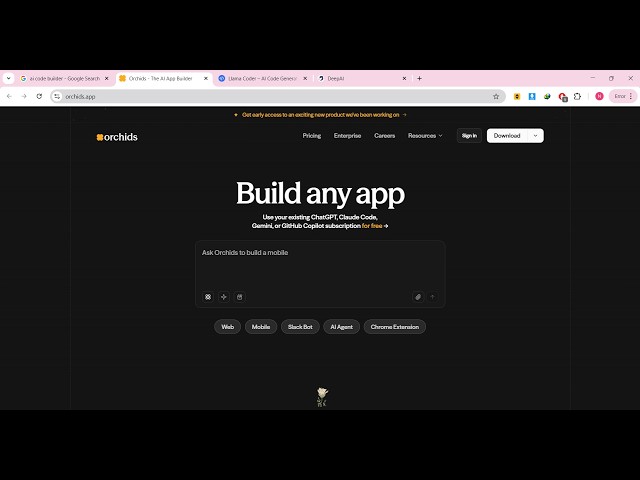
called as orchids.app.
0:11
If you go to Google simply type here
0:13
orchids AI.
0:15
It's an AI app builder.
0:18
It's an AI powered IDE directly inside
0:21
the browser. Once you open the website
0:24
This is actually the address here
0:26
orchids.app.
0:28
The interface is quite simple. You have
0:30
a chat screen where you can actually
0:32
build out
0:34
So now to actually do this, you do need
0:36
to sign in. You can continue with your
0:38
Google account.
0:40
And
0:42
This actually takes very less time. Once
0:45
you sign up you can actually use the
0:47
platform for generating full stack
0:49
coding applications
0:52
from a single prompt.
0:55
So [snorts] it's similar to Claude,
0:56
cursor, Gemini, all those platforms.
1:00
So it has two features. Either you can
1:02
make the application directly inside the
1:04
browser or you can download this as a
1:07
EXE file for Windows, Mac operating
1:10
system, Linux instantly built this
1:13
application.
1:18
So it instantly builds out this
1:20
application in its own AI powered editor
1:24
similar to VS code.
1:26
So it's actually building out the
1:28
application in the background,
1:30
installing the necessary modules,
1:32
everything.
1:33
So we also see this deploy button as
1:36
well. So once the application runs, you
1:39
can deploy this application as well
1:40
instantly. So directly Visual Studio
1:44
kind of a editor opens. All the files
1:47
will be generating one by one.
1:50
So now the AI is actually building out
1:53
this entire application.
1:56
The live preview will be seen right
1:58
here.
1:59
And this is actually the source code
2:00
that you see.
2:17
So it's actually building out
2:21
all the files here one by one.
2:25
So all the things are doing it in the
2:27
behind in the background. Everything
2:30
installing modules, making the necessary
2:33
files here.
2:36
So once it completes
2:39
it will actually show you the live
2:42
preview of the application.
2:58
So this is actually the actual live
3:00
preview screen.
3:02
And this is a code screen where all the
3:04
code is written.
3:11
So they do have the pro plan as well.
3:13
You can enroll in the pro plan as well.
3:15
So
3:25
So it's completely free to try.
3:30
So once it actually makes, let me just
3:34
show you the platform. It's called as
3:36
orchids AI.
3:38
So once you
3:41
So this is in fully AI powered editor.
3:44
Uh
3:46
You can download this inside your as a
3:48
Windows installer as well.
3:51
So it does offer you as a desktop
3:53
software as well.
3:56
So it's round about 189 megabytes. So
3:58
you can install it as a desktop software
4:00
as well.
4:01
Like cursor
4:03
that you use AI platform.
4:08
So as you see it's actually
4:11
creating this entire project from
4:13
scratch.
4:14
Tailwind project then installing the
4:16
dependencies.
4:19
Uh it's little bit slow as compared to
4:22
other AI tools, but uh I would say it's
4:25
completely free so definitely try this.
4:28
It's similar to Claude, GPT, Gemini. So
4:30
it created this project for us.
4:33
As you see
4:41
it's little bit slow.
4:44
That I can simply tell you because as
4:47
compared to other
4:49
platforms,
4:51
AI platforms, this feels like very slow.
5:28
>> [sighs]
5:30
>> So [snorts] you can see it is installing
5:33
after
5:35
that after having this project it's now
5:38
at this stage installing jsPDF.
5:53
So it's actually using the latest
5:55
version of React.
6:01
So it's average own
6:04
VS code like editor and
6:10
So once it finishes you can uh
6:12
uh just uh ask follow-up questions as
6:15
well.
6:17
But as you can see right here
6:34
It's really slow to be fair. The actual
6:36
AI platform
6:38
as compared to other AI platforms it's
6:41
really slow.
6:42
But it has all the features. You can
6:44
deploy the app. You can connect your
6:46
GitHub.
6:48
Everything is there.
7:17
Uh so if any problem occur it will
7:19
directly fix out all the issues if any
7:23
issues happen directly.
7:25
So
7:50
So in this way you can actually uh
7:54
uh build out the application.
7:57
For the time being it's taking really
7:59
long long time to actually do this.
8:02
So once it finishes, now you can see it
8:04
is moving to the third stage
8:06
where it is actually making the
8:07
component image to PDF UI components.
8:11
So once it finishes you will see the
8:12
live preview of the app right here. And
8:15
then you can click the deploy button to
8:16
actually deploy the application. So
8:19
definitely check out this platform as
8:21
well orchids.app platform.