Up next in 10


Get the full source code of application here:
Show More Show Less View Video Transcript
0:00
Uh hello guys, welcome to this video. So
0:02
in this video, I'll show you a new tool
0:04
that is developed by this Chinese
0:06
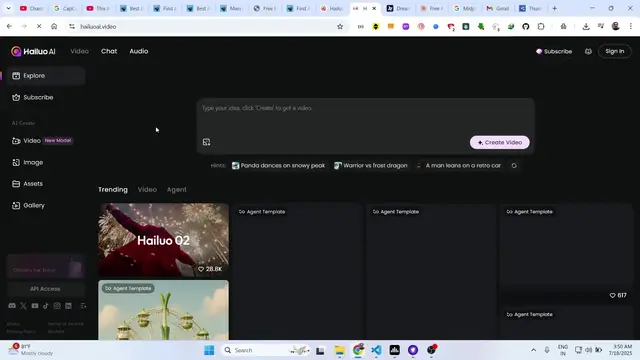
company Miniax. It's Halu AI. It's an AI
0:10
powered video generator. You can even
0:12
generate images using this tool as well.
0:14
It's very tremendous. I personally tried
0:16
this. And if you just type on Halo AI on
0:20
Google, the very first result which
0:22
comes right here, this is the website
0:24
here, Halo AI. And uh if you land on
0:28
this website, it's completely free to
0:30
try out. The interface looks something
0:33
like this. You actually have the prompt
0:35
window where you actually actually write
0:37
your prompt. So let's suppose I want to
0:40
generate. So first of all, you just need
0:42
to sign in with your account. Here you
0:45
can log in with your Google account. So
0:47
it's totally free to try out. So first
0:51
of all, just grant the access.
0:56
And I personally tried this and I can
0:58
tell you that this tool is insane,
1:01
tremendous
1:02
and uh
1:07
they also offers the max plan as well
1:11
but uh you can actually try their free
1:13
tool.
1:17
So once you can just write like the
1:20
video here. So I will say please make a
1:24
coding video
1:26
where
1:28
a boy coding
1:32
avatar writing code
1:36
on a laptop having
1:40
editor as backgrounds.
1:45
You basically provide the prompt here
1:47
and then we have the option here to
1:49
create the video. So click on that and
1:51
then the Halo AI uh AI will start
1:55
processing it and then you just need to
1:58
verify that you are a human. So after
2:00
that in the right hand side it will
2:03
generate your video and uh
2:07
the video length will be 6 seconds and
2:11
as you can see it is using the latest
2:13
model here which is the haiku 02
2:18
ultra clear precise quality videos will
2:20
be generated. So these are basically
2:23
using this model and then it shows you
2:26
this percentage sign here how much
2:28
processing is done. So once it completes
2:30
you will actually see the video.
2:33
So the speed is also tremendous. It is
2:36
not slow. It is very fast as well to
2:38
generate a video. So this video you can
2:41
safely use for any purpose inside your
2:44
blog
2:47
and per video you can see it is using 25
2:50
credits.
2:52
And inside the free account, if you
2:53
create this inside the free trial, you
2:56
basically get this credits for 3 days.
3:00
After that, you just need to upgrade
3:02
this. So, you get these 175 credits to
3:05
actually try out their website. And for
3:08
each video you create, you consume 25
3:12
credits.
3:14
So it I think it's more than enough to
3:16
actually try out their AI service for
3:20
videos, images, everything. You write
3:23
the prompt and then you see the magic.
3:31
So just wait for the process to
3:33
complete. I'm not pausing any sort of
3:35
thing. I'm just showing you the complete
3:37
process of how it is generated. You can
3:39
track how much time it takes. They do
3:42
offer their service which is image to
3:44
video as well where they actually
3:46
convert a series of images to a video
3:50
but this one is very good text to video.
3:52
You just write the prompt and then the
3:55
video will be generated.
4:03
So video generation is very trendy right
4:05
now. Many tools are there on the market.
4:08
So you just need to follow all the tools
4:11
which are released.
4:13
So one such tool is this one. I tried
4:16
this basically it is owned by this
4:19
company which is the Chinese company
4:20
which is Miniax.
4:23
This is the parent company of this. So
4:26
this is the parent company Miniax AI and
4:29
this is their tool which is
4:34
uh this one.
4:37
where it is gone ha this is their actual
4:42
service that they offer the minimax is
4:44
the parent company which is a Chinese
4:46
company
4:50
so once complete guys you will see it
4:51
will generate a 6second video
4:54
avatar doing the coding and you can just
4:56
see the quality of the video and they
4:59
will do just put a watermark right here
5:02
and I think you can click the download
5:05
button
5:07
you have the option to remove the
5:09
watermark as well. So if I click remove
5:12
watermark
5:14
so then you need to upgrade to the plan
5:16
here. These are their yearly plans. It's
5:19
very expensive to be fair. Uh which is
5:22
this is the max plan which is the
5:24
maximum $199 per month. You basically
5:28
get 20,000 credits unlimited usage of
5:31
the haiku their basic model 180p video
5:35
generation 10-second video generation
5:38
watermark is removed they do also offer
5:41
their seven standard plan which is $7
5:43
per month which gives you,000 credits
5:48
like this and in the pro plan $27
5:53
you get 4500 credits 10 second and this
5:58
is their master plan which is so you can
6:01
check out their pro plans and in the
6:02
free plan basically you get uh up to
6:06
three task
6:08
it's very limited functionality so but
6:10
you can try this you get this download
6:14
option with watermark so click it to
6:17
actually download the video inside your
6:19
machine so once you play this video you
6:23
will see that this video plays the video
6:25
is tremendous The quality looks it is
6:28
not 1080p in the free version it's 768p
6:31
but the quality I think it's looking
6:33
quite good it is actually the avatar is
6:37
doing coding here you can see that so
6:42
so it's a great feature here you can
6:44
post this to any social media network
6:47
Reddit Tik Tok Facebook anything
6:51
you also have the option to recreate
6:52
this video once again and then they also
6:55
offer this feature as well image to
6:57
video as well. So here you can actually
7:00
select any sort of image
7:03
and then convert that image to video as
7:06
well. So this is their uh thing this is
7:10
their AI service the video is the new
7:13
model it uses the latest model if you go
7:15
to the image generation as well. So it
7:18
can even generate images as well. So
7:20
let's suppose I write
7:23
please generate
7:29
girl avatar
7:33
doing coding
7:36
in a Google office and she is angry.
7:44
So I'm basically writing this prompt
7:46
here
7:49
and for image generation it basically
7:53
for each image it gen it's consume four
7:55
credits. So if you just uh
8:01
do this now you will see four images
8:04
will be created and it uses this uh high
8:08
quality model here to generate the
8:10
images.
8:12
So you can see that
8:15
the image generation is little bit
8:16
quicker because video is complex. So
8:20
image will be generated quickly.
8:34
So just wait for the process to finish.
8:45
So now you can see that it basically
8:47
generated these four images.
8:50
You can see the quality. They will put
8:52
this
8:54
watermark right here.
9:01
So you can also see the emotion on the
9:03
face. You can see I put explicitly the
9:06
girl should be angry. So you can see the
9:08
emotions are also angry. It is a Google
9:10
office and doing it on a laptop. So
9:13
everything is
9:16
captured perfectly and uh definitely try
9:19
this tool guys which is you can try this
9:22
for completely free Miniax Hiko AI
9:27
and also check out my website
9:29
freemediatools.com
9:32
uh which contains thousands of tools