Up next in 10


Get the full source code of application here:
Show More Show Less View Video Transcript
0:00
Uh hello guys, welcome to this video. So
0:02
Uh hello guys, welcome to this video. So
0:02
Uh hello guys, welcome to this video. So in this video, I'll show you how to
0:03
in this video, I'll show you how to
0:04
in this video, I'll show you how to format your Laravel blade files. So if
0:07
format your Laravel blade files. So if
0:07
format your Laravel blade files. So if your files are not formatted, it is
0:10
your files are not formatted, it is
0:10
your files are not formatted, it is appearing something like this. So there
0:13
appearing something like this. So there
0:13
appearing something like this. So there is a VS code extension which will help
0:15
is a VS code extension which will help
0:15
is a VS code extension which will help you simply go to the extension tab and
0:17
you simply go to the extension tab and
0:17
you simply go to the extension tab and simply type here blade formatter and
0:20
simply type here blade formatter and
0:20
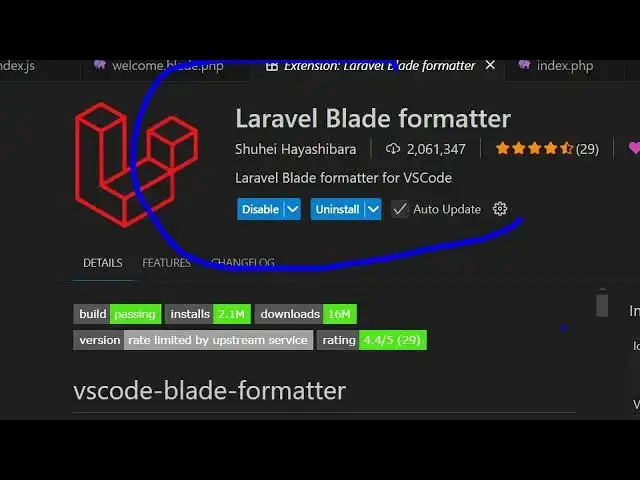
simply type here blade formatter and this extension will come right here.
0:22
this extension will come right here.
0:22
this extension will come right here. It's specifically built for Laravel
0:24
It's specifically built for Laravel
0:24
It's specifically built for Laravel Blade files. It's got almost 2 million
0:26
Blade files. It's got almost 2 million
0:26
Blade files. It's got almost 2 million installs and it automatically detects
0:29
installs and it automatically detects
0:29
installs and it automatically detects the unformatted code and automatically
0:31
the unformatted code and automatically
0:31
the unformatted code and automatically formats that. So once you click the
0:34
formats that. So once you click the
0:34
formats that. So once you click the install button and simply activate this
0:37
install button and simply activate this
0:37
install button and simply activate this extension. So after it activates
0:40
extension. So after it activates
0:40
extension. So after it activates now simply go to the file which file is
0:44
now simply go to the file which file is
0:44
now simply go to the file which file is not formatted. Simply right click and
0:47
not formatted. Simply right click and
0:47
not formatted. Simply right click and you will see this option appearing. As
0:49
you will see this option appearing. As
0:49
you will see this option appearing. As soon as you activate this extension,
0:54
soon as you activate this extension,
0:54
soon as you activate this extension, you will see this option now will
0:55
you will see this option now will
0:55
you will see this option now will appear. If you right click for format
0:58
appear. If you right click for format
0:58
appear. If you right click for format document, simply click this option and
1:01
document, simply click this option and
1:01
document, simply click this option and automatically
1:03
automatically
1:03
automatically your file will be formatted.
1:06
your file will be formatted.
1:06
your file will be formatted. So in this easy way you can see with a
1:10
So in this easy way you can see with a
1:10
So in this easy way you can see with a simple click right click format document
1:12
simple click right click format document
1:12
simple click right click format document and instantly the file will be
1:14
and instantly the file will be
1:14
and instantly the file will be formatted.
1:16
formatted.
1:16
formatted. And this is the extension Laravel blade
1:18
And this is the extension Laravel blade
1:18
And this is the extension Laravel blade formatter. So simply install this for VS
1:21
formatter. So simply install this for VS
1:21
formatter. So simply install this for VS code and instantly with the matter of
1:24
code and instantly with the matter of
1:24
code and instantly with the matter of time you will able to format your files.
1:28
time you will able to format your files.
1:28
time you will able to format your files. So definitely install this extension and
1:31
So definitely install this extension and
1:31
So definitely install this extension and I will be seeing you in the next
#Programming
#Software