Up next in 10

I Built & Launched a Website & Mobile App in 15mins! (No Coding) Using Replit Agent4
Apr 17, 2026

💡 Try it here: : https://groq.com/
Show More Show Less View Video Transcript
0:00
Hello guys, in this live stream I will
0:03
show you I built out launched several
0:06
web applications and mobile applications
0:09
through a tool it's called as Replit
0:12
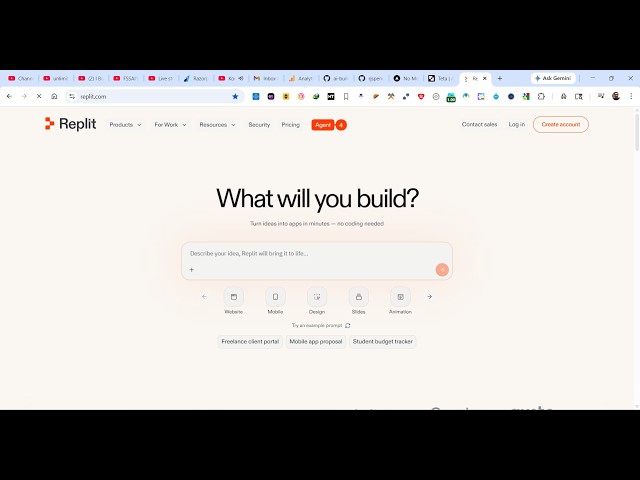
Agent. Replit is Replit Agent is
0:15
actually a very popular tool
0:18
if you are looking forward for building
0:20
full stack coding applications.
0:22
Simply type this on Google, the very
0:24
first result which comes. So they have
0:26
released their own Replit Agent which
0:28
actually generates production ready
0:30
applications in a matter of seconds.
0:33
So the latest agent version is four. So
0:36
this is the latest Replit Agent that
0:40
they have released.
0:42
So you can
0:43
directly
0:46
sign up using your Google account to try
0:48
this out for completely free.
0:52
So it doesn't cost you anything. You
0:55
simply log in with your Google account
0:57
and simply assign whatever application
1:00
you want to develop. It can be a mobile
1:03
or desktop application.
1:06
So once it creates your account, it will
1:09
simply redirect you to the dashboard
1:11
area.
1:14
So right here you can create something
1:15
new or import code or design.
1:18
So right in this app
1:20
agent Replit Agent mode you specify what
1:23
sort of application you want to develop.
1:25
It can be a mobile application as well.
1:28
So I simply tell it that build a image
1:31
to PDF
1:32
mobile app.
1:34
So I simply tell this in the prompt
1:37
build a image to PDF mobile app.
1:40
So now the Replit Agent will start
1:42
developing this mobile application
1:45
directly live.
1:48
So once it completes you will get a
1:49
notification and you will be able to
1:52
deploy that
1:54
mobile application directly to the Play
1:56
Store as well. So
1:58
as you see we have this live preview.
2:01
Uh
2:02
this Replit Agent is directly modifying
2:05
the changes.
2:08
You can see that
2:10
it is creating the necessary files which
2:12
are required for this.
2:16
So these are different tools and files
2:18
it is creating it
2:20
and generating the live preview.
2:23
And you also get the publish button to
2:25
publish the app to the Play Store or you
2:27
can directly try this on device as well.
2:30
This is a new feature which is
2:32
introduced in this Replit Agent.
2:35
So once it finishes you will get the
2:37
actual notification that it is
2:39
completed. You can even scan the QR code
2:42
as well
2:43
to actually directly run the application
2:46
inside your Android or iOS device.
2:50
You will see the live preview once it
2:52
completes.
2:55
You can simulate on web as well, iOS,
2:58
Android. All of these features are
3:00
available for you.
3:02
Same goes with the web applications as
3:04
well.
3:05
I'm specifically just showing you the
3:08
mobile application right here.
3:10
If you do need to upgrade, they do have
3:12
the paid plan as well. You can try out
3:15
with the free version which gives you
3:17
three daily agent credits.
3:19
You can publish up to one app. And the
3:23
pro plan starts with $20 which gives you
3:26
$20 of monthly credits.
3:32
Like this. So definitely
3:36
check this out and
3:39
as you see it is creating the relevant
3:42
files here for us
3:44
in a big parallel batch. So it is
3:47
writing multiple files in background. So
3:49
once it finishes
3:51
it will show you the notification that
3:54
it is completed.
3:55
You can check out the
4:24
So you can see it is requiring the
4:26
necessary packages which are required
4:29
for starting the application.
4:31
It is
4:32
starting the application in the
4:34
background.
4:35
So just wait for this
4:37
live preview.
4:50
So this is the best agent mode that I
4:53
can try yet so far
4:56
specifically for mobile application
4:58
development. You simply
5:00
assign the task
5:02
and just let the thing AI will take care
5:04
of itself. You can even ask follow up
5:06
question as well
5:08
by simply typing that.
5:10
And you will see all the changes
5:13
directly live.
5:16
And then you can even click the publish
5:18
button to publish the app
5:20
directly.
5:24
So you give it a domain name wherever
5:26
you need to
5:29
you use the logo, everything and then
5:32
click publish.
5:56
So now you can see that guys the app is
5:59
successfully started in the image to PDF
6:01
application.
6:10
You can even fix errors as well. So it
6:14
will automatically fix all the errors
6:16
for you.
6:39
So now it has successfully
6:44
fixed the error.
6:46
It has converted this.
6:50
It has created this full stack code
6:52
mobile application image to PDF. It
6:54
shows you the live preview as well. And
6:57
then you can simply click the publish
6:59
button to publish it
7:01
to the Play Store directly from here
7:03
or you can live preview it by simply
7:06
scanning the QR code and directly
7:07
running this application. So this is the
7:10
Replit Agent mode guys. You can directly
7:12
get started for completely free. Simply
7:14
type your prompt and automatically the
7:17
AI will start building out your
7:19
mobile application. So definitely check
7:22
this out.