Up next in 10

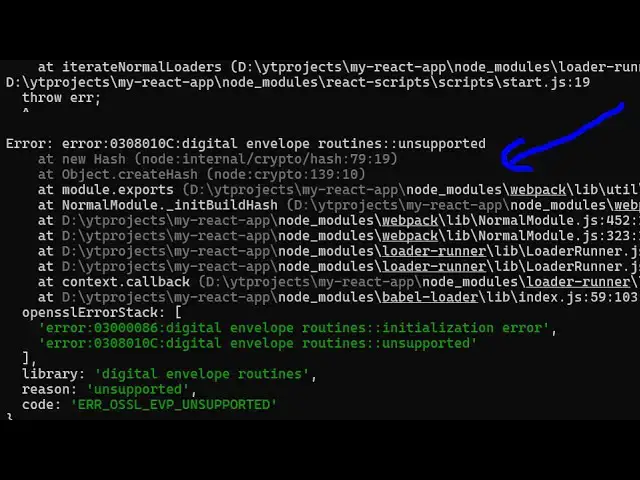
How to Solve and Fix Error message "error:0308010C:digital envelope routines::unsupported" React.js
Jun 3, 2025

Get the full source code of application here:
Watch My Visual Studio Code IDE Setup Video For Fonts,Themes & Extensions
https://youtu.be/Bon8Pm1gbX8
Hi Join the official discord server to resolve doubts here:
https://discord.gg/cRnjhk6nzW
Visit my Online Free Media Tool Website
https://freemediatools.com/
Buy Premium Scripts and Apps Here:
https://procodestore.com/
Show More Show Less View Video Transcript
0:00
uh hello guys uh welcome to this video
0:02
uh so in this video I will show you how
0:05
to fix this error message whenever you
0:08
run your ReactJS project uh this error
0:12
comes you can see that digital envelope
0:15
routines
0:17
unsupported and you can see that this
0:20
error basically comes whenever you run
0:22
your ReactJS projects typically this
0:25
ReactJS version is 16.0
0:29
so I will show you how to fix this error
0:32
message uh there are two solutions to
0:34
this problem the first problem the first
0:36
solution will typically fix your problem
0:40
the first solution is as you can see we
0:43
are using the latest version of NodeJS
0:45
which is
0:48
23.7.0 so you can actually fix this
0:51
problem by downgrading your NodeJS
0:54
version so let's suppose I want to
0:56
switch to the
0:59
16.0.0 so you should downgrade your
1:02
NodeJS version whichever latest version
1:06
that you're using you should downgrade
1:07
to
1:09
16.0.0 i'm using this tool Node version
1:12
manager to actually manage multiple
1:14
versions of Node so I'm just downgrading
1:16
it to use the NodeJS 16 version so this
1:21
is the first solution so now if I show
1:23
you my NodeJS version which is
1:26
16.0.0 so now if I run the same
1:28
application by running the command here
1:31
npm run start so what you will see the
1:34
application will run perfectly the error
1:37
will not
1:39
come so now just wait the ReactJS server
1:43
is development server is running
1:46
[Music]
1:48
so now you will see that error message
1:52
will not come and it will go
1:56
away so just wait for the development
1:59
server to
2:01
start now you can see the application is
2:04
perfectly running on local host 3000 so
2:07
this is the first
2:09
solution by which you can fix this
2:12
problem 99% of the time this will fix
2:16
but if this solution is not working just
2:19
move your NodeJS version let me move to
2:22
the latest
2:27
version so let me change my NodeJS
2:30
version to the latest version so if I
2:32
just show you NodeJS version is
2:35
23.7.0 now the second solution is very
2:38
easy uh now inside your package.json
2:42
JSON file so whenever you start your
2:44
application you just need to write this
2:47
code that I will show
2:49
you so right inside your npm run start
2:53
script right here section at the
2:56
starting here you just need to add this
2:58
code
3:00
set
3:03
node options is equal to and then we
3:07
need to say
3:09
dash
3:11
open SSL dash
3:15
legacy
3:18
provider and That's all that we need to
3:21
do guys in this if you
3:23
see we need to add this code here set
3:28
node options is equal to d-open SSL-
3:33
legacy-p provider and symbol and then
3:37
rest of the thing react script
3:40
start so this will also fix your problem
3:43
if I run the
3:44
same npm run start here so now what it
3:48
will do it will start this ReactJS
3:51
application with these options that we
3:53
set right
3:54
here so if you see your application is
3:57
now perfectly working that error is not
4:00
coming and if you see your ReactJS
4:02
application has successfully been
4:04
started so I have shown you two
4:05
solutions right here first of all the
4:07
solution is to downgrade your NodeJS
4:10
version to
4:12
16 or you can use the second one so you
4:16
can comment if
4:17
you if your problem is fixed please hit
4:20
that like button subscribe the channel
4:22
and also comment on this video if your
4:25
problem is fixed or not and also check
4:28
out my website
4:30
freemediatools.com which contains
4:32
thousands of tools regarding audio video
4:34
and image and I will be seeing you in
4:36
the next video