Up next in 10

How to See Bundle Size of Imported Node js Packages Automatically in VSCode IDE
Jul 12, 2025

Get the full source code of application here:
Show More Show Less View Video Transcript
0:00
Uh hello guys, welcome to this video. So
0:02
in this video, I'll show you a VS code
0:04
extension which will show the size of uh
0:07
npm packages right in the VS code
0:09
itself. So this is the extension. So
0:13
just go to extensions tab and just write
0:15
here size of npm. And the very first
0:17
extension which comes right here, it's
0:20
called as bundle size. It's got 64,000
0:23
installs. So as you can see then the
0:26
extension it shows you the size of each
0:30
package here bundle size package.
0:34
So simply click the install button to
0:36
install this package. So once the
0:38
package is activated you simply go to
0:40
the file.
0:43
So this is wherever you are importing
0:45
the package here. It will actually show
0:47
the size of the package.
0:50
So just we require the package here.
1:02
So once the extension is activated, you
1:04
just need to I think restart.
1:15
Yeah, sorry. I think it works with the
1:17
import statement.
1:32
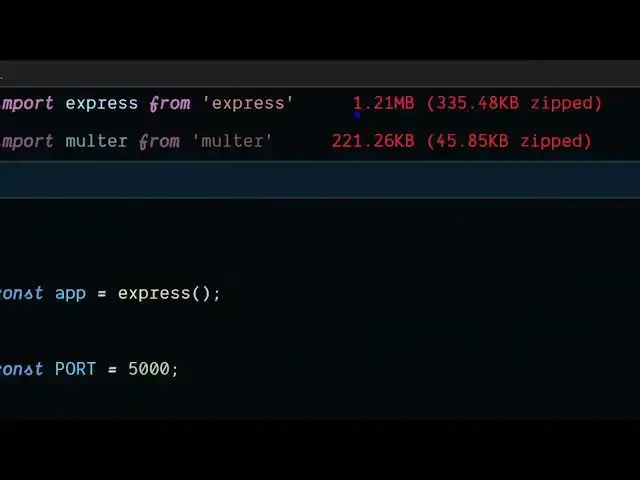
So as you can see it will display the
1:35
size of this package side by side.
1:43
So that way you will actually know the
1:46
size of each package directly inside.
2:12
I think it it only works with the import
2:15
statement.
2:18
If I change this to
2:46
So I think it works with only import
2:48
statement. So you import the package
2:51
here.
2:56
So then it will show you the size of the
2:58
package. So there is other extensions as
3:00
well which does the same thing.
3:11
So I think this one also.
3:23
So simply install it and start using it.
3:26
It will display the size of each package
3:28
right in VS code. So also check out my
3:32
website freemediatools.com
3:34
uh which contains thousands of tools.
#Programming
#Software