Up next in 10

How to Run SFC & DISM Scan in Windows to Repair & Fix Corrupt System Files on Command Prompt
Jul 7, 2025

Get the full source code of application here:
Show More Show Less View Video Transcript
0:00
Uh hello guys, welcome to this video. So
0:02
in this video, I'll show you how to run
0:04
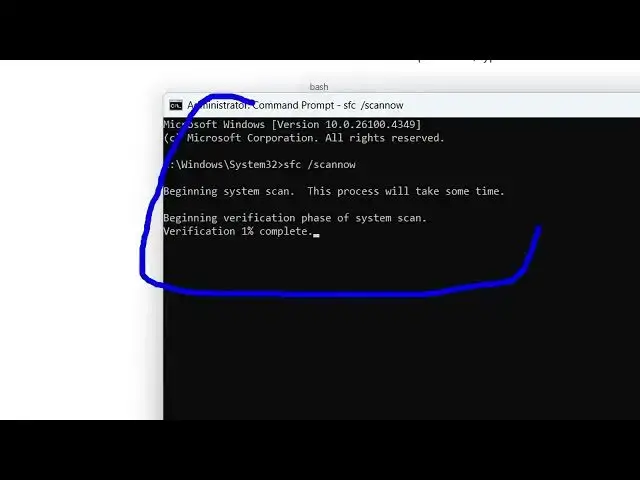
sfc and disism scan inside your Windows
0:07
machine to actually repair and fix
0:09
corrupted system files. So these are two
0:12
basic scans that you can run inside your
0:14
terminal. The I will show you both the
0:16
commands. So just open the terminal and
0:19
right here you need to simply say sfc.
0:23
Just type this sfc and after that
0:26
space/can.
0:28
Now this is the first command here. sfc
0:31
space/c
0:33
scan now. So this is the first command
0:37
and for this to run you must be an
0:39
administrator.
0:41
So just open your command line using an
0:44
administrator. So right click this and
0:46
run as administrator.
0:50
And now you are on the administrator
0:52
level. So now you can run this command
0:54
here. Simply type this command and now
0:57
it will actually do the whole system
0:59
scan here. So this can take some time
1:01
here for the verification to complete
1:04
and this will actually fix any sort of
1:07
files that are corrupted inside your
1:09
system. Uh this will hardly take uh
1:12
let's suppose uh around about 5 minutes
1:16
to complete and it will verify the whole
1:19
system issues related to your system. If
1:21
you have any sort of corrupted files, it
1:23
can fix your system. The next scan that
1:26
I will show you, it's called that it's a
1:29
dism scan. This also does the scanning
1:32
of your computer. Let me show you this
1:35
command as well. D I slash online
1:42
slash cleanup
1:45
image slash restore
1:49
health.
1:51
So just I have given both these commands
1:53
in the description of the video. dism
1:56
space/online/cleanup-
1:59
image/restore health. This is a disism
2:03
command here. And now it will check your
2:06
image version of your system and uh it
2:09
will also take around about 1 minute to
2:12
complete.
2:13
So these are two commands that you can
2:15
run here inside your Windows machine to
2:17
actually fix and repair corrupted system
2:21
files which are there.
2:24
The first one is S sfc scan and this one
2:27
is dism scan. So you can see now it will
2:31
run. So you can just run them
2:32
completely. Don't
2:37
don't press any key. Just run them in
2:40
the background and when they are
2:41
completed they will show you or they
2:43
will automatically fix your system
2:45
issues or any files that are corrupted
2:49
or so in this easy way you can run both
2:52
these scans. So also check out my
2:55
website guys freemediattools.com
2:59
uh which contains thousands of tools.
#Operating Systems