Up next in 10


Get the full source code of application here:
Show More Show Less View Video Transcript
0:00
Uh hello guys, welcome to this video. So
0:02
in this video, I'll show you how to
0:03
install and activate emoji style files
0:06
and folders icons theme inside your VS
0:08
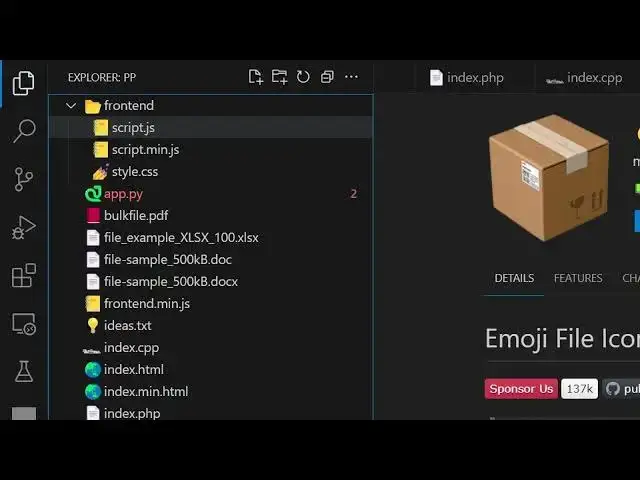
code. So this file folder structure will
0:12
change to emoji style. So there is one
0:14
fun little extension that you can
0:16
install. If you just type emoji right
0:19
here in the search bar, this extension
0:21
will come right here, which is emoji
0:23
file icons. And it's almost used by
0:26
136,000 developers. So,
0:30
so this will look something like this
0:32
emoji style
0:34
file icon structure. It looks pretty
0:37
good. So, if you just install this
0:39
extension and after that you simply need
0:42
to set your icon theme which is emoji
0:46
file icons. As soon as you make this
0:48
change, you will see your files folder
0:50
structure will change to this emoji
0:53
style structure. You will see this is
0:55
your JavaScript file. This is your
0:57
folder structure will look something
0:59
like this. This is your Python file
1:01
which looks like this. Snake structure.
1:04
This is your PDF file. This is your
1:06
Excel file which looks something like
1:08
this. This is a txt file. This is your
1:11
HTML file. So clearly the icons and the
1:15
folder structure drastically look
1:17
different. But it looks different in a
1:19
very fun little way. You can see it
1:20
looks quite good. You can see it's a
1:23
JSON file. This is a markdown file. So
1:26
if you like this file icon structure,
1:28
you can install this extension.
1:30
Personally I like this and also you can
1:34
select from a series of you can even
1:37
customize this
1:39
icons that appears like this as well.
1:41
You can see
1:43
by selecting.
1:48
So this is a fun little extension that I
1:52
wanted to share with you. This looks
1:53
quite good.
1:55
And depending upon if you just want to
1:57
disable this, click the disable button
1:59
and once again you will be reverted back
2:01
to the original settings. But just if
2:03
you just want to enable this, you can
2:05
enable this. So it looks good. So, thank
2:08
you very much for watching this video
2:10
and also check out my website
2:12
freemediattools.com
2:14
uh which contains thousands of tools.
#Programming
#Software