Up next in 10

How to Enable & Disable Brackets Pair Colorizer in Visual Studio Code IDE Editor
Jul 14, 2025

Get the full source code of application here:
Show More Show Less View Video Transcript
0:00
Uh hello guys, welcome to this video. So
0:02
in this video I will show you how to
0:03
enable or disable bracket pair
0:05
colorization inside your VS code. So by
0:08
default it is built in inside VS code.
0:11
You just need to install this extension
0:13
which is bracket play pair colorization
0:16
toggler. So if you just type this on the
0:21
go to extensions just type here bracket
0:25
pair
0:26
colorization
0:28
toggler and this extension will come
0:31
there is quite a number of extensions
0:33
which are there but I personally tried
0:35
this extension it works definitely
0:37
install this extension it's got almost 1
0:40
million installs after installing it you
0:43
basically go to the source code
0:45
whichever source code you want to
0:47
highlight.
0:50
So as you can see I already enabled the
0:53
toggling here. So it basically each
0:56
bracket has different colors right here
0:58
that you can see. This is called as
1:00
bracket spare colorizer. So if you now
1:03
want to enable it there is a setting
1:05
that you need to do. Just go to your
1:07
user setting file control shiftp to open
1:10
command pallet and just type here user
1:12
settings
1:14
JSON file here. So just open this file
1:17
here and just search for this setting
1:18
which is bracket
1:21
pair
1:23
colorization.
1:25
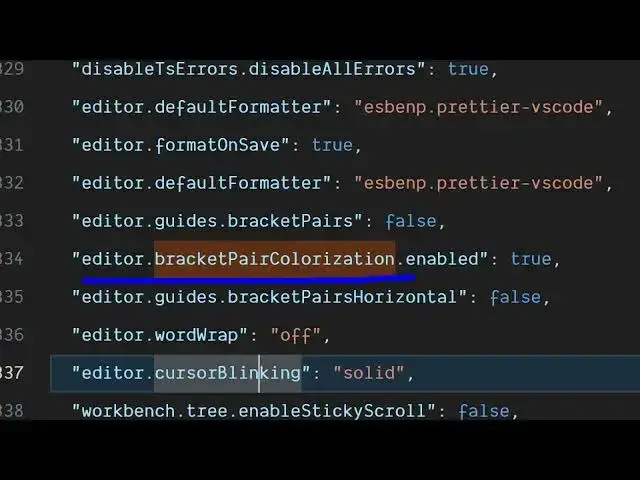
So this is the setting which will come
1:27
right here. Uh editor dot bracket pair
1:30
colorization dot enabled. So by default
1:33
it will be false.
1:36
If you change it to false here now
1:38
bracket colorization is disabled. So if
1:41
you don't want the bracket colorization
1:43
sometimes in some cases you don't want
1:45
it. So in this easy way you can easily
1:47
disable it by going to the settings file
1:50
just search for this setting here which
1:52
is bracket pair colorization dot enabled
1:54
and simply disable this by changing this
1:57
from true to false. So now this will be
1:59
disabled and uh now you will see there
2:02
will be no colors inside different
2:05
brackets but uh personally I will
2:08
recommend this setting to be turned on
2:11
here. So just change from true to false
2:14
to true so that now it is enabled once
2:18
again. So now you will see each bracket
2:20
has different colors. So you can easily
2:24
see which bracket is which
2:28
can see that. So clearly highlight the
2:32
opening and closing of brackets. So
2:33
bracket pair color IG. So in this easy
2:36
way you can toggle this setting inside
2:39
VS code and also check out my website
2:42
free media tools.com uh which contains
2:46
thousands of tools.
#Software