Up next in 10

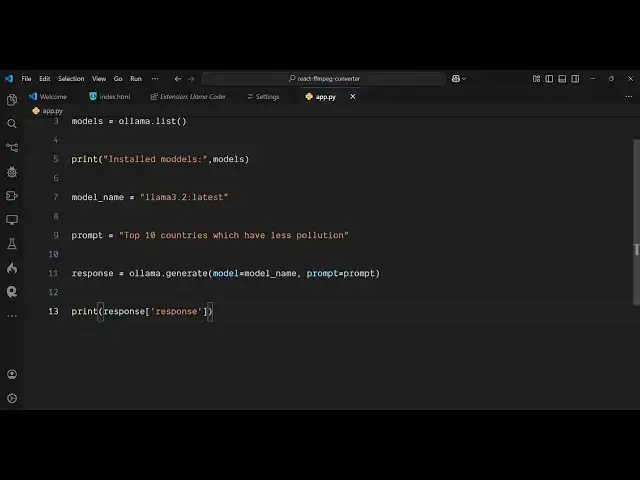
How to Download Ollama and Install Deepseek & llama AI Models and Run it in VSCode Using Python
Mar 2, 2025

Watch My Visual Studio Code IDE Setup Video For Fonts,Themes & Extensions
https://youtu.be/Bon8Pm1gbX8
Hi Join the official discord server to resolve doubts here:
https://discord.gg/cRnjhk6nzW
Visit my Online Free Media Tool Website
https://freemediatools.com/
Buy Premium Scripts and Apps Here:
https://procodestore.com/
Show More Show Less View Video Transcript
0:00
uh hello guys welcome to this video so
0:02
in this video I will show you how to set
0:04
up AMA uh uh inside your vs code and run
0:09
uh free models of AI AMA is actually a
0:14
platform where you can run free AI
0:18
models here so this is actually the
0:20
website here ama.com
0:23
so if you just write on Google AMA and
0:27
this website will come here right here
0:30
so here this is you need to download for
0:32
your respective operating system so I'm
0:35
running Windows 64 bits so I will simply
0:37
click the download button and here you
0:40
can select either Mac lus windows so I
0:43
am on the Windows machine so I will
0:44
simply click the download for Windows
0:46
button so it will
0:50
actually see this 768 MB exe file will
0:54
be there simply download this
0:57
file and this download is pretty simple
1:00
and it will download this 768 megabytes
1:03
so in the meantime let me open the
1:05
zoomit tool so that I can zoom in on
1:08
particular
1:11
element so now if you see it has
1:14
installed it
1:17
just you will see this file here exe
1:20
file so this is a setup file so this is
1:22
very easy in Windows so you will see the
1:25
setup process will be there let's set up
1:28
this Lama here simply click the install
1:31
button so it will
1:33
install
1:35
inside the C directory this is actually
1:38
the location here where it will install
1:40
AMA see users whatever is username app
1:44
data local programs and then it will
1:46
create a folder called as AMA so just
1:48
wait for the installation to finish as
1:50
soon as it installs successfully then we
1:53
will set up and run some
1:56
models inside the vs code I will show
1:59
you how to set up it you can even
2:03
install third party extensions which are
2:05
available in vs code to actually use
2:07
these AI
2:14
models so I will be back whenever it is
2:17
installed
2:20
successfully so now after you install
2:22
those models guys you can go to the
2:24
command line and there is a command
2:26
inside
2:28
AMA we can which you can directly run
2:31
AMA list so it will list out all the
2:34
models that you have
2:36
installed so can just see
2:40
ama list this is a command here and it
2:45
will list out all the models that have
2:47
been there so we have installed two
2:49
models which is deeps and llama and it
2:52
shows the size
2:54
and the minutes ago so we need the just
2:58
the model name here which is important
3:01
now I will show you how to run this
3:03
model using a python script and for this
3:05
you just need to install a module which
3:09
P install AMA so this is actually the
3:13
command so just install this module AMA
3:18
module in Python to directly interact
3:20
with this model so I have already
3:21
installed it so just create a simple
3:24
python file app.py inside your vs code
3:28
and uh now we'll be directly be running
3:31
this model so for doing this we first of
3:33
all need to import this model wama and
3:37
after this we will create a models
3:40
variable and just use this module and it
3:44
actually contains a list method and it
3:47
will list out all the models which are
3:54
present so if I run this file here just
3:57
run this file python app.py so you will
4:00
actually see it will run this python
4:03
script and uh it will list out all the
4:07
models which are installed on your
4:09
system so now we will be using one of
4:13
the model and we will ask some question
4:16
to
4:17
it so I will just provide a model name
4:20
here so
4:22
once so this model name is this one
4:26
we'll provide this first of all Lama so
4:32
l l a m a and then
4:36
3.2 so just copy that name and paste it
4:41
here and then we just need to ask a
4:45
question here
4:46
[Music]
4:47
prompt so what I can just do a what is
4:50
the capital of France so any question
4:52
that you can ask
4:53
here and then it will
4:55
give the response back so we can
4:58
actually use this cury generate
5:02
function and here you need to pass the
5:05
model here which will
5:07
be the model name and the prompt so here
5:11
you can see
5:13
that and then we will simply print the
5:17
response which will be
5:21
coming so that's all that we need to do
5:24
we simply use this model we ask a
5:26
question and then it will generate the
5:28
response and we have printing this
5:30
response so if I run this python script
5:32
now so now it will actually use this AI
5:35
model and it will actually generate the
5:38
response to us and the nice thing is
5:41
that it is completely free you'll see
5:43
the capital of France is Paris so it has
5:46
returned this and now let me ask some
5:48
more complicated questions so I will
5:50
simply
5:51
say uh a coding question so I will say
5:55
build a
6:02
calculator in uh HTML CSS and
6:07
JavaScript give only the
6:10
index.html
6:13
file which contains the Full code so we
6:17
basically write this prompt here so we
6:19
just asking it to make a calculator in
6:22
HTML CSS and JavaScript and just give
6:25
the entire code so now if I run this now
6:29
by script you will see it will actually
6:31
use this AI model and it will actually
6:34
generate the code for us and print this
6:37
inside the command line so just wait for
6:40
some time because it is writing the code
6:45
so it also depends upon how much
6:49
complicated question that you are asking
6:51
here so
7:02
and different models take different
7:04
amount of time as well
7:07
because this actually depends upon how
7:10
many parameters are there so this is a
7:12
very basic model that we have installed
7:14
which is llama model
7:16
so now you can see it has returned this
7:19
result to us so it is completed this you
7:22
can see it's entire HTML file it has
7:24
given to us which contains the
7:27
calculator code so so you can see that
7:31
so it is the entire HTML code here can
7:34
directly copy
7:37
this and paste it so this is actually a
7:40
full calculator if I run this in the
7:43
browser you will see it is not perfect
7:46
but still you can see it is working so
7:49
we can enhance this by asking some more
7:52
questions on top of it as well so you
7:54
are just looking uh how to run this
7:58
model so simp similarly we can just say
8:02
top
8:05
10 countries which
8:08
have less
8:11
pollution you can ask any question any
8:14
question related to any Niche so now
8:17
this time I will use the second model
8:20
that we installed which is deep
8:27
seek so here you
8:31
installing just give the name
8:35
here and now it will be using this model
8:38
which is deep seek model and it will
8:40
return the top 10 countries which have
8:42
less pollution so just wait and it will
8:46
give the response back to you
8:49
so so this is completely free guys it is
8:52
not taking any it is not making use of
8:55
any API once you install AMA inside your
8:58
you can install
9:00
any free
9:03
models and it is actually making use of
9:06
that model
9:11
so so these are very basic models
9:13
because if you go to the
9:16
website if you want faster result to be
9:20
coming up you can
9:22
install more complicated models by going
9:25
to the models here and you will actually
9:28
see this par Meers which depends upon if
9:30
you click on individual model you will
9:35
see the size will differ because this is
9:39
only taking 7 billion parameters so we
9:42
also have this bigger models as well
9:45
which takes 70 billion parameters which
9:47
is 43 G gigabyte this will also work
9:51
faster so you can just
9:54
see we can install there is this command
9:58
here we can run it or Run Deep sick R1
10:01
which takes 70 billion parameters so
10:04
just copy this command and install this
10:08
module some models will not work for
10:12
certain questions as well so I think the
10:15
previous model that we used was best for
10:19
questions related to very basic which is
10:22
Lama
10:23
3.2 so this
10:29
so in this easy way you can
10:32
actually run the AI
10:36
model using the python script
10:41
in so thank you very much guys for
10:44
watching this video and I will be seeing
10:47
you in the next video
#Software
#Software Utilities
#Scripting Languages
#Intelligent Personal Assistants
#Machine Learning & Artificial Intelligence