Up next in 10


Get the full source code of application here:
Show More Show Less View Video Transcript
0:00
Uh hello guys, welcome to this video. So
0:02
in this video, I'll show you how to
0:03
customize your lock screen and disable
0:06
those ads which appear when you have
0:09
your lock screen and those ads appear.
0:11
So it's very easy. Go to settings and
0:15
then inside on the left hand side you
0:17
will see this option of personalization.
0:20
Simply go to this option and right here
0:23
you will see this option of uh lock ads
0:27
lock screen
0:29
and simply click on that and by default
0:31
it is set to windows spotlight just need
0:34
to change to picture or slideshow. So
0:36
let me change to picture and here you
0:39
can put your own image in the background
0:40
as well. It's very easy and this just
0:44
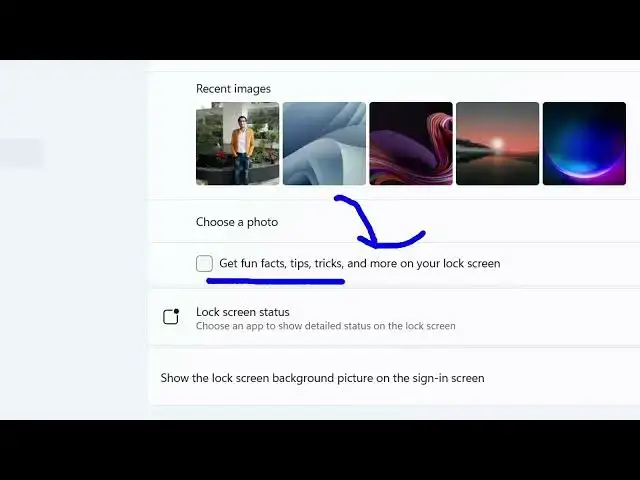
toggle this off right here. Get fun
0:46
facts, tip, tricks and more to your log
0:48
screen. So by default it will be
0:50
enabled.
0:51
Just make sure that you untoggle this.
0:54
So this will disable all the lock screen
0:56
ads which appear
0:59
inside your screen. Just disable this
1:05
and uh after that here you can dis uh
1:09
just put any photograph that you want to
1:12
do in the background. Simply select your
1:14
photograph and this will be there in the
1:16
background position.
1:20
So you can basically select here if you
1:23
have a series of images.
1:26
You can select image here. You can see
1:29
these image will appear right here.
1:33
You can also change the order as well.
1:36
Simply
1:38
and then you can even have a slideshow
1:40
as well. You can basically upload a
1:44
select a series of images that are
1:46
shared in the can select a folder right
1:49
here
1:53
and this folder will be selected which
1:54
contains a series of images. So in this
1:56
easy way you can customize the look and
1:58
appearance of this personalized screen
2:00
inside Windows 11. It's really easy and
2:03
also you can disable the lock screen ads
2:05
as well which appears. Simply untoggle
2:08
this option. This will disable all the
2:10
ads which appear.
2:13
So, thank you very much for watching
2:15
this video and also check out my website
2:17
freemediatools.com
2:19
uh which contains thousands of tools.
#Software