Up next in 10

Google Jules Coding AI Agent is INSANE to Build & Deploy Full Stack Apps From Prompt For FREE
Apr 8, 2026

Watch My Visual Studio Code IDE Setup Video For Fonts,Themes & Extensions
https://youtu.be/Bon8Pm1gbX8
Hi Join the official discord server to resolve doubts here:
https://discord.gg/cRnjhk6nzW
Visit my Online Free Media Tool Website
https://freemediatools.com/
Buy Premium Scripts and Apps Here:
https://procodestore.com/
Show More Show Less View Video Transcript
0:02
Uh, hello guys. Welcome to this live
0:04
stream. So, in this live stream I will
0:06
actually show you uh, Google has
0:09
released a new product in terms of
0:11
programming and development.
0:13
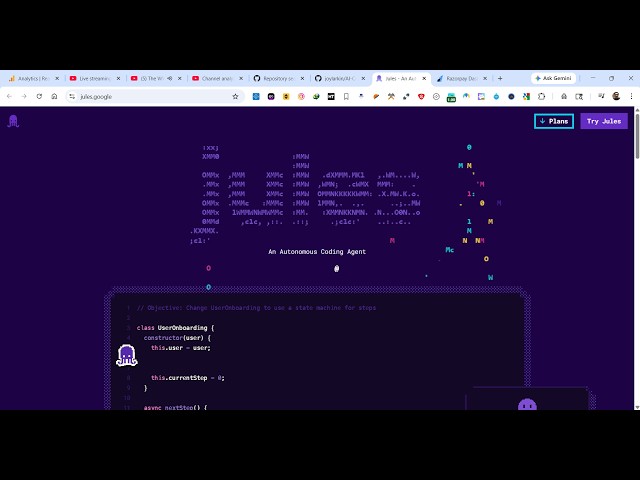
This is called as Google Jules, j u l e
0:17
s. So, this is actually a
0:21
uh,
0:23
AI AI tool
0:25
which is actually a coding agent where
0:28
you can actually build out coding
0:29
applications.
0:31
This is their website, j u l e s,
0:34
jules.google.
0:37
If you land on this page, it's an
0:38
autonomous coding agent for programmers.
0:43
And it's totally free to try
0:45
inside your browser. If you click try
0:48
Jules, you first of all sign up
0:52
and [snorts] connect your GitHub repo.
0:54
So, it will land on this page. So, from
0:56
here you will connect your GitHub
0:58
account.
0:59
And if you're doing it for the very
1:01
first time, you will first of all
1:03
authorize this.
1:05
After the authorization is complete, you
1:08
will basically need to verify your
1:10
email. So,
1:15
this you just need to do it for the very
1:16
first time. So, this is a very fantastic
1:19
tool. I've already tried this numerous
1:21
number of time.
1:23
So,
1:25
you can see that. So, let me just paste.
1:34
So, once you connect your GitHub repo,
1:37
so you basically
1:40
click on save.
1:49
So, once the authentication is complete,
1:51
you will simply say successfully
1:53
authenticated with GitHub.
1:55
And now it will import all your GitHub
1:58
repos. So, specifically,
2:00
you will simply ask the question related
2:02
to your GitHub repos. So, it's actually
2:05
automation tool. You can even
2:07
download the CLI version as well.
2:10
If you want to try out the CLI version,
2:12
you can definitely install this by npm
2:15
install -g.
2:17
And you can directly go to your terminal
2:19
if you
2:20
prefer the terminal version.
2:22
You go to the terminal and execute this
2:24
command.
2:27
So, it will install this Jules.
2:29
Directly, you can first of all login it
2:31
for authentication, logout. These are
2:34
all the commands here.
2:35
So, you can see that. So, how easy it
2:37
is.
2:38
So, it's actually a Google tool. It's
2:39
completely free to try. And from here
2:42
you can even try this in the browser as
2:44
well. So, related to your GitHub repo,
2:46
so it will
2:48
Let me just list out
2:50
all my repos
2:53
with their
2:55
description.
2:57
So, right here, you is actually asking
3:00
some question related to your GitHub
3:02
repo. So, now what will happen, it's
3:05
actually
3:06
you can view the result. Uh, so
3:11
you can see that. So, related to your
3:12
GitHub repo, you can ask any sort of
3:14
question.
3:24
So, once it completes, you will see
3:27
result. Similarly, you can ask any
3:29
question. Let's suppose you want to
3:31
create a new project,
3:33
full stack coding application, you can
3:35
set up this.
3:37
You can even attach
3:39
the images as well as you see.
3:55
So, build a
3:57
image to PDF web app.
4:07
So, you can even create multiple tasks
4:09
as well.
4:10
So, now this task is also created, build
4:13
image to PDF web app in browser.
4:16
So, it will actually boot up the virtual
4:18
machine, create your application in the
4:20
background, and then save this as a
4:22
GitHub repo.
4:23
So, in this easy way, you can create
4:25
multiple task as well. So, in the past
4:29
I've created this as you see, image to
4:31
PDF application. So, it actually created
4:34
all these files for us. So, you will see
4:36
that. You can also download the code as
4:39
a zip file as well.
4:41
So, it's actually ultimate editor where
4:43
it can create your files.
4:47
So, you can just see here.
4:51
So, this is all the files which are
4:54
there. You can see that.
4:59
You can also make some changes to your
5:02
existing
5:03
existing GitHub repo. All these GitHub
5:05
repos are connected right here.
5:13
So, it's actually
5:15
You can see it's searching it in the
5:16
background.
5:18
So, definitely try this Google Jules.
5:21
It's actually AI automation tool for
5:23
programming and coding. And the the
5:26
thing about this is completely free as
5:28
well.
5:29
No need to charge anybody. So, I have
5:32
actually made some
5:34
changes to my GitHub repos as well in
5:36
the past.
5:37
So,
5:39
it is a little bit slow as compared to
5:41
other paid solutions, but it does the
5:43
job for you.
5:44
Definitely try this. So, it's actually
5:46
as you can see, it's creating the
5:47
necessary files here.
5:50
You can even enable notification as
5:53
well. Once it completes, you will see
5:54
the notification.
5:59
So, definitely try this.