Up next in 10

👉 Google Chrome Extension – Shorten Long URL's & Share Links Instantly With QRCode Like a Pro
Aug 20, 2025

Get the full source code of application here:
Show More Show Less View Video Transcript
0:00
Uh hello guys, welcome to this video. So
0:02
in this video, I'll show you a Google
0:04
Chrome extension for uh URL shortener.
0:09
Basically, it's an extension for
0:11
shortening your long URLs into a short
0:14
ones and it can even generate QR codes
0:16
of as well. So this is an ultimate
0:19
extension for shortening your long URLs
0:22
to a short ones. Simply search on the
0:24
extensions tab, URL shortener. So quite
0:28
a number of extensions will come right
0:29
here. If you see URL shortener so you
0:33
just need to get this one. It's used by
0:38
this is their official website the byes
0:40
effect. You can try other extensions
0:43
well as well but I found this extension
0:46
to be very useful.
0:49
So as you can see quite a number of
0:51
extensions are there.
0:56
So I basically use this one. So which is
0:59
by this company. So simply type this
1:01
exact name and click on add to chrome.
1:04
So once you basically activate this
1:06
extension, this will appear right here.
1:08
Simply you need to pin this extension.
1:11
So now after you visit any website right
1:14
here
1:15
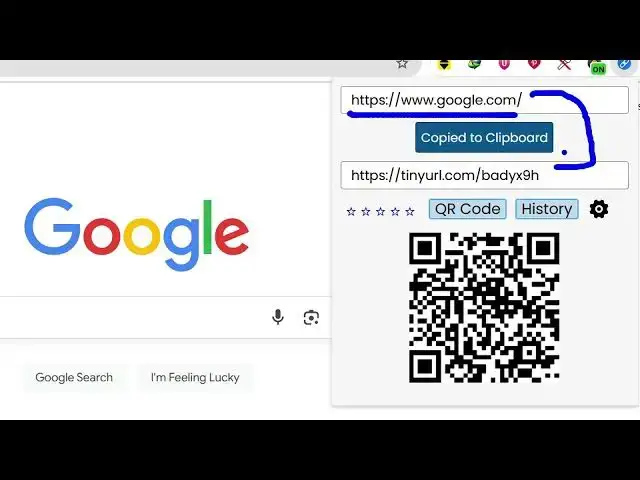
and just click on this extension. So
1:18
automatically this will uh
1:21
uh uh shorten this URL to this URL. It
1:25
will give you this and also it will
1:27
instantly generate the QR code as well.
1:30
So here you can right click and save
1:32
this QR code image as well inside your
1:34
computer. So it's very simple as you can
1:36
see it's downloaded the QR code as well.
1:40
So from a single click you will be able
1:42
to shorten this URL. It gives you this
1:45
short URL and which will redirect you to
1:48
the google.com. So here you can try
1:52
anything. So I just write here
1:54
JavaScript tutorial. I go to any
1:56
specific web page.
2:05
If you have a long URL right here. If I
2:08
go to this URL
2:10
again, if I click, then it will give you
2:13
this tiny URL. And once you go to this
2:15
URL, it will redirect you to that
2:17
specific URL. So from a single click,
2:20
you'll able to also generate the QR code
2:23
as well. So here you can basically
2:26
select what sort of URL shortener you
2:28
want to use. Tiny URL, Bitly. So from a
2:32
single click you will be able to use all
2:34
these popular URL shorteners
2:38
and uh you can also enable night mode as
2:41
well
2:44
and uh these are all the settings uh
2:47
having inside this plug-in. So once you
2:49
install this this will rightly appear
2:51
inside this section and it will shorten
2:54
your URL also convert to QR code as
2:57
well. So definitely try this extension.