Up next in 10

Format C/C++ Code Instantly in VSCode with Intellisense Support – INSANE Extension!
Aug 3, 2025

Get the full source code of application here:
Show More Show Less View Video Transcript
0:00
Uh hello guys, welcome to this video. So
0:02
Uh hello guys, welcome to this video. So
0:02
Uh hello guys, welcome to this video. So in this video, I'll show you how to
0:03
in this video, I'll show you how to
0:03
in this video, I'll show you how to format your C C++ code inside VS Code.
0:08
format your C C++ code inside VS Code.
0:08
format your C C++ code inside VS Code. So by default, VS code doesn't have an
0:10
So by default, VS code doesn't have an
0:10
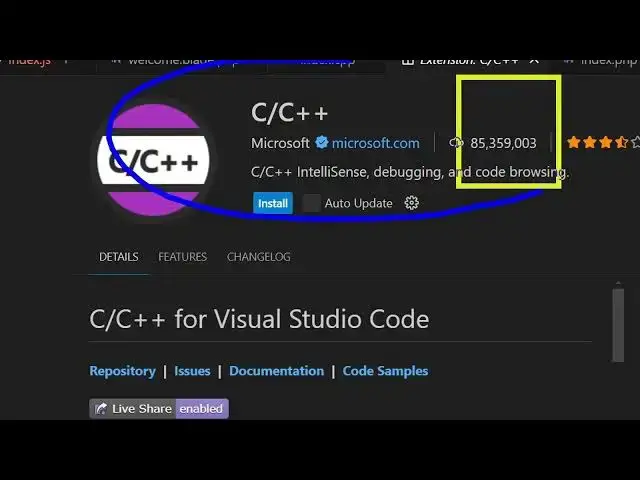
So by default, VS code doesn't have an extension to format C C++ code. So if
0:13
extension to format C C++ code. So if
0:13
extension to format C C++ code. So if you go to the extensions tab, just type
0:16
you go to the extensions tab, just type
0:16
you go to the extensions tab, just type here C C++
0:19
here C C++
0:19
here C C++ and you will actually see this official
0:21
and you will actually see this official
0:21
and you will actually see this official extension by Microsoft. You just need to
0:25
extension by Microsoft. You just need to
0:25
extension by Microsoft. You just need to install this. It provides you with all
0:26
install this. It provides you with all
0:26
install this. It provides you with all the features related to C++ such as
0:29
the features related to C++ such as
0:29
the features related to C++ such as intellisense, formatting, debugging, all
0:31
intellisense, formatting, debugging, all
0:31
intellisense, formatting, debugging, all this stuff. So if you don't have this
0:34
this stuff. So if you don't have this
0:34
this stuff. So if you don't have this extension then there is no other
0:37
extension then there is no other
0:37
extension then there is no other extension which is there in VS code. If
0:39
extension which is there in VS code. If
0:39
extension which is there in VS code. If you right click you will not see this
0:41
you right click you will not see this
0:41
you right click you will not see this option of formatting.
0:43
option of formatting.
0:44
option of formatting. So if you have unforatted C++ code, you
0:47
So if you have unforatted C++ code, you
0:47
So if you have unforatted C++ code, you will not be able to format this. So
0:49
will not be able to format this. So
0:49
will not be able to format this. So simply click the install button. It's
0:51
simply click the install button. It's
0:51
simply click the install button. It's used by almost 85 million developers.
0:54
used by almost 85 million developers.
0:54
used by almost 85 million developers. You can see. So simply click the install
0:56
You can see. So simply click the install
0:56
You can see. So simply click the install button and as soon as you do this now
0:59
button and as soon as you do this now
0:59
button and as soon as you do this now you will see this option will appear of
1:02
you will see this option will appear of
1:02
you will see this option will appear of format document
1:05
format document
1:05
format document and you simply say format document and
1:07
and you simply say format document and
1:07
and you simply say format document and you simply configure this formatter as
1:10
you simply configure this formatter as
1:10
you simply configure this formatter as default
1:12
default
1:12
default and as soon as you do this you will see
1:14
and as soon as you do this you will see
1:14
and as soon as you do this you will see all your code will be formatted
1:17
all your code will be formatted
1:17
all your code will be formatted in a matter of second with a single
1:19
in a matter of second with a single
1:19
in a matter of second with a single click. Again simply click format
1:23
click. Again simply click format
1:23
click. Again simply click format document and automatically you will see
1:25
document and automatically you will see
1:25
document and automatically you will see all your code will be formatted. So this
1:27
all your code will be formatted. So this
1:27
all your code will be formatted. So this is a really easy way by which you
1:30
is a really easy way by which you
1:30
is a really easy way by which you install the official extension by
1:31
install the official extension by
1:31
install the official extension by Microsoft to in activate this and then
1:35
Microsoft to in activate this and then
1:35
Microsoft to in activate this and then automatically this will format your code
1:38
automatically this will format your code
1:38
automatically this will format your code and auto also it provides you with the
1:40
and auto also it provides you with the
1:40
and auto also it provides you with the intellisense features as well. So as you
1:43
intellisense features as well. So as you
1:43
intellisense features as well. So as you write the code here you basically will
1:46
write the code here you basically will
1:46
write the code here you basically will get all this
1:51
autocomplete suggestions as well. So
1:54
autocomplete suggestions as well. So
1:54
autocomplete suggestions as well. So it's very easy to
1:57
it's very easy to
1:57
it's very easy to code C++ as well. So as you write here
2:01
code C++ as well. So as you write here
2:01
code C++ as well. So as you write here you will see the suggestions coming.
2:05
So definitely try this official
2:08
So definitely try this official
2:08
So definitely try this official extension
2:09
extension
2:09
extension related to C C++ to format code and also
2:12
related to C C++ to format code and also
2:12
related to C C++ to format code and also add intellisense features in VS code.
#Programming
#C & C++