Up next in 10


Get the full source code of application here:
Show More Show Less View Video Transcript
0:00
Uh hello guys, welcome to this video. So
0:02
in this video, I'll show you a AI
0:04
platform which can actually turn text
0:06
inside videos with different AI voices.
0:09
The platform name is flicky.ai. If you
0:12
go to the browser, simply type this or
0:15
you can even search this on Google as
0:17
well. L
0:21
F L I KI.
0:24
So this is the actual tool here,
0:27
flicky.ai.
0:29
So simply go to this and simply sign up
0:32
to get started here and you can sign up
0:36
using your Google account.
0:41
So once you sign up
0:44
you can try this platform.
0:51
So just select a bunch of question.
0:55
So right here you can subscribe to the
0:58
paid plans here which is the standard
1:00
plan which gives you credits for 180
1:02
minutes export length 15 minutes. So
1:05
these are some of the plans or you can
1:07
continue with the free plan. So right
1:10
here these are bunch of options you can
1:13
say if you have a script or a idea.
1:18
So let me select the script option. So
1:21
right here inside this you need to paste
1:23
your script. So for generating the
1:27
scripts you can make use of this
1:28
toolsclude.ai
1:30
which is completely free. Right here you
1:32
can simply say generate
1:35
script for
1:38
302
1:40
whiteboard avatar video
1:43
explaining
1:45
about programming. So now it will
1:48
actually give you a step-by-step prompt
1:52
because prompts are really important
1:54
when it comes to generating videos using
1:56
AI. So that's why you need to use this
2:00
scripts right here.
2:03
So this will
2:05
simply copy this and paste it right
2:07
right here. And after that click on
2:09
next.
2:11
And now you choose your template what
2:13
sort of templates you want to use.
2:17
Let me select this one.
2:21
And right here you can select which sort
2:23
of language direct stock media
2:27
you can select or AI avatar.
2:33
You can even select voices as well.
2:36
Gender you can also do at different
2:39
voices are there.
2:43
Click on submit and after that you will
2:46
basically generate a video right here.
2:51
So once it completes you will get this
2:54
notification and the video will play.
2:59
So definitely check out this platform
3:01
flicky.ai AI and they do have
3:05
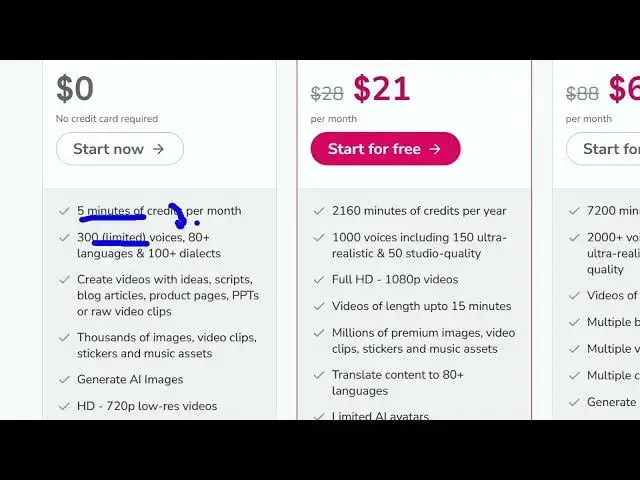
the free plan here which you can
3:06
actually create 5 minutes of credits 300
3:10
limited voices but the paid plan is $21.
3:17
So just wait for some time as the video
3:19
is generated.
3:54
So once it completes you will see the
3:57
video here.
4:13
So now you can see the video is
4:14
generated. Let me turn on the volume.
4:17
0 to 3 seconds.
4:34
We write these steps special languages
4:36
computers understand like Python,
4:39
JavaScript or Java.
4:43
So in this easy way guys you can create
4:45
videos using this. It totally depends
4:47
upon what prompt you write. I am not
4:49
good at generating videos. So
4:52
you click this option generate avatar
4:54
video for the current voice over. So
4:56
once you do this the lip sync will be
5:00
there or you can even replace your
5:03
different avatar as well. So you can
5:05
select whatever thing.
5:08
So then you can download this video by
5:11
clicking the download button. So
5:13
definitely check out this platform
5:14
flicky and also check out my website
5:18
freemediatools.com
5:20
which contains thousands of tools.