Up next in 10

🚀 Fitten Code + Deepseek AI Agent are INSANE! Better Than Copilot, Claude & Cursor in VSCode! 🔥
Jul 24, 2025

Get the full source code of application here:
Show More Show Less View Video Transcript
0:00
Uh hello guys, welcome to this video. So
0:02
in this video, I'll show you yet another
0:03
VS code extension for AI coding
0:06
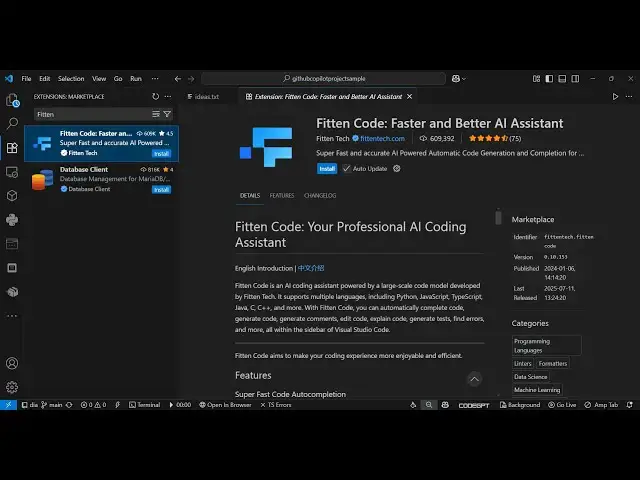
development and it's called as fite
0:11
code. If you go to the extensions tab,
0:13
just search for this. It's got almost
0:16
600,000 installs. It's similar to GitHub
0:19
Copilot, Claude and Cursor like tools.
0:23
And this is their official website as
0:25
well, fi
0:28
n tech.com.
0:31
It's a Chinese-based AI code assistant.
0:33
As you can see, this website is in
0:35
Chinese. And now to install this, simply
0:38
click the install button. And as you
0:41
install this on the sidebar section, it
0:44
will appear.
0:49
So simply activate this. After
0:51
activating this,
0:55
it will be simply you
1:00
click that option right here, start
1:02
chat. And first of all, you need to you
1:05
can even try this in the browser as well
1:09
by clicking this option. So it's also
1:11
available to check
1:14
and then you just need to sign up using
1:17
your Google or GitHub account.
1:32
So just write here in this.
1:44
So the main problem is that the website
1:47
is in Chinese. So it is difficult to
1:50
understand what is written right here.
1:52
So
1:54
but you simply click on the login button
1:57
right here to sign up.
2:03
Don't know why it is not working this
2:04
button. Try and browse.
2:34
So yeah this is the interface here you
2:36
see fitten
2:40
fast accurate efficient and save AI code
2:44
assistant and
2:49
the pricing if you see in the free plan
2:51
you get real time line functional code
2:55
generation
2:57
All these features you get the program
3:00
start like this. You can even chat with
3:02
image online search projectwide chat all
3:06
these things
3:19
also provides you with the web demo as
3:21
well. So you can try this completely
3:23
free right in at this address
3:25
code.fittech.com/try.
3:29
So right here you select the whatever
3:31
programming language you're working
3:32
right here. So let's suppose I say
3:35
JavaScript and right in the chat prompt
3:37
right here I just need to enter whatever
3:41
task. So I say that build a
3:50
image to PDF.
3:55
So right here as I ask the question it
3:57
is generating the response for me.
4:08
So there is an option here which will
4:10
insert
4:11
and automatically also show the live
4:14
preview of the application as well. So
4:16
as you can see here you can change the
4:19
model here by default it's using the
4:21
default lum but you can even change this
4:23
to deepsek.
4:27
So here you select
4:29
the images,
4:33
click on convert to PDF.
4:43
So in this easy way
4:46
you can copy to clipboard as well and
4:48
simply paste this code right here.
5:01
You also get the download button as
5:03
well. So,
5:11
so right here you can even try this by
5:14
signing it with your Google account.
5:17
Simply select
5:22
and simply just login it. After logging
5:25
in you will get this success message and
5:27
uh now this will be activated. So right
5:30
here either you can chat or inside the
5:34
agent mode.
5:40
So right here you will
5:43
write the task here.
6:02
So I basically written this prompt build
6:04
an image to PDF web app create a file in
6:07
my working directory. So now it will
6:10
actually create this file.
6:26
So already a file is present here if you
6:29
see.
6:33
So it is automatically detecting it.
6:58
So in this easy way you can actually
7:05
so it will create a file called as
7:08
science.html
7:10
in the current working directory.
7:14
So as you can see it is creating this
7:16
file.
7:24
So that file will automatically create
7:26
get created. So just wait for this
7:29
process to finish.
7:49
So you also get code completions as
7:51
well. So if you write any sort of code
7:53
right here if you
7:57
will see it is suggesting you code
8:00
automatically
8:03
just press the tab key to accept the
8:05
suggestions which are coming. So in this
8:07
easy way it supports all the languages
8:09
as well. So definitely try this
8:11
extension uh
8:14
fit and code.
8:17
It's using deepse similar to chat GPT,
8:21
GitHub copilot, cloud and cursor.
8:25
And also check out my website
8:28
freemediatetools.com
8:30
uh which contains thousands of tools.
#Programming
#Software
#Business & Productivity Software