Up next in 10


Buy the full source code of application here:
Show More Show Less View Video Transcript
0:00
uh hello guys uh welcome to this video
0:02
so in this video I will show you how to
0:05
flip or rotate uh a video file using
0:08
ffmppg
0:10
uh right in the command line it's very
0:12
simple uh I will show you so you should
0:15
have f MPG installed inside your command
0:18
line so I have simply a video right here
0:22
if you see a MP4 video so if I play this
0:25
video it's a very
0:28
simple you can see it's a
0:31
simple video so now if I want to rotate
0:35
or flip this video I have this very
0:37
simple command in ffmppg simply write
0:40
here
0:41
fmpp and then we provide the input file
0:44
which
0:46
is
0:48
trim.mpp4
0:50
so we simply provide input file and then
0:53
we have this video filter in ffmppg we
0:57
access it using this keyword here dash
1:00
VF vf stands for video filter -vf so
1:05
after that we just need to provide in
1:07
double quotes uh this video filter which
1:10
is transpose t r a n s p o s e is equal
1:15
to and then it actually takes various
1:18
values
1:19
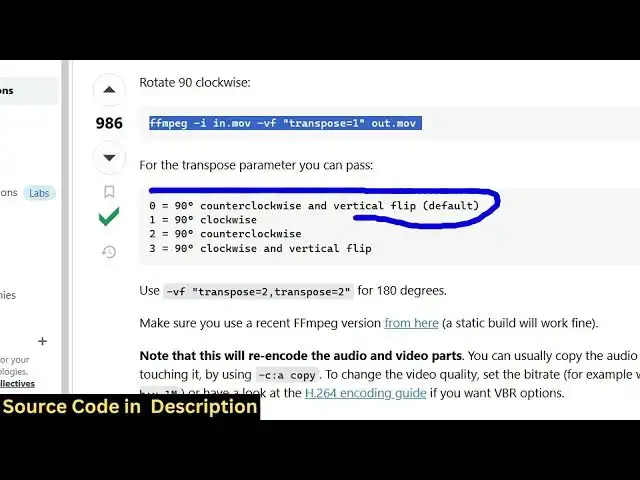
here it can either take 0 1 2 3 so I
1:25
have uh linked this blog post here of
1:28
stack overflow where I got this command
1:31
so where they have explained each option
1:33
in detail so you can see if you provide
1:35
zero right here it will rotate the video
1:38
in the counterclockwise direction and it
1:41
will flip the video in the vertical
1:42
direction so it is very much useful if
1:44
you want to create Instagram video you
1:47
can actually flip the video in the
1:49
vertical direction so if I just provide
1:52
here transpose to zero and then we
1:55
simply write the output file name which
1:57
is can give so very simple command here
2:01
we provide the input file then we just
2:04
have this video filter -vf in double
2:08
quotes we just write transpose is equal
2:10
to zero and then we have the output file
2:13
so just enter and then it will process
2:16
this
2:18
so you can see if I try to open the
2:21
output file right here you will see it
2:25
the video is successfully rotated in the
2:29
counterclockwise direction and it is
2:31
flipped in the vertical direction if you
2:33
see
2:34
that and let me show you all the four
2:37
options right here and if I change this
2:40
from 0 to one you will see some slightly
2:44
different output
2:51
so now it has rotated it in the
2:55
clockwise direction you can see
3:04
that so you can just modify this command
3:07
here you can link this article right
3:10
here so you can just also provide three
3:14
here as well
3:16
so you can play with this command with
3:18
different options to get different
3:20
outputs right here you will see if I
3:22
provide three here I will get a
3:24
different output uh the video will be
3:27
rotated in a different
3:30
direction so you can see that
3:32
so this is a very simple but very useful
3:36
command as well
3:40
so in this way you can rotate or flip
3:43
your vid videos in
3:45
ffmppg uh thank you very much for
3:48
watching this video and also check out
3:50
my website
3:52
freemediattools.com which contains
3:54
thousands of tools regarding audio video
3:56
and image