Up next in 10


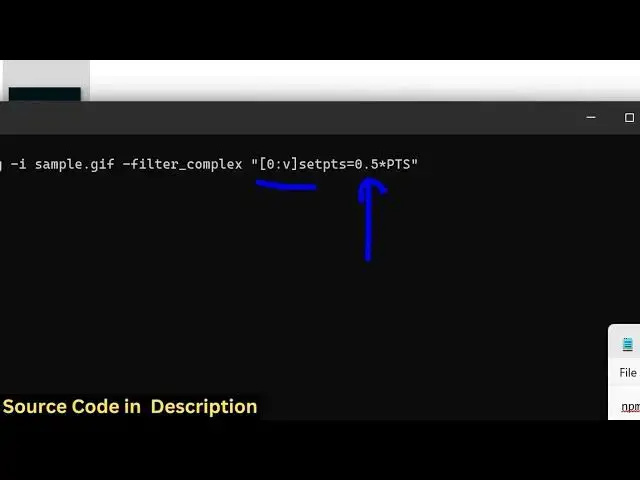
ffmpeg -i input.gif -filter_complex "[0:v]setpts=0.5*PTS" output.gif
Show More Show Less View Video Transcript
0:00
uh hello guys uh welcome to this video
0:02
so in this video I will show you how to
0:04
change the playback speed of a GIF
0:07
animation right in the ffmppg command I
0:10
will show you so this is actually a
0:12
simple GIF animation file that I will be
0:15
working upon so if you try to if you
0:17
want to increase or decrease the speed
0:20
of uh how this GIF animation is playing
0:22
you can control the speed using a very
0:24
simple ffmpg command so just open your
0:27
command line and we have this command
0:29
right here which is
0:31
ffmppg- and then you provide your input
0:33
file name which is
0:35
sample.gif we are working right here and
0:38
after that there is a filter that you
0:40
can apply in
0:41
ffmpg- filter complex and in double
0:45
quotes we actually manipulate the speed
0:48
of the gif animation by simply writing
0:51
these angular brackets 0 colon v and
0:56
then there is a property that you can
0:58
control the speed here which is set pts
1:01
is equal to and then we multiply the
1:04
numeric value
1:06
0.5 multiplied by
1:09
pts so this is actually the filter right
1:12
here set pts filter so if the value is
1:17
small here if it is the value is smaller
1:20
than one then the gif animation will be
1:23
quicker
1:24
so the speed will be larger and then we
1:28
put
1:29
the output file which is
1:32
increased.gif so as I execute this
1:34
command you will see it will create a
1:36
new GIF file increase.gif if I try to
1:39
open this file you will see the speed of
1:41
this GIF animation will be slightly
1:43
increased as compared to the original
1:46
one this is actually the original
1:49
speed and now if you see the speed is
1:52
little bit increased
1:55
you can see that
1:58
so the main value is this one which is
2:00
0.5 so if I incre if I decrease this
2:04
even more let's suppose I provide
2:06
0.1 and uh now if you see the speed will
2:10
be very much higher you will see that
2:13
how we increase the speed of this GIF
2:16
animation so in this way you can
2:19
increase it and now for decreasing it
2:21
you actually increase that value that I
2:24
showed you which is set pts value so for
2:27
this you just need to apply
2:30
uh
2:32
1.5 so this will actually reduce the
2:35
speed of the GIF
2:38
animation so now you can see the speed
2:41
is very much decreased
2:45
so this is actually a very simple ffmpg
2:49
command where you can actually control
2:50
the playback speed of your GIF animation
2:54
either you can increase it or decrease
2:56
it so I have given this command in the
2:59
description of this video you can play
3:00
with this command to actually adjust the
3:03
speed and uh also check out my website
3:08
freemediattools.com uh which contains th
3:10
thousands of tools
#Fun & Trivia
#Flash-Based Entertainment
#Software
#Multimedia Software
#Online Goodies
#Clip Art & Animated GIFs
#Animated Films