Up next in 10

🔥 Cursor AI IDE Alternative Bind AI = Code, Debug & Deploy with Claude + Gemini Copilot!
Jul 20, 2025

Get the full source code of application here:
Show More Show Less View Video Transcript
0:00
Uh hello guys, welcome to this video. So
0:02
in this video I'll show you a AI coding
0:05
platform where you can actually generate
0:07
applications with a single prompt and
0:10
also deploy those applications as well.
0:12
So it will be a great alternative to
0:14
tools like uh cursor AI which basically
0:18
runs on a subscription based model. So
0:21
this is the IDE name right here bind AI
0:24
it is called as. So this is their
0:26
website getbbind.co Go
0:29
and uh as you can see from a single
0:32
prompt as you must just just just write
0:35
the whatever application you want to
0:36
generate it will generate all the code
0:38
for you a single prompt and then all the
0:42
code will be automatically generated for
0:44
you. So now to get started you simply
0:46
click
0:48
start creating with IDE. So then it will
0:51
launch a complete IDE right here in the
0:53
browser itself. No need to actually
0:56
download any sort of software inside
0:58
your machine. So just need to login with
1:02
a sign up here on this website and you
1:04
can login with your Google account.
1:07
Simply select the account here and you
1:09
can try this application for completely
1:11
free.
1:14
So just grant the permission here and
1:16
after that uh a full IDE will be
1:19
constructed and here you just need to
1:22
actually write in the prompt here what
1:25
sort of application you want to generate
1:27
here. So let's suppose I say build a
1:34
reacts image to PDF application in
1:38
browser.
1:39
So similarly you will basically write
1:42
whatever application that you want to
1:43
generate and as soon you can see it is
1:46
using all the advanced AI models such as
1:50
the cloud ultra basic everything
1:54
and as soon as you do this automatically
1:57
the code will be generated.
2:03
So it is generating the files here
2:06
and we also have the buttons to actually
2:08
show the live preview of the project
2:10
download project and also we have the
2:13
button to deploy this project as well.
2:19
So
2:21
so it is telling us that shall I go
2:24
ahead and build this? So you just need
2:26
to answer yes
2:28
and deploy. So as soon as you do this
2:31
automatically it will start building out
2:33
your project
2:36
it will create all the first of all it
2:39
will create package.json and then it one
2:41
by one all the files will be constructed
2:44
automatically.
2:45
So from a single prompt
2:48
as you can see right here it click the
2:50
execute button. So it will install all
2:52
the packages for you.
2:57
So now the node packages are installed.
3:02
So you can see automatically all the
3:03
source code is generated. And if you
3:05
click the button show preview. So here
3:08
the application will be shown right
3:10
here. It will start a local development
3:13
server.
3:18
So as soon as it starts
3:22
developing the project you will get this
3:24
notification. So as you can see it is
3:27
creating all these files.
3:44
So
3:46
once it completes you will see basically
3:49
it is saying installing dependencies
3:51
please wait while we set up your
3:52
project. So
3:56
if you just go to Google just type here
3:58
bind AI and the very first result which
4:01
comes this is the bindi copilot this is
4:04
the thing it uses a it will be a great
4:08
alternative to tools like cursor claude
4:12
gemini and you can basically try this
4:15
for completely free for 3 days after
4:17
that you just need to
4:21
uh pay the subscription fees so if So I
4:23
show you the models here. In the free
4:26
model,
4:27
in the free plan, you get unlimited
4:29
access to their AI co-pilot with all the
4:34
models cloud GPT.
4:37
And the premium model starts from $18
4:40
per month. And uh as you can see still
4:43
it is generating the code here
4:51
and you can even click download project.
4:53
So it will actually download all the
4:56
source code files and inside your
4:58
computer. So you can actually see all
5:01
the source code which which has been
5:03
successfully generated by this tool. So
5:07
you can instantly generate any source
5:09
code from this tool. So it's that easy.
5:14
And we also have the button of deploy.
5:17
So if you want to deploy this
5:18
application, you click this button uh
5:21
deploy.
5:23
So this will actually start deploying
5:25
your applications. So,
5:48
so this is a platform guy definitely
5:51
check out this and using this platform
5:53
it will generate deploy everything it
5:56
will do for you
5:59
and basically it also
6:02
is from a single prompt here you can
6:04
generate application so it is telling us
6:06
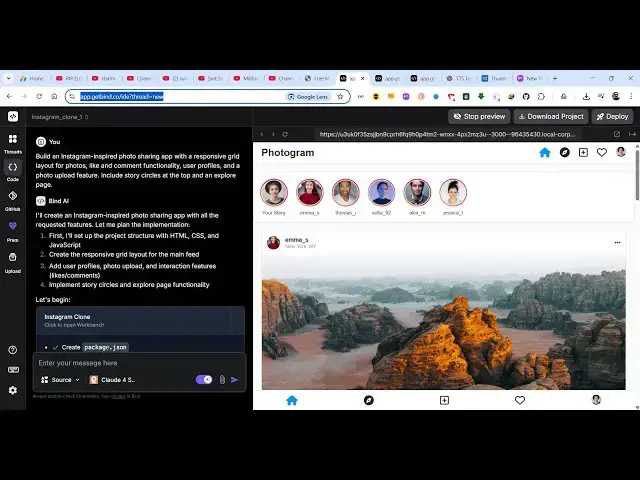
that try this Instagram clone you can
6:10
build
6:14
so this is a single prompt here build
6:16
Instagram inspired photo sharing app
6:18
with a responsive grid layout for photos
6:21
so you basically write this prompt here
6:24
and then the AI will start generating
6:26
the project for you.
6:32
So at this moment of time you can uh
6:35
start
6:39
using this for completely free at this
6:41
moment of time.
6:47
You also see the progress bar as well.
6:49
So which actually shows you how much
6:50
time is remaining.
6:54
In this way you can full screen as well.
7:31
So this is a platform guys. Definitely
7:33
check out this.
7:35
You can also attach files as well by
7:38
using the file. And now you can see your
7:40
Instagram has been clone has been
7:42
successfully constructed.
7:44
And uh
7:47
this is your source code
7:50
and this is the live preview which is
7:52
shown right here. So
7:55
it's that easy to construct and here you
7:57
can select any sort of photographs that
8:01
you want to upload. Click on share.
8:11
So in this easy way you can actually use
8:14
this tool to actually construct
8:16
applications. It's bind AI copilot
8:20
and also check out my website
8:22
freemediattools.com
8:24
which contains thousands of tools.
#Programming
#Software
#Business & Productivity Software