Up next in 10

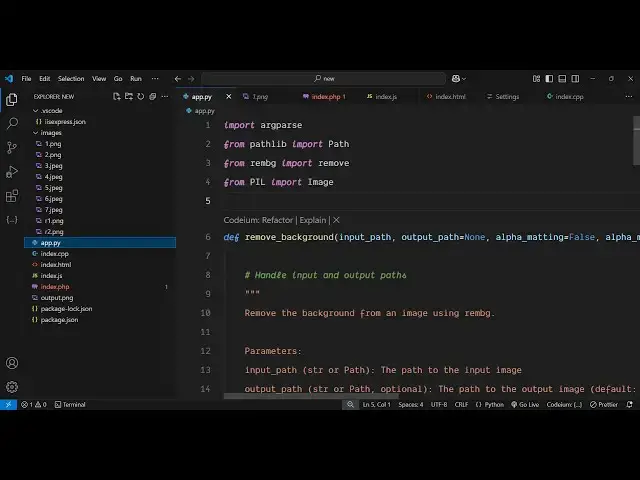
Claude AI gave me this Python Script Which Removes Background From Images Unlimited For FREE Forever
Mar 7, 2025

Get the full source code of application here:
https://gist.github.com/gauti123456/d1d0a6aac48ab75ef5a5c72cbc8573de
Watch My Visual Studio Code IDE Setup Video For Fonts,Themes & Extensions
https://youtu.be/Bon8Pm1gbX8
Hi Join the official discord server to resolve doubts here:
https://discord.gg/cRnjhk6nzW
Visit my Online Free Media Tool Website
https://freemediatools.com/
Buy Premium Scripts and Apps Here:
https://procodestore.com/
Show More Show Less View Video Transcript
0:00
uh hello guys welcome to this video so
0:03
in this video I will show you a python
0:05
script which will remove background from
0:08
your images for completely free and it
0:11
is not using any paid API it's
0:13
completely open source it's completely
0:15
free inside Python and I basically found
0:18
out using Cloud AI Cloud AI is a very
0:21
good coding AI platform this is actually
0:24
the new cloud. a it's artificial
0:28
intelligence spe specific built for
0:30
coding application so I just uh one day
0:33
written this prompt here python script
0:36
to remove background from image using
0:38
open source package so Cloud give me
0:41
this response here you will see I will
0:43
create a python script that removes the
0:45
background from an image using an open-
0:47
Source package and one of the most
0:49
popular options for this task is R MBG
0:53
so this is actually a python package
0:55
which removes the background completely
0:57
free you can install on your system
0:59
which uses is the this model right here
1:02
this is ai ai model and then it actually
1:05
gave me this quote right here and if you
1:07
need the full python script I've given
1:09
the link in the description where I
1:11
given this you can directly copy that
1:14
and also it gives me automatically this
1:16
instruction to use this script you need
1:18
to install this required packages so it
1:21
did gave me these instructions pip
1:23
install you need to install these two
1:25
packages and then it also showed me how
1:28
to run this python script simply provide
1:31
the input file it can be jpg PNG any
1:34
image file and then you can even provide
1:37
output file where you need to store the
1:40
output so now let me run this python
1:42
script so I already have this python
1:46
script right here and I have a series of
1:48
images that I will show you so these are
1:50
the seven images that I have so you can
1:54
simply run this the only prequest for
1:58
this python script you should have
2:00
python installed on your system before
2:03
running this so just make sure that you
2:05
have the latest version of
2:07
python so I've already have the latest
2:10
version which is at the time of
2:12
recording this video is 3.13 the latest
2:15
version so it's compatible with the
2:17
latest version so before running the
2:19
script you should have these modules
2:21
installed here this is re MBG module so
2:25
you can directly install these packages
2:27
using pip install re
2:30
MBG and then also this pillow which is
2:34
again a open source package of python so
2:38
just install this by executing this
2:39
command here so this will install these
2:41
two packages inside your
2:44
python so it is just downloading it so
2:47
this will hardly Take 5 to 10 seconds
2:50
and then it will install this so once
2:52
again if you run this you will get this
2:54
error you do need to install this
2:56
package as well which is O NX run time
3:00
this is also required so
3:02
pip
3:04
install on n n x run time so also
3:09
install this package as
3:16
well so after you install this now you
3:19
can run your python script so now to run
3:21
this script right here first of all you
3:23
provide the name of the script here
3:25
python followed by the name of the
3:27
script
3:28
app.py and then we need to provide the
3:31
input image so let's suppose I'm taking
3:33
this example the image is present in the
3:35
images folder so images 1.
3:39
PNG and here we provided this input
3:41
image now to store the
3:43
output if you want to store it in the
3:46
same folder so I will say RN r1. PNG so
3:51
we just provided that- o flag for the
3:54
output file so this output file will be
3:57
created in the same folder so if you
3:59
just run this script right here so it
4:01
will take some time and it will remove
4:03
the background you will see background
4:05
removed successfully output saved so it
4:09
is saved here you will see the
4:10
background is successfully removed this
4:12
was this image and you can see the
4:14
output on your screen so you can just
4:17
see the quality here it's tremendous
4:20
using this free open-source AI model
4:22
inside python you can see that so you
4:25
can even open it so it's completely
4:28
transparent all the background is
4:30
successfully removed so you can see that
4:33
so we haven't used any paid Source API
4:36
haven't used any paid API it's
4:38
completely free you can do it unlimited
4:40
number of times you just need python
4:43
installed on your system and you can
4:45
change this image
4:50
to.png so you can just see it literally
4:53
take very less
4:57
time so just make sure that oh sorry
4:59
this was a JPG image so sorry this was a
5:03
JPG image so just change this
5:08
extension so you can do this with any
5:11
image type this is now the jpg image so
5:13
I just need to rename
5:15
this so it will now create the second
5:23
image
5:26
so I think this is the jpg image uh so
5:30
this will be jpg not do
5:36
jpg so what I will prefer uh for this to
5:41
completely work here you just need to
5:43
change all these images to
5:47
PNG because this Library doesn't work
5:50
with JPG so what what I will recommend
5:54
that you uh actually convert all these
5:56
images to PNG so there will be this
5:59
extension available in vs
6:02
code image converter if you just
6:06
search just make sure that you convert
6:08
all your images
6:13
to um P
6:17
so just write here PNG converter
6:37
PNG conver you can just do this by
6:40
visiting my own website which is freem
6:43
mediat tools.com I have this converter
6:46
just find out image
6:48
converter just make sure that you all
6:50
your images are in PNG
6:53
format so you can locate
7:01
so this is present in the video give
7:13
folder so now this image is there if you
7:27
see I will just show you for this image
7:30
so that you can understand this is
7:33
actually the image let me delete this
7:37
image and rename this
7:43
to so now we have this 2.png so it is
7:47
there in the PNG format so this takes
7:49
just a little bit of time
7:51
so just make sure that all your images
7:54
are in PNG so if you execute
7:57
now you will see back background removed
8:00
successfully and it actually removed
8:04
it so this one you can see it actually
8:07
remove this
8:09
one for some images it will slightly
8:12
vary but this is completely open source
8:15
it's totally free you can deploy this
8:18
python script if you know development
8:21
you can deploy this python
8:23
script online and create a simple online
8:26
tool which converts or remove background
8:29
from
8:30
images so I have given the link in the
8:33
description you can directly copy paste
8:35
this python script and let me just guide
8:41
you what this python script does
8:45
basically so at the top is it is using
8:48
this pillow library from image and this
8:50
open source package which is RM
8:54
import and then we have return a simple
8:56
function remove background and this
8:58
function actually takes the input image
9:00
path then we also provide the output
9:02
path and these are the additional
9:05
settings for removing the background so
9:07
we have declared these three
9:10
variables and there we take the input
9:13
image using the path
9:15
here and then we actually read the file
9:20
we open the file here by the open method
9:22
of python then we use this function
9:24
remove function which removes the
9:26
background of the input image just
9:29
passing these four default options
9:31
lastly we save the output image at the
9:35
location so now you can run this program
9:37
in the command line by simply calling
9:40
the python script F providing the input
9:43
file and then the output file so in this
9:45
way guys Claud you can visit this
9:48
website as well Claude I found this
9:51
website to be very useful especially for
9:53
programmers and coders cloud. it's
9:56
better than chat GPT and all the AI
9:58
providers it's the best AI for
10:01
programming so you can write prompts
10:03
here and it will give you very specific
10:08
examples like this one that it give me
10:10
free python script for converting or
10:13
removing background so thank you very
10:16
much for watching this video and also
10:17
check out my website freem mediat
10:19
tools.com which contains thousands of
10:21
tools regarding audio video and image
10:24
and I will be seeing you in the next
10:26
video