Up next in 10

Build a Vue.js FFmpeg.wasm Video Editor — Trim Clips, Cut Scenes, Export in Browser
Mar 5, 2026

Buy the full source code of application here:
https://procodestore.com/index.php/product/build-a-vue-js-ffmpeg-wasm-video-editor-trim-clips-cut-scenes-export-in-browser/
Live Demo of App:
https://freemediatools.com/videocutter/
Show More Show Less View Video Transcript
0:00
video editor that I developed directly
0:02
in Vue.js using ffmpg web assembly
0:04
library. I've also deployed this and
0:07
given the demo link in the description
0:09
of the video. So please check the full
0:11
description. This is the actual solution
0:13
video cutter and trimmer. This is the
0:16
interface which looks something like
0:17
this. So once you select the video file
0:21
it's a single page application. There is
0:23
no back end to it. Now we have these
0:25
sliders. Select the starting duration
0:27
and the ending duration.
0:30
So once you selected this then we have
0:32
this button that you can click trim
0:34
video and the processing will directly
0:36
happen directly in the browser and now
0:38
this is your output file. You can play
0:41
this output file and even download this
0:43
as well. So it's very simple single page
0:46
application and it's developed inside
0:48
Vue.js. I've also given the link in the
0:51
description to purchase the source code.
0:54
So once you purchase the source code
0:55
this will be the directory structure.
0:57
Each component is divided into its own
0:59
view file right here and as you can see
1:03
we are using the view3 framework and we
1:07
are also using ffmpg web assembly
1:09
library as well. So it's very simple uh
1:13
first of all you can try out the demo
1:16
and then if you are happy you can
1:18
purchase the source code we running also
1:21
locally so it's very simple npm rundev.
1:25
So this will start the local development
1:27
server and the exporting processing
1:31
everything directly happens in the
1:32
browser. So localhost 5173 as you can
1:36
see that again you repeat the same
1:39
process you select the video and then
1:42
again you trim out whatever portion that
1:45
you want to.
1:48
So this is your output file. So for this
1:51
we are using fmpp which is a very famous
1:54
library for processing audio and video.
1:57
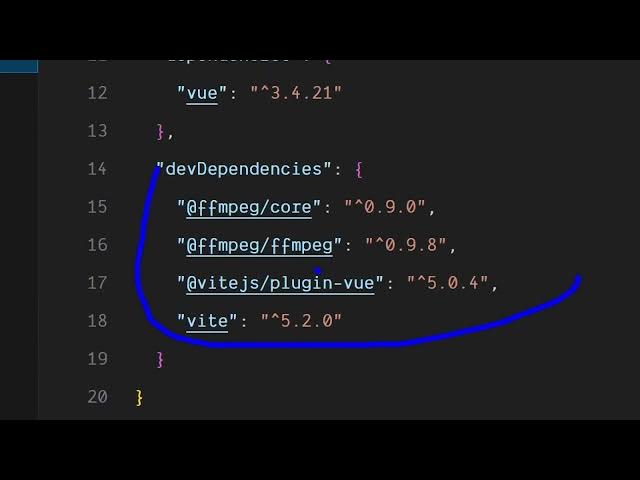
But this solution fmpp web assembly
2:00
allow you to directly execute ffmppg in
2:02
the browser. So that's exactly the
2:06
package that we have used to build out
2:08
this video editor.
2:10
So once you get the source code you can
2:12
even modify it and add additional
2:14
features to it.
2:16
So the link is given for both the demo
2:19
and the purchase link. So check the full
2:21
description
2:23
and this is a complete offline solution
2:26
for building a complete video editor
2:29
where you can trim uh cut your clips and
2:33
the processing all happens directly in
2:35
the browser.