Up next in 10

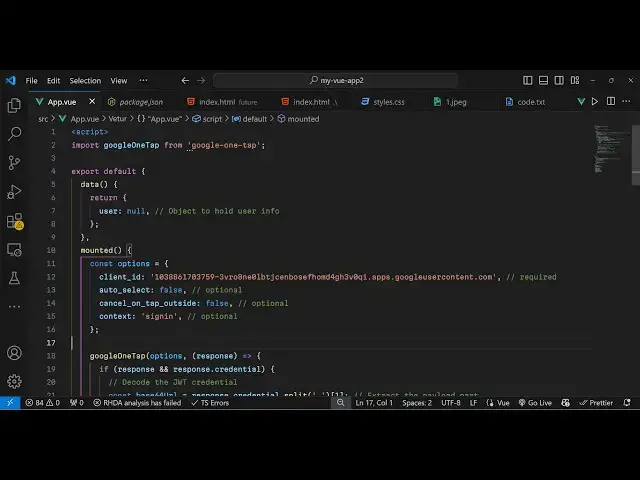
Build a Vue.js 3 Google One Tap OAuth2 Login to Display User Profile in Browser Using google-one-tap
Jan 21, 2025

Get the full source code of application here:
https://codingshiksha.com/vue/build-a-vue-js-3-google-one-tap-oauth2-login-to-display-user-profile-in-browser-using-google-one-tap-in-ts/
Hi Join the official discord server to resolve doubts here:
https://discord.gg/cRnjhk6nzW
Visit my Online Free Media Tool Website
https://freemediatools.com/
Buy Premium Scripts and Apps Here:
https://procodestore.com/
Show More Show Less View Video Transcript
0:00
uh hello guys welcome to this video so
0:02
in this video I will show you how to
0:04
implement One Tap authentication Google
0:06
authentication inside VJs 3 so as soon
0:10
as you load the page you will see on the
0:11
right hand corner of the screen the
0:13
account screen will open and you tap on
0:16
that continue as coding seure so you
0:17
have seen this on multiple sites so as
0:20
soon as you click that the profile
0:22
information will be returned and your
0:24
profile picture email address and
0:26
username will be returned and uh it's a
0:29
very minimalistic package here which we
0:31
are integrating
0:33
so it returns this profile information
0:36
and then you can display this so the
0:39
package is Google one
0:41
tap if you go to npmjs.com
0:45
and just search for this package Google
0:48
One
0:49
Tap so essentially we are using this
0:52
package uh the command is very
0:56
simple so this is the command here I've
0:58
already installed it so it's almost got
1:00
9,000 weekly downloads so now to get
1:03
started uh I've given all the source
1:07
code in the description so just edit
1:09
your app. view file we simply writing
1:13
the code
1:14
here and first of all we need to Simply
1:17
import this module at the top by the
1:21
import statement so Google one
1:23
Tab and then we need to export this
1:27
component and declare some variables
1:30
so we only need one variable for this
1:33
application to store the user profile
1:35
information so the user variable will be
1:39
null and after this we'll be using the
1:41
life cycle method mounted so this method
1:45
will execute as soon as your vuejs
1:47
application executes so inside this
1:50
function we will load the one
1:54
tap SDK so for this we need to provide
1:58
the client ID
2:00
which you will get from Google Cloud
2:03
console and also three more options we
2:06
need to pass which is Auto Select to be
2:08
false then cancel
2:12
on Tab
2:19
outside which is also
2:22
false and then the context here will be
2:25
sign
2:26
in so these are four options it takes
2:30
and for the client
2:32
ID you need to have a Google Cloud
2:34
console account and then you need to
2:37
click on this o or client ID and select
2:41
here from application type to be web
2:43
application and in the authorized
2:45
JavaScript Origins you need to paste the
2:48
homepage URL so I'm developing this
2:50
application on Local Host
2:53
5173 you simply paste it and also you
2:57
paste
3:00
the URL which is Local Host so both
3:02
these versions are required plus the
3:05
port number and then the HTTP Local Host
3:08
and inside the authorized redirect URI
3:11
you need to paste the same URL of your
3:14
homepage plus the boat number and then
3:17
simply click on Create and this
3:20
will so I've reached the limit here of
3:23
36 so I've already created one
3:26
so so this will give you your client ID
3:29
so I will simply copy this and paste
3:35
it inside
3:38
this so after pasting it
3:42
now we can
3:48
actually call this Google One Tap so we
3:52
using this module here that we import it
3:55
and it actually takes the
3:57
options and then it returns response in
4:00
this call back
4:02
function so this response will contain
4:05
this Json web token which is we need to
4:09
decode that token so for decoding this
4:14
basically add this snippet of codes so
4:16
you can find in the description link
4:18
I've given all the source codes so step
4:21
by-step instructions so after you get
4:24
this
4:26
this will actually contain the profile
4:30
information so if you execute this
4:32
application you will see on the right
4:34
hand side window
4:36
the if you tap
4:38
it and inside the
4:43
console it is saying Json playload is
4:45
not
4:49
defined okay sorry this needs to contain
4:52
this
5:07
so you will see that now we get this
5:09
Json response so you just need to pass
5:12
it to convert this into a Json or sorry
5:14
JavaScript object so we use json.
5:21
parts so we create
5:24
another variable data and this we use
5:27
json. par and pass this
5:32
and then store this JavaScript object in
5:34
this disc.
5:36
user
5:43
profile then the email will be contained
5:45
data. email and then the picture data.
5:50
picture so we stored this object which
5:53
contains these three properties name
5:55
email and picture now we just need to
5:57
display this inside the template
6:03
so we have this V if directive so if the
6:08
user information is available then only
6:11
execute
6:15
this so we display the
6:18
image which is contained inside user.
6:24
picture then we display
6:28
the the username like
6:31
this and then we display
6:35
our email address like this displaying
6:38
all these three information so this
6:40
completes the application if you reload
6:42
this click on one tap so it's very
6:45
minimalistic very easy you will see it
6:47
will fetch the profile information
6:48
username and the email address in this
6:51
easy way you can do the authentication
6:54
inside vuejs 3 and you can get the full
6:57
step by-step instruction in my blog post
6:59
the link is given in the description and
7:01
also check out my website as well free
7:04
mediat tools.com uh which contains a
7:07
thousands of tools regarding audio video
7:09
and image and I will be seeing you guys
7:11
in the next video
#Internet Software
#Other