0:00
uh hello guys uh welcome to this video
0:02
So in this video I'll show you how to
0:04
integrate a time picker input form field
0:08
inside your ReactJS application Uh this
0:11
is actually the time input field will
0:13
display right here You will be able to
0:14
edit the time here If you are taking
0:16
time input from your user inside your
0:18
application very simply this time input
0:21
field will display here You can adjust
0:26
uh the module that we are talking about
0:35
simple time field This is actually the
0:41
here It's a third party module and uh
0:44
the command is simple You install this
0:47
It's almost having 14,000 weekly
0:49
downloads and it can actually take
0:51
inputs in different forms This is the
0:53
default input If you also want to show
0:56
seconds you can include them It also
0:58
comes with react material UI as well And
1:02
they have given a nice little demo on
1:04
their website If you go to their website
1:06
with full source code as well So this is
1:09
the default thing You can adjust the
1:14
here And then it also comes with second
1:17
as well if you also want to show second
1:20
And if you want to show custom colors
1:22
you can even pass this as
1:26
well And now to actually integrate this
1:29
is very easy You actually declare the
1:31
functional component here React
1:33
functional component After that you
1:36
simply import the module at the very top
1:38
by using the import statement So import
1:41
time field from react simple time field
1:45
So this is the import statement by which
1:47
we actually import the module And after
1:49
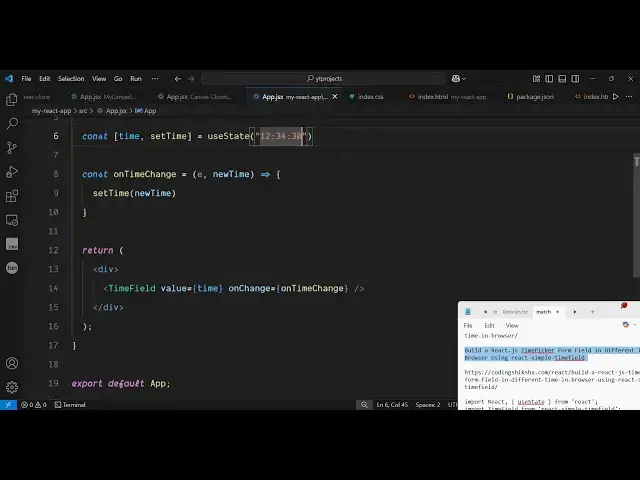
that we declare a state variable So this
1:53
will be time set time So this variable
1:57
will be useful when you using state hook
2:00
Initial value will be you can set any
2:03
time And then wherever you need to embed
2:06
this you simply include this component
2:08
here that we included time field and
2:11
just close it And it actually takes a
2:13
parameter the property the current value
2:17
of the time that you want to attach And
2:20
uh after that it also comes with a
2:24
onchange event handler So as soon as you
2:27
change the time here this onchange event
2:30
handler will execute and here you can
2:33
attach a custom function on time change
2:37
anything you can call and we can define
2:39
this function on time
2:42
change So here e parameter will be
2:47
time these two parameters will be passed
2:49
So here we can update the time by using
2:52
this hook function which is set time is
2:54
equal to new time So in this easy way
2:57
you first of all import this module by
3:00
the import statement Then wherever you
3:02
need to embed this you embed this It
3:04
takes two properties the current value
3:06
and the onchange event handler So here
3:08
we attach this custom function So right
3:11
here new time is there We are setting
3:13
this by the hook function So if you
3:16
refresh your application you will
3:18
actually see this input field appearing
3:20
and here we can change the time here and
3:27
updated So this is the simple way by
3:31
which you can integrate this and
3:34
uh you can if you also want to include
3:37
second you can even include set uh
3:44
well So you can refer to their
3:47
documentation It actually have all the
3:49
options supported with this module You
3:52
can control the hour hand
3:54
minutes local settings minute second
3:57
everything you can control right here
3:59
Size of the clock as well Uh also check
4:04
freemediatools.com which contains
4:06
thousands of tools regarding audio video