Up next in 10

Build a React.js Image to PDF Canva Editor in Browser Using jsPDF & lucide-react in JavaScript
Apr 1, 2025

Buy the full source code of application here:
https://procodestore.com/index.php/product/build-a-react-js-image-to-pdf-canva-editor-in-browser-using-jspdf-lucide-react-in-javascript/
Watch My Visual Studio Code IDE Setup Video For Fonts,Themes & Extensions
https://youtu.be/Bon8Pm1gbX8
Hi Join the official discord server to resolve doubts here:
https://discord.gg/cRnjhk6nzW
Visit my Online Free Media Tool Website
https://freemediatools.com/
Buy Premium Scripts and Apps Here:
https://procodestore.com/
Show More Show Less View Video Transcript
0:00
uh hello guys welcome to this video so
0:02
in this video I'll show you a react CH
0:05
application that I developed in the
0:07
browser which lets you convert a bunch
0:10
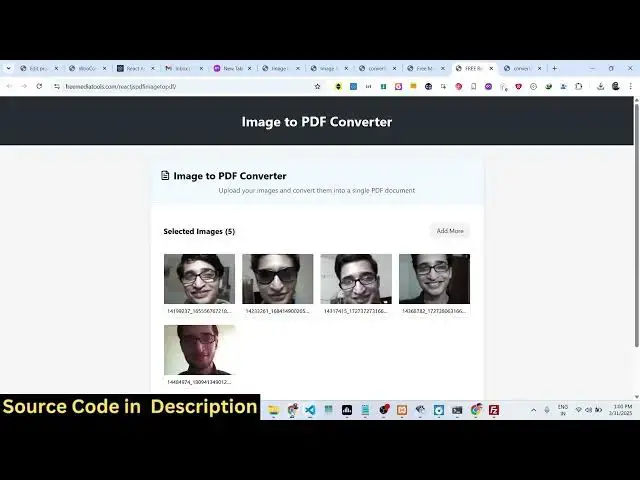
of images to PDF document so this is
0:14
actually the user interface of the
0:15
application I've already deployed this
0:18
website on my website freem mediat
0:19
tools.com you can check out this uh tool
0:23
right here it works right in the browser
0:26
itself it doesn't require any server
0:28
site code so here uh you actually drag
0:31
and drop whichever files you want to
0:35
embed so it will also show you the live
0:38
preview of whichever image files that
0:40
you
0:42
selected you can even click add more to
0:45
add more
0:46
images you will see that so it actually
0:49
shows you how many images you selected
0:51
so five images you selected and then we
0:54
have a button right here convert to PDF
0:57
so it's a similar to canva clone image
0:59
to PDF editor so it's developed inside
1:02
react CHS and it's a static app which
1:04
runs in the browser so if you click the
1:07
convert to PDF button you will see the
1:09
output PDF file will get
1:11
downloaded and if you try to open the
1:14
PDF file right here you will see on each
1:16
page the image will be converted so it
1:20
has created five pages in The PDF so
1:23
this is the third page fourth
1:25
fifth so it's a simple application which
1:28
converts a series of images to PDF
1:31
documents so many of times you need to
1:33
convert your images to PDF so for that
1:35
purpose you can actually use this tool
1:39
so it's coded inside react CH so let me
1:42
show you the source code uh so the link
1:46
is given in the description to purchase
1:48
the full source code so after you
1:50
purchase it you will actually get this
1:52
ZIP file from Google Drive automatically
1:55
so you just need to extract the content
1:57
of the zip file and for building this we
2:00
are you using this jspdf open-source PDF
2:05
generation
2:06
Library so if you just just type JS PDF
2:09
it's a open- source client side
2:11
JavaScript PDF generation Library so we
2:15
are using this
2:16
library for building this application
2:19
and react we can see we are using the
2:21
latest version which is 19 at the time
2:24
of recording this video so now to run
2:28
this application locally it's very easy
2:30
so if you are running it for the very
2:32
first time just first of all say
2:35
npmi just to install all the nodejs
2:39
modules so it will create this folder
2:42
and after that you just need to say npm
2:44
run Dev so this will start sorry npm Run
2:49
start so this will start the development
2:52
server and it will start your
2:54
application locally at Port number 3,000
2:58
so just wait for the application to
3:00
start here so you will see it has
3:03
started this application at Local Host
3:09
3000 so it is just loading the
3:12
application so it is that easy to run
3:17
the application after you purchase it
3:19
you will see that the application will
3:21
run perfectly here you will select any
3:25
PNG or jpg image click on that and you
3:28
will see
3:30
the application is perfectly working so
3:32
once you get the source code guys you
3:34
will actually see how I coded this
3:36
project so this is actually the overall
3:38
component right
3:42
here it's very easy to modify the code
3:45
as well so once you get the source code
3:47
you can add additional capabilities to
3:49
this application as well so and it's
3:51
very easy to deploy this this
3:53
application as well so there is a build
3:55
command as
3:57
well it will create this build folder
4:01
which will contain the static minified
4:03
code right here it's very easy for you
4:05
to deploy this application to a real
4:07
domain name as well
4:09
so you will just go come to the terminal
4:11
right here and just say npm run build so
4:14
this will build out your
4:17
application so it's a very good react CH
4:20
project guys s canva clone mh2 PDF
4:23
editor which allows you to convert a
4:26
bunch of images with live preview to PDF
4:29
document and a complete
4:34
editor where you select a bunch of
4:37
images converts so it's a static website
4:41
you can easily put advertisements and
4:42
earn a lot of Revenue you can
4:46
rank on Google so once you purchase it
4:48
you can rank this tool for this keyword
4:52
so it's possibilities are endless the
4:54
link is given in the description and
4:56
thank you very much for watching this
4:57
video and also check out my website free
5:00
mediat tools.com which contains
5:03
thousands of tools regarding audio video
5:05
and image
#Other
#Other