Up next in 10

Build a React.js Canva Handwriting Font Text to Image Editor Using jsPDF & Tesseract OCR in Browser
Apr 1, 2025

Buy the full source code of application here:
https://procodestore.com/index.php/product/build-a-react-js-canva-handwriting-font-text-to-image-editor-using-jspdf-tesseract-ocr-in-browser/
Watch My Visual Studio Code IDE Setup Video For Fonts,Themes & Extensions
https://youtu.be/Bon8Pm1gbX8
Hi Join the official discord server to resolve doubts here:
https://discord.gg/cRnjhk6nzW
Visit my Online Free Media Tool Website
https://freemediatools.com/
Buy Premium Scripts and Apps Here:
https://procodestore.com/
Show More Show Less View Video Transcript
0:00
uh hello guys uh welcome to this video
0:02
so in this video I will show you a
0:04
reacts uh project that I developed which
0:07
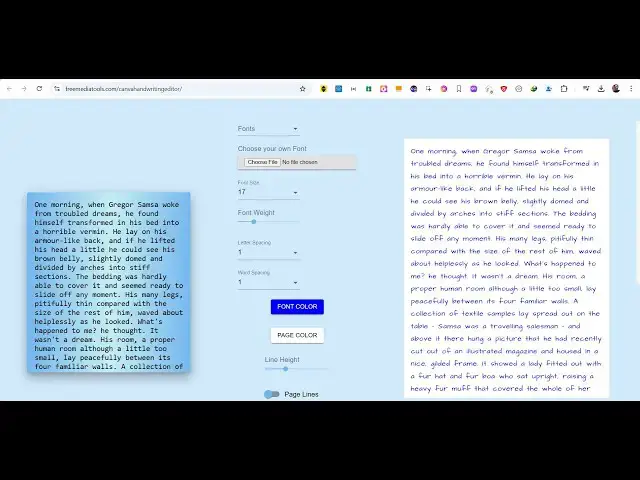
actually is a Canva handwriting font to
0:11
image editor so it's I basically
0:14
deployed this on my website and uh this
0:17
is the actual interface so here you will
0:20
actually write your
0:21
text and we have all these options we
0:24
can actually convert to all these
0:27
built-in fonts which are there you can
0:30
select from the drop-down handwriting
0:32
fonts these are different kinds of
0:34
handwriting fonts so as soon as you
0:36
change the font you will see the live
0:38
preview so then you can actually
0:41
download this as a image this is the
0:43
actual editor you can convert the text
0:46
into image using this Canva handwriting
0:49
font
0:50
editor let's see that so if you are
0:53
making some kind of notes for your you
0:55
know university college or anything you
0:57
can even change the font color using
0:59
this color
1:03
picker then we can even customize the
1:06
page color as well can change to any
1:09
color you can customize the line height
1:12
as well you can see that everything is
1:15
customizable in this React project guys
1:18
it runs in the browser that's the main
1:20
thing
1:22
and it's really fast you can even conver
1:24
uh basically change the phone size as
1:26
well you can even change the letter
1:29
spacing how much
1:31
space word spacing as well you can even
1:35
change the font
1:37
weight can see that so this is
1:41
actually can see
1:46
that and it also supports all these
1:49
effects page lines if you want the page
1:52
lines you can support this scan effect
1:56
it will add this nice little box shadow
1:58
effect page margin top space so it is
2:02
now looking like a note can see
2:11
that so letter spacing let me set it to
2:14
one and
2:16
change and now if you download this it
2:19
will look something like this so you can
2:22
try this tool guys i deployed this on my
2:25
website
2:26
freemediatools.com/canvah handwriting
2:28
font and if you need the full source
2:30
code of this project I have given the
2:33
link in the description of this video
2:34
you can go to my website
2:36
procodestore.com after purchasing it you
2:38
will be automatically be redirected to
2:40
Google Drive where you will get this zip
2:42
file and you just need to extract the
2:45
zip file which will be this full
2:47
directory structure we have different
2:49
components right here if you see for
2:51
different kinds of things it is all
2:54
coded inside JavaScript and it is using
2:57
ReactJS and uh if I show you the
2:59
package.json JSON file right here if you
3:01
see we are using the 16 React 16 version
3:05
and it's compatible with the latest
3:07
version as well and we are using JSPDF
3:10
library which is a PD uh PDF generation
3:13
library for JavaScript and also we are
3:15
using Tesseract JS tesseract is actually
3:19
a OCR library
3:22
for extracting text from image so we are
3:27
using this pure JavaScript OCR library
3:30
and also we are using JSPDF which is a
3:32
PDF generation library so once you get
3:35
the source code guys if you are a
3:37
developer you can easily customize this
3:39
and add additional capabilities as well
3:42
so once you get the source code go to
3:43
the terminal if you want to run it
3:45
locally simply type the command npmi to
3:48
install the NodeJS modules which are
3:50
mentioned in the package.json JSON file
3:53
and then you just need to say npm run
3:56
start so this will start the development
3:59
server it will start this ReactJS
4:01
application
4:04
locally at localhost 3000 so it will
4:08
start this application locally you can
4:11
see that so now the application has
4:13
started and one more thing I forgot to
4:16
tell you it also supports voice typing
4:18
as well so if you are lazy if you can't
4:20
type then just click the listen button
4:24
it will basically allow the permission
4:26
from your microphone so now whatever I'm
4:29
speaking right here you can see it is
4:30
converting the speech into text so
4:32
whatever that I'm speaking right here it
4:34
is being converted to text so in this it
4:36
also supports this option as well of
4:38
voice typing so you can actually speak
4:41
and it will convert all of your speaking
4:44
to text so you can it will save you a
4:47
lot of time this voice typing feature so
4:49
now to stop this you click the stop
4:51
button and then copy to clipboard and
4:55
now just paste it right here so as soon
4:58
as you paste it you will see that all
5:01
this text is converted to this notes and
5:04
you can simply download the
5:08
image can see that
5:11
so it's a nice little project guys canva
5:14
handwriting font you can also upload
5:17
your own font as well if you have a TTF
5:19
file you can choose file and or you can
5:22
just use this pre-built fonts that I had
5:25
for this custom handwriting fonts so if
5:29
you like this video guys please hit that
5:30
like button you can purchase the full
5:32
source code the link is given in the
5:34
description you can deploy the source
5:35
code as well to your own website as well
5:38
and you can edit this so once you get
5:40
the source code you will it will be a
5:42
great project for you if you are a
5:44
student or if you are a applying for a
5:47
job that will be a good source code so
5:50
the link is given in the
5:56
description so if you are
6:01
interested the link is given in the
6:06
description so you can see we it can
6:09
even basically export to PDF as well you
6:12
can see we are using JSPDF as
6:19
well
6:22
so this is
6:25
actual directory structure right here so
6:27
once you get it is very easy to
6:29
understand the code so once you purchase
6:31
it you will see it will actually it's
6:34
very easy to see how it is coded so if
6:39
you are interested the link is given in
6:41
the description guys thank you very much
6:43
for watching this video and also check
6:45
out my website
6:47
freemediatools.com which contains
6:49
thousands of tools regarding audio video
6:51
and image and I will be seeing you in
6:54
the next video
#Programming
#Computer Education