Up next in 10

Build a Node.js Express Google OAuth2 Login & Logout System With Sessions Using google-auth library
Jan 17, 2025

Get the full source code of application here:
https://codingshiksha.com/node/build-a-node-js-express-google-oauth2-login-logout-system-with-sessions-using-google-auth-library/
Hi Join the official discord server to resolve doubts here:
https://discord.gg/cRnjhk6nzW
Visit my Online Free Media Tool Website
https://freemediatools.com/
Buy Premium Scripts and Apps Here:
https://procodestore.com/
Show More Show Less View Video Transcript
0:00
uh hello guys welcome to this video so
0:02
in this video I will show you uh the
0:05
complete Google authentication system
0:07
how to build this inside nodejs Express
0:10
so we have this live demo available to
0:12
us and we have this login with Google
0:15
button and as soon as you click the
0:17
login with Google button you will be
0:18
redirected to a screen where you'll be
0:21
able to select your Google account so
0:23
it's a consent screen and as soon as I
0:25
select my Google account I need to Grant
0:27
the permission so simply click on
0:29
continue
0:30
as soon as you click continue you will
0:32
see it will display the username this is
0:38
your username right here email address
0:41
this is your profile picture that is not
0:44
showing it due to course
0:47
issue but it also returns so we also see
0:51
the log out button as well so the thing
0:52
is that we are storing this information
0:54
in sessions so that when you refresh the
0:56
page as well let's suppose I close this
0:59
tab and re reopen this tab so it will
1:02
automatically detect that I'm already
1:04
logged in so it will refresh and uh
1:07
redirect to my profile page so we are
1:10
storing this information in sessions
1:12
using Express session middleware and we
1:15
are also using ejs template engine we
1:18
just to serve the
1:21
HTML and apart from that we are using a
1:24
special package in nodejs which is for
1:27
authentication for doing the Google AU
1:30
so this package name is Google Au
1:34
Library so if you just search for this
1:37
package it's say Google API client
1:41
Library so the command is simple you
1:43
just need to install this I already
1:46
installed it's almost having 11 million
1:48
weekly downloads it's a very popular
1:51
package for implementing the Google
1:53
authentication so now for implementing
1:56
this I have given the step-by-step
1:58
instruction with a in a detail blog post
2:00
you can go to the description link to
2:03
follow along with this video so first of
2:06
all guys what we need to do I will
2:08
simply delete everything and start from
2:13
scratch
2:16
so let me delete
2:19
everything and start from scratch
2:23
so let me show you all the modules that
2:27
we need for this tutorial so if you see
2:30
in the package.json file we are using
2:33
this EnV which is the module necessary
2:37
for storing sensitive information so
2:39
inside this we will store the client ID
2:41
client secret we have the EGS module
2:45
Express and then the express session
2:48
which used to store information inside
2:50
your sessions variables and then this
2:52
Google o
2:53
Library these five packages are required
2:56
simply install this by simple command go
2:59
to your terminal just type npmi and
3:01
install all those five packages now to
3:04
get started just create a simple
3:07
index.js file inside the root directory
3:10
and uh apart from that we also need to
3:12
create a EnV file where we will store
3:15
all this information which is your
3:19
client secret client ID redirect
3:23
URI
3:24
so just create these three variables and
3:27
a session secret as well so
3:30
for implementing this Express session
3:32
middleware you need this session secret
3:34
this can be anything I'm just calling it
3:36
as secret so these four variables client
3:40
ID client secret redirect
3:42
URI so for obtaining this information
3:45
you need to go to your Google Cloud
3:47
console account
3:50
and just create account here I've
3:52
already have one account so just go to
3:56
credentials and uh create a o or client
4:01
so simply tap this option and simply
4:04
click o or client ID and
4:09
uh so from the drop down simply select
4:12
web application and uh in the authorized
4:14
JavaScript origin you need to paste the
4:18
full URL of your homepage so where your
4:21
application resides so I'm running this
4:24
application on Local Host 3000 apart
4:27
from that we also need to paste The
4:29
Local Host version right here so both
4:32
these two links we need to paste right
4:34
here and apart from that in the
4:36
authorized redirect URI we need to paste
4:38
the same URL so simply copy this and
4:41
paste it right here and then you need to
4:43
click the create button and as soon as
4:46
soon as you click the create button it
4:48
will give you your client ID so this is
4:51
your client ID simply copy
4:54
this and replace it right here so this
4:59
will be different for you so and then
5:03
similarly it also gives you the client
5:05
secret as well
5:09
so simply copy this and same redirect
5:13
URI you
5:15
will so whatever redirect URI you used
5:18
in
5:20
that let me copy this redirect URI and
5:24
paste so which is HTTP Local Host 3000
5:28
sl/ Google / callback so I'm just going
5:34
it and replacing it the same URL in the
5:38
authorized redirect URI simply paste the
5:40
same URL right here and then click on
5:44
save so that's all that we need to do
5:46
inside the configuration so now you can
5:48
close this and lastly which we have the
5:52
session secret so just Define this so
5:55
now you can close this EnV file and
5:59
after doing this authentication now we
6:02
can start our sample Express server
6:05
where we will start our web application
6:09
so for this we will need to start a
6:12
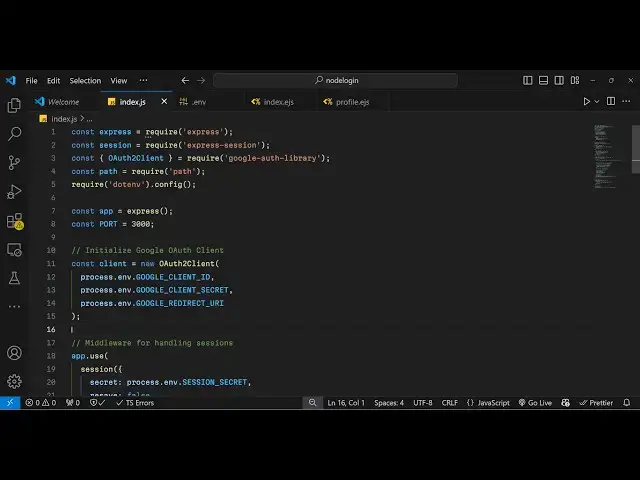
basic Express server so we require
6:16
Express and also you'll be requiring the
6:20
express session
6:27
middleware and then we also need to
6:30
require the o to
6:36
client which will be coming from Google
6:39
Au
6:40
library and then we also need the
6:42
buil-in path package of
6:47
nodejs and then you'll be requiring this
6:49
EnV package for loading the EnV
6:52
variables so EnV doc
6:55
config and then you'll simply start a
6:58
basic Express app
7:01
and I will listen on this port number
7:09
3,000 so app is listening on Port
7:12
3,000 so in this way you can start your
7:16
basic Express app so if you go to Local
7:18
Host 3000 so we do need to define a
7:21
route here so we simply say
7:25
app.get so whenever you go to the
7:27
homepage we will show a simple EGS
7:32
template so we just need to set the view
7:34
engine so you say ab. set view engine
7:38
EGS so then we can render this simple
7:41
template index so for this ejs we need
7:45
to create a views
7:46
folder and then just Define this
7:50
template index. ejs so here you
7:53
will paste your
7:56
HTML code so this will simply contain
7:59
the login
8:01
button so you can go to my blog post as
8:06
well to get this HTML code directly
8:08
paste that so this simply contains this
8:11
H H1 tag welcome to the Google login
8:14
demo and we have a button anchor tag and
8:18
as soon as you click this button you
8:20
will be redirected to//
8:23
Google so if you refresh now you see
8:26
this but we haven't made this route look
8:29
host 3000 //g gooogle so now we just
8:33
need to Define this route so just go to
8:35
your
8:38
index.js so right
8:43
here we will Define this route here
8:46
which will be ab. getet SL
8:52
Au SLG Google and here we will redirect
8:57
the user to the authentication URL so
9:04
client I think we haven't made
9:09
this so first of all uh we need to pass
9:12
the middleware
9:13
app.use so your
9:16
session the express session so here it
9:18
takes three options the secret so the
9:21
secret is available in the process. EnV
9:25
and we have defined
9:27
this environment variable session secret
9:31
and then it also takes the resave option
9:34
and this is typically set to false the
9:37
third option is save on uninitialized it
9:40
is typically set to true so in this way
9:43
you can pass your Express
9:45
middleware and then here we need to down
9:47
Define the O client so we'll be defining
9:52
the new instance of o or to client and
9:55
here it takes three arguments first of
9:57
all your client ID so we have defined
10:01
all these three variables the
10:04
environment variables so one by one we
10:05
will pass it secondly which is your
10:09
client
10:12
secret then we
10:15
have the redirect urri
10:25
so so you can see in this way we have
10:28
passed all these three things which we
10:30
defined in the EnV
10:34
file so after you do this now we will
10:38
inside this request we
10:41
will inside this call
10:44
back this client object it actually
10:47
contains a function which is used to
10:50
create the authentication
10:53
URL so it contains this function client.
10:57
generate Au URL
11:00
and here we need to pass the option
11:02
access type to
11:04
offline and here we need to pass the
11:07
scope so which information you are
11:08
accessing of this user so we need the
11:10
simple profile information and the email
11:13
of the user so here we are explicitly
11:20
telling so this is actually a array not
11:22
an object so just change it to square
11:25
brackets so here we are simply telling
11:28
the API to to request the profile and
11:30
the email of the user so now they will
11:33
give us this URL so now we need to
11:35
Simply redirect the user so response or
11:38
redirect and
11:40
URL so now what happens uh if you click
11:43
this link
11:46
here so if you go to click this button
11:50
you will be redirected to the Google
11:51
consent screen where you will see the
11:53
series of accounts Google account so as
11:56
soon as you click the account now you
11:58
need to Grant the permission simply
12:00
click continue and now you this call
12:03
back you redirect URI uh which hasn't
12:06
been defined here so this authorization
12:09
code you can see right here we now need
12:11
to exchange it with the access token so
12:13
now we need to Define this redirect URI
12:16
which we mentioned in the Google Cloud
12:18
console so now after this we will Define
12:27
this uh uh
12:29
get route where we will be exchanging
12:32
this authorization code that we have
12:34
with the access token to get the profile
12:36
information so this redirect URI which
12:40
is/ SLG gooogle SL call back this can be
12:44
anything I'm just calling it like
12:48
this request response it's Asing
12:51
function and here we first of all store
12:53
this authorization code by request. cury
12:57
do code after getting this authorization
13:00
code now we this Library contains a
13:03
function so we will write all this code
13:05
in the TR catch block
13:11
so so right here uh we first of
13:16
all extract this access
13:19
token so this client dot we have this
13:23
function get token so here we need to
13:25
pass the authorization code so this will
13:27
gu give give us this this access token
13:31
so now we need to verify this access
13:33
token so we can simply
13:36
say const ticket await so there is a
13:40
function here for this as well so
13:43
client. verify ID
13:50
token and this actually takes an object
13:54
right here this function and here you
13:56
need to pass your ID token which is
13:58
available able inside tokens.
14:01
ID
14:03
token and then the
14:06
audience so audience here we need to
14:08
pass your Google client ID which is
14:11
stored inside the environment
14:13
variable so now this will give us this
14:18
data and it contains this ticket get
14:22
payload
14:24
function so now this payload will be
14:27
your user data prob user profile data
14:30
now we need to save this information in
14:31
the session so you simply say request.
14:34
session. user and we are simply creating
14:37
a new variable in the session so user
14:39
object and it will contain three
14:42
properties payload and it contains your
14:46
name then we need to store the email of
14:50
the user then the profile
14:53
picture so
14:56
payload do picture so we we are storing
14:59
these three details name email and
15:01
picture now we just need to redirect the
15:04
user back to the homepage so we simply
15:06
say response redirect
15:09
homepage so now what happens if you see
15:12
uh after redirect you redirect the user
15:15
back to the homepage so now we need to
15:17
change this template we need to hide
15:19
this Google login with Google button
15:21
because we now need to show the profile
15:23
information so for this
15:31
we need to Define
15:32
another EGS template so just create the
15:36
view inside the views folder we need to
15:38
create profile.
15:40
ejs so here we will be displaying the
15:43
actual profile of the user
15:47
so and now we need to make change in the
15:51
get route so whenever you go to the Home
15:54
Route because we are statically loading
15:57
this template here response render but
16:00
here we need to now make a condition
16:01
that if the user is already in the
16:04
session if the session exist then we
16:07
need to render out this template which
16:09
is the profile template so the user will
16:12
be already logged in so we need to pass
16:14
the logged in user which is contained
16:17
inside response request. session.
16:21
user so in the else block if the user is
16:24
not logged in if the session doesn't
16:26
exist then we show the login page
16:30
so we just make this condition
16:32
so now we can show the profile
16:36
information if you refresh
16:43
now so as soon as you click the button
16:45
you will see you will now be redirected
16:48
to the profile route the login button
16:51
has been hidden so now in this profile
16:53
route to show this user profile
16:56
information we are getting this object
16:59
past so we can directly access the
17:02
properties and display a simple welcome
17:06
message so we will use some EGS so user.
17:11
name so this percentage sign is a simple
17:14
syntax of
17:16
EGS so similarly uh we can
17:20
display simple profile information so I
17:23
will just paste this code so you can get
17:25
this using the blog post so if you
17:28
refresh now you will see this data
17:30
appearing this is your username email
17:32
address and profile information profile
17:35
picture doesn't typically display
17:37
because of course error because the
17:40
picture is belonging to a different
17:41
domain so we can't directly access
17:44
it sometimes it display sometimes it
17:47
doesn't but we get this profile
17:49
information if you see and now if I
17:52
close this again access it then also it
17:56
will it will work you can see
17:58
automatically it detects that we are
17:59
already logged in so we added this log
18:02
out function as well so if I click the
18:04
logout button we haven't implemented
18:06
this uh route here when we click the log
18:09
out button we need to uh Delete the
18:11
information from the session so that the
18:14
user is successfully logged out so we
18:17
just need to go to index.js and just
18:19
make this request
18:32
so inside this request we simply make
18:35
the session variable to null so that the
18:38
information stored of the user becomes
18:42
null
18:46
so so there is a function here which
18:49
request. session. destroy so this will
18:51
destroy the
18:56
session that's all so
18:59
if you refresh
19:09
now so now you already logged in so if I
19:13
go again to the homepage I will redirect
19:16
to the profile page but as soon as I
19:18
click the log out
19:27
button oh sorry we missed a condition
19:30
right here after destroying the session
19:32
we also need to redirect the user to the
19:35
homepage so we add need to add this line
19:38
response.
19:39
redirect to the homepage so now what
19:43
happens as soon as you click the log out
19:45
button you will be redirected to the
19:46
homepage so now you can see that so in
19:49
this way guys you can Implement uh user
19:52
authentication of Google inside nodejs
19:55
and express using this
19:57
package all the source code will be
19:59
given in the description of this video
20:02
and also check out my website as well
20:04
free mediat tools.com uh which contains
20:07
thousands of tools regarding audio video
20:09
and image and I will be seeing you guys
20:11
in the next video Until then thank you
20:14
very much
#Programming
#Web Services