Up next in 10

Build a Next.js Freelance Video Editor in Browser Side Hustle with FFmpeg ($300/Day Passive Income)
Mar 3, 2026

Buy the full source code of application here:
https://procodestore.com/index.php/product/build-a-next-js-freelance-video-editor-in-browser-side-hustle-with-ffmpeg-300-day-passive-income/
Show More Show Less View Video Transcript
0:00
videos. In this video, I'll show you I
0:01
built out a Next.js
0:04
freelancer project for micro based SaaS
0:08
application. So, if you want to edit
0:10
your videos, this will be a perfect
0:12
project for you. So, we are running this
0:13
on localhost.
0:15
So, it's a complete video editor
0:17
project. So, you click
0:18
and add a new project.
0:21
So, it's entirely built in Next.js. This
0:23
is actually the full directory
0:24
structure. If you need the source code
0:26
of this, I've given the link. You can
0:28
directly purchase the full source code.
0:30
Each component, as you can see, it's
0:31
divided into its appropriate TypeScript
0:34
file. So, it's very easy for you to
0:36
customize this
0:38
and add more features on top of this.
0:40
You can easily deploy this once you
0:42
purchase the domain name. We are using
0:44
some
0:45
FFmpeg WebAssembly library for building
0:47
this. We are also using Remotion library
0:50
as well.
0:53
Latest version of Next and React we are
0:56
using. So, we are running it on
0:57
localhost,
0:58
as you can see. So, now if you click on
1:01
that, you will be redirected to a
1:03
timeline based editor. This is actually
1:05
the interface of the video editor. So,
1:08
you can actually earn a lot of passive
1:09
income if you place advertisements once
1:12
you deploy the application, or you can
1:14
also enroll a subscription based model
1:16
as well,
1:17
where user will pay a definite amount of
1:20
fees for using your video editor.
1:22
So, once you add the video in the
1:23
timeline, you can easily edit the
1:27
videos. Now, let's suppose I only want
1:29
to cut the first 6 seconds.
1:32
So, once I do this, you will see you can
1:33
easily play the video inside the video
1:35
player.
1:36
And now at this moment, if I want to cut
1:38
the video, I basically can click the
1:40
split button.
1:42
And now it will split the video into two
1:45
parts. So, now this part I don't need, I
1:47
can click the delete button to delete
1:49
that. And now in this easy way, you can
1:52
actually
1:53
cut videos
1:55
directly using this editor.
1:57
And you can also control the
2:00
volume video using the slider,
2:03
the position of the video as well.
2:06
Everything is customizable. Then if you
2:08
want to add some text as well, you can
2:11
even add that as well.
2:13
Your watermarks, so click the text
2:15
button
2:16
and that text will be added. You can
2:18
control the duration of it very easily.
2:22
So, now you can play this. The text will
2:24
be added right here. You can also
2:26
control the
2:28
color of the text as well using this
2:30
color picker. You can
2:32
control the X position, Y position of
2:35
the text accordingly.
2:38
Similarly, you can even add images as
2:40
well. So, you add media. You can
2:42
actually
2:43
if you have a image, you can even add
2:45
that as well. Once you add the image,
2:50
you can control the duration,
2:53
the width and the height of the image as
2:54
well, similarly.
3:10
So, you can just see here how easy it
3:12
is.
3:13
Now, this will be the output video. You
3:15
basically can select image.
3:20
You can control it perfectly. So,
3:30
So, now this will be the output video.
3:32
If you want to now export this, you can
3:34
click the export button.
3:36
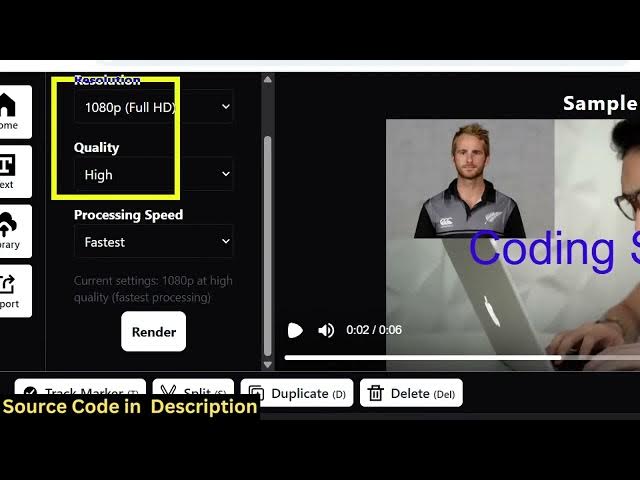
So, this will be a perfect
3:39
SaaS kind of an application. You can
3:41
build out micro SaaS app. You can now
3:44
export this, control the duration,
3:46
resolution, everything. If you click the
3:48
render button, the processing will
3:49
start.
3:51
It's a single-page application. It
3:52
doesn't have a back end. So, all the
3:54
processing directly happens in the
3:56
browser. It's actually used FFmpeg
3:58
WebAssembly library.
4:00
So, once it reaches 100%, automatically
4:03
the output video will get created. And
4:06
I will definitely recommend purchase.
4:08
The The link will be given in the
4:10
description.
4:13
>> [snorts]
4:13
>> So, this is actually a great
4:17
passive income idea. You can actually
4:20
earn about $300 per month using this
4:23
application. Once you deploy this using
4:25
a real domain name,
4:26
I can even show you proof as well. You
4:28
can actually use a ad network called as
4:30
Ezoic. So, once you purchase a domain
4:33
name, deploy this application,
4:36
this is a high-paying ad network.
4:39
I'm also running this.
4:44
So, if I show you actual proof here,
4:47
so in the last 30 days, I actually
4:51
So, this is niche based niche niche
4:53
based website.
4:55
So, you can see once it's all the
4:56
processing is taking place. So, all the
4:59
files are customizable. You can just see
5:01
here TypeScript files.
5:03
So, it's a complete Next.js project. It
5:05
will save you a lot of time. It's a
5:07
great
5:09
passive income idea.
5:11
Video editor directly in the browser.
5:19
So, once it completes, you will see this
5:21
is your output video. Text and images
5:23
automatically added.
5:26
So, you don't need any video editor. You
5:29
instead you can use this and download
5:31
this output video.
5:35
You can just see here.
5:37
It's very easy for you to edit videos
5:39
directly in the browser using this
5:42
video editor.
5:43
So, if you are interested in purchasing
5:45
the source code, the link is given in
5:47
the description.
5:54
So,