Up next in 10

Build a Full Stack Youtube Clone With JWT Auth in Browser Using React.js & Node.js Express + SQLite
Mar 5, 2026

Buy the full source code of application here:
https://procodestore.com/index.php/product/build-a-full-stack-youtube-clone-with-jwt-auth-in-browser-using-react-js-node-js-express-sqlite/
Show More Show Less View Video Transcript
0:00
Uh hello guys in this video I'll show
0:02
you I built out a full stack YouTube
0:04
clone kind of a video streaming
0:06
application directly in browser using
0:08
ReactJS NodeJS express which will be in
0:12
the back end. This is actually the full
0:14
directory structure we actually this is
0:16
the react project and this is the back
0:19
end of the application which is using
0:20
NodeJS express. Uh the link is given you
0:23
can directly purchase the source code.
0:25
So this is inside the back end section
0:27
we are using SQLite database for storing
0:31
you can see this is the database which
0:33
is storing all the things for us and for
0:38
uploading videos we are using cloudary
0:40
which is a really cloud-based
0:44
uh where you can store your things. It's
0:46
a very popular platform. So here we are
0:48
storing all the assets such as videos,
0:50
images everything. So let me show you
0:52
the first of all the demo. It has
0:54
authentication as well. So we are
0:56
running this front end on localhost
0:57
3000. So first of all you need to create
1:00
account here. So you just put the field
1:03
first name, last name, username,
1:05
everything.
1:12
[snorts]
1:12
So here you put the username and the
1:15
email address
1:20
and the password.
1:28
So you click on sign up and you will be
1:30
automatically signed up right here. So
1:33
this is some of the videos that I
1:35
uploaded right here. So this will the
1:37
videos will appear something like this.
1:38
We are using videojs for the video
1:40
player. It has all the controls. You can
1:43
view the video in full screen. So these
1:45
are suggested videos which will come and
1:47
we have this upload section where you
1:49
can actually upload a video. As you
1:51
click the upload button, you just need
1:53
to select whatever video you need to
1:56
upload.
2:03
So as you select the video, the upload
2:06
process will start
2:09
and here you just give the title to the
2:11
video
2:14
and the description
2:16
and click on upload. And as soon as you
2:19
see the video will be uploaded. As you
2:21
will see the video can be played. You
2:23
also have the controls for liking
2:25
disliking the video. So you can like the
2:27
video
2:29
and it will show right inside your liked
2:32
video section. You will see that. So
2:34
this is your channel screen. So we have
2:37
this username John 1997.
2:40
So you can edit your profile as well uh
2:43
such as changing the about section. So
2:46
this will be saving you all of the time.
2:49
If you're looking forward for building
2:50
out a YouTube clone. So this is a readym
2:52
made solution which is built by me from
2:54
scratch. You can directly purchase the
2:56
source code. So after you purchase, you
2:59
just need to fill out these entries in
3:01
ENV file. So this is JWT secret. I have
3:05
already filled it and this is inside the
3:08
back end section. And inside the front
3:10
end section here you need to replace
3:12
your own entries such as the cloudary
3:14
cloud name API key and the upload
3:17
preset. So this you will get from cloudy
3:20
once you sign up for the free account.
3:22
So it's available right here inside uh
3:26
it basically the cloud name. So you can
3:29
create a new API key and the preset. So
3:32
all this information you can configure
3:33
and after that your project will run.
3:36
It's very easy for you to deploy this
3:37
project as well.
3:40
So you can just see here you can create
3:42
multiple accounts as well. So this is
3:45
the search feature which is there. So
3:46
here you can search for any
3:51
user. You can see that this is you can
3:53
subscribe to other users as well. So I
3:55
have already created this. This is the
3:58
another user which is there which has
4:00
created three videos right here. So we
4:02
are getting this option. You can either
4:03
subscribe to the channel. As you click
4:05
the subscribe button, automatically the
4:08
entries are uh created in the database
4:11
and inside the subscription section you
4:13
basically see this uh uh channel is
4:16
coming. So as soon as you click the
4:17
button you are subscribed to the channel
4:21
and if you see now
4:25
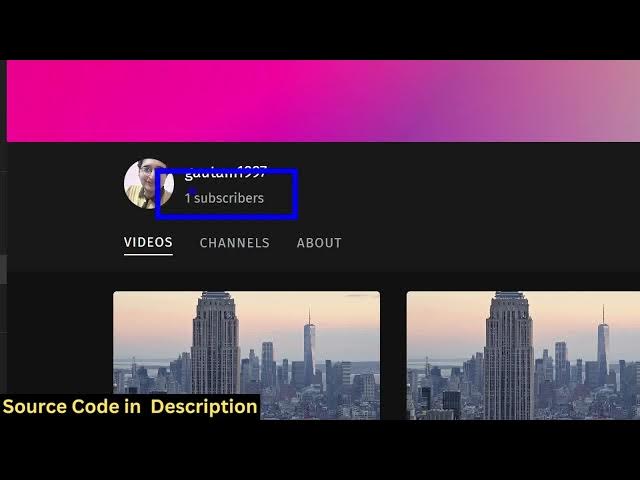
the subscriber will be increasing
4:27
because we have subscribed to the
4:28
channel. So you can see 0 to one
4:30
subscriber. So it's the ultimate
4:32
solution guys. You can also log out as
4:35
well. So as you click the log out
4:36
button, you are logged out successfully
4:38
and again you can log in here. So it's a
4:41
complete authentication is also there.
4:44
So it's a full stack YouTube clone kind
4:46
of application in ReactJS. So you can
4:48
play any video. The videos will show in
4:51
the suggested way. You can see that you
4:53
can play any video. You can see that you
4:56
can like dislike anything. You can even
4:58
make a comment as well. So let's suppose
5:00
I
5:03
just watch this video and I want to make
5:05
a comment. So I can make a comment here.
5:09
So you can see that this user has make a
5:12
comment. And if you refresh the page
5:14
here.
5:20
So here you can
5:25
copy the exact address of this video. So
5:28
you will see that that comment is
5:29
successfully there.
5:32
So you can create multiple users. So
5:35
it's a full stack YouTube clone. So you
5:37
can you can upload videos. You can also
5:40
get notification once the user uploads a
5:42
video. So you again click the upload
5:45
button.
5:48
So all these videos are stored inside
5:50
the cloudy. So once you click the upload
5:52
button, everything is stored right here
5:54
in the assets folder. So
5:57
it provides you with a free plan. So up
5:59
to a limit you can actually store
6:01
everything. So you can see all these
6:02
assets are stored right here inside
6:04
this.
6:06
So
6:09
you basically provide a description,
6:11
title, everything. As you click upload,
6:14
the video will be uploaded.
6:18
You'll see that the video is uploaded.
6:26
So it's an ultimate solution guys. If
6:28
you are interested in purchasing it, the
6:30
link is given in the description. If you
6:32
still face any issues, I will definitely
6:34
help you in actually configuring and
6:36
running this project. It's an ultimate
6:39
full stack YouTube clone inside ReactJS.
6:42
If I show you the package.json JSON
6:43
file. We are using the React latest
6:46
version and we are also using Redux as
6:48
well for uh maintaining the state of the
6:51
application, the data, everything. We
6:53
are also using XCOS as well as you'll
6:55
see. And for the video player, we are
6:58
using video.js which is an open-source
7:00
library for playing video directly in
7:03
browser. And inside the back end section
7:05
as you will see we are using uh SQLite
7:09
SQLite 3 and JSON web token for the
7:12
authentication envir.
7:16
So it's an ultimate uh full stack
7:19
YouTube clone. So it's very easy for you
7:23
to deploy as well. If you purchase a
7:25
domain name, if you're looking forward
7:26
for building a video streaming kind of a
7:28
website, this is an ultimate solution.
7:31
It will save you a lot of time. Here
7:33
you'll see that the search is also
7:35
perfectly working and you can dislike as
7:39
the video as well. You can comment.
7:44
So it's really fast as well because
7:50
you can create multiple accounts as
7:51
well. So if you go to again this URL.
7:58
So first of all you again can sign up
8:00
here. Create account here.
8:14
Click on sign up. Your account will be
8:16
created and uh you can just see this is
8:18
your profile section. So automatically
8:21
here you can edit your profile. Just
8:23
give
8:25
you can even change the profile picture
8:27
as well. Just click the profile picture
8:29
and here you can
8:34
[clears throat] just give it a profile
8:36
picture. It will automatically get
8:38
updated. Click on save. And now you can
8:40
see the profile picture is also saved.
8:43
So it's very easy guys. You can see it's
8:45
again you can subscribe it. So you have
8:48
now two subscriptions. So two
8:50
subscribers are there. So it's
8:52
ultimately all the functionalities are
8:54
there which YouTube have the subscriber
8:57
functionality like comment you can
8:59
search functionality you can upload a
9:01
video play the video directly so it's an
9:04
ultimate solution you just need a domain
9:06
name you can directly deploy this
9:08
application if you're looking forward or
9:10
if you're applying for a job if you're
9:12
looking forward for building this
9:14
YouTube clone and most importantly if
9:16
you purchase it you will definitely know
9:18
how I coded this all the files
9:20
components are divided into its
9:23
appropriate JavaScript file. So each and
9:25
every component is customizable. You can
9:27
add more functionality as well on top of
9:29
this application.
9:31
So this is an ultimate react
9:34
application. All the components are
9:36
customizable. You'll see this is channel
9:38
tab.
9:39
Bottom bar, icon, login, navigation bar,
9:42
video player, search, sign up,
9:44
subscription, upload video, like video.
9:48
So these are hooks.
9:51
These are different pages here. So each
9:54
and every component is customizable. So
9:57
this will save you a lot of time because
10:00
if you are starting to build from
10:03
scratch, it will take you a lot of time.
10:05
But uh you can save your time by
10:07
purchasing this. It's an ultimate
10:09
project. If you still face any problem,
10:12
I will definitely help you. You will see
10:14
that.
10:18
So the link is guys is given in the
10:20
description. You can definitely purchase
10:23
it.