0:00
uh hello guys uh welcome to this video
0:02
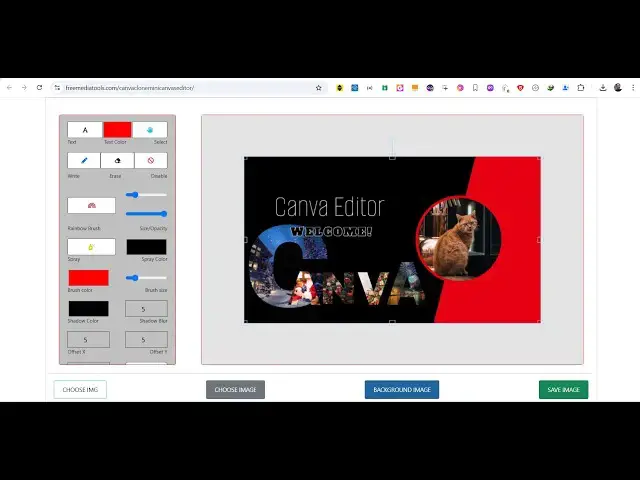
so in this video I will show you a new
0:04
tool that I developed which looks
0:06
similar to Canva clone uh which is a
0:10
editor canva is a very popular website
0:12
for creating thumbnails or modifying
0:14
your images so I've just created a very
0:17
simple tool similar to it uh I also
0:19
deployed this on my website
0:21
freemediatools.com so you can check out
0:26
live and uh first of all here you can
0:31
uh actually choose a image file so there
0:34
is three buttons available choose image
0:36
so here you will select your input
0:42
select it can be PNG JPG so once you
0:46
select the image you will be controlling
0:48
the position and the location of the
0:51
image simply by using the mouse here so
0:55
just increase the size of the image and
0:57
place it accordingly in the canvas and
1:00
then we also have the option
1:03
to add text right here so as soon as you
1:07
text you can control the location and
1:10
the size of the text here you will see
1:17
that so this application is built
1:20
entirely in HTML CSS and JavaScript a
1:23
single file is there uh the link is
1:25
given in the description uh let me show
1:30
you i I'm just running this file here
1:33
only index html if you
1:37
see so this is around about 1,500 lines
1:41
of code here which is simply
1:44
JavaScript CSS and HTML and for this we
1:47
are using fabricjs which is a JavaScript
1:50
animation library free open source so we
1:54
are using this fabric js library inside
1:57
our single page HTML CSS and JavaScript
2:02
so this is actually the full source code
2:04
if you are interested in this you can go
2:06
to the my website and directly purchase
2:09
it after purchasing it you will be
2:11
redirected to Google drive where you
2:13
will actually get that zip file you can
2:15
just see you can control the
2:18
location and uh we also have the spray
2:21
tool here we can draw something here
2:24
then we also have the rainbow brush tool
2:26
as well you can see the spray tool you
2:29
can use all these tools to actually
2:31
design your thumbnail similar to Canva
2:33
and you can change the spray
2:36
color to red here so using this color
2:39
picker which is available right here you
2:41
can change the spray color tool right
2:43
here so pick any color and you can just
2:46
see how awesome the thumbnails are
2:50
uh we can even have shadow color as well
2:54
so it's advanced tool right here and uh
2:58
if you want to write something you will
3:00
write like this and if you want to erase
3:03
something here you just
3:10
say so this is actually eraser
3:14
tool if you want to make it again
3:19
the So this is actually the tool right
3:24
uh to add input image you simply click
3:26
the choose image button and once you add
3:30
image you make your modifications you
3:39
text so after that you can even put a
3:43
background image as well so there is a
3:45
second button a variable background
3:49
put and then we also have a button to
3:52
save the canvas here so if you click
3:54
save canvas you just need to select the
3:56
sizing here width and the height you can
3:58
even change that as well so click on
4:00
save and your image will be successfully
4:07
that you can draw anything right here so
4:10
you can add text here you can write
4:13
something in the canvas and then you can
4:16
export your canvas similar to Canva so
4:18
if you're interested guys in this uh you
4:22
can first of all try this tool on my
4:24
website and if you are interested you
4:27
can directly purchase this single file
4:29
here which is about 1500 lines of code
4:31
and you will get to understand that how
4:33
I build this project from scratch using
4:35
fabric js you can just
4:38
see this source code you will get it's
4:40
very easy to run it locally here right
4:42
here as well and also deploy to your any
4:45
show shared hosting that you're using so
4:48
it's a single HTML file so it doesn't
4:50
use as it doesn't use any uh serverside
4:54
code so it's entirely a single page
4:57
application so static
5:00
website it's very easy to deploy as well
5:02
so thank you very much for watching this
5:04
video and also check out my website
5:07
freemediattools.com which contains
5:09
thousands of tools regarding audio video
5:11
and image and I will be seeing you in